
Inspiring
November 17, 2020
Question

Odd icon color in Windows 10 20H2

  • November 17, 2020
  • 4 replies
  • 731 views

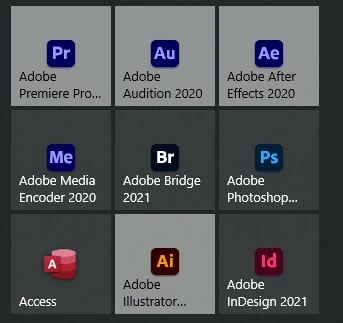
Okay, not real important, but what is up with the Premiere, AE, Audition, and Illustrator icons that they won't take the theme color? This problem just showed up with the update I did yesterday to 20H2.


You can see some Adobe program icons work and some don't. I've tried clearing everything, removing, re-adding but the program icons always look like this. These were the only four I found.


Again, not a big deal, but when I open the Start menu these look like they're highlighted.


This topic has been closed for replies.

4 replies

Known Participant
March 12, 2021

OMG, I just updated to 20H2, saw this, and immediately did a Google search on it as to why. It's so obnoxious. So... why is this still happening? Adobe? And while you are at, please fix the white menu bar across AE, PR, and AME... for the love of...


BNC10aAuthor
Inspiring
December 31, 2020

Glad someone else noticed it. Thought it was only me. Still if it's a Windows update issue, why do only a few of the Adobe icons show like this, why not all of them? Seems like Adobe has the power to correct this on their end.


Anyhow, I've moved on...Thanks for the replies.

Peru Bob
Community Expert
Community Expert
December 31, 2020

I think that there was a thread about this that said it was a Windows update issue and would be fixed in a future Windows update.

Known Participant
December 30, 2020

Agreed it isn't life threatening, but it really is annoying. I posted this in a similar thread.