
Exit
  • Global community
    • Language:
      • Deutsch
      • English
      • Español
      • Français
      • Português
  • 日本語コミュニティ
  • 한국 커뮤니티
0

Opacity effect

Community Beginner ,
Jul 14, 2020 Jul 14, 2020

IHi there,

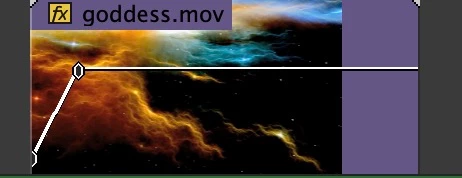
don't know if this effect is called opacity in English, but it is the effect you could make clips transparent. In recent versions of Premiere Pro one could change it while moving a fader directly on the clip, but this seems not possible in version 14.3 - or how can I switch it on?

Thanks for responding.
 

screenshot_526.jpg


TOPICS
Editing , Effects and Titles , User interface or workspaces
255
Translate
Report
Community guidelines
Be kind and respectful, give credit to the original source of content, and search for duplicates before posting. Learn more
community guidelines
LEGEND ,
Jul 14, 2020 Jul 14, 2020

Right-click on the sequence in the timeline, Show Clip Keyframes/Opacity/Opacity as in the image below.


Neil


Timeline Keyframe Opacity.PNG


Translate
Report
Community guidelines
Be kind and respectful, give credit to the original source of content, and search for duplicates before posting. Learn more
community guidelines
Community Beginner ,
Jul 14, 2020 Jul 14, 2020
LATEST

Got it! Thank you so much, Neil!

Translate
Report
Community guidelines
Be kind and respectful, give credit to the original source of content, and search for duplicates before posting. Learn more
community guidelines