
Participant
June 18, 2017
Answered

Opacity in Timeline gone

  • June 18, 2017
  • 2 replies
  • 19943 views

Hey Guys,

In the Timeline at Premiere Pro is the line where you can adjust the opacity of a videoclip gone. I don´t know what happend? For sound the volume line is still there but for video the line for opacity is gone.

My version is Premiere Pro CC 2017 and i have updatet the last version. Can erveryone help me an tell me how i get this line in the timeline back?

Thank you for your helping and sorry for my bad english.

greetings Farina
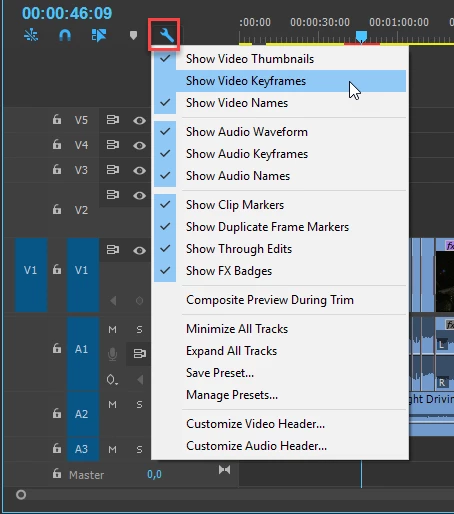
Correct answer Ann Bens

2 replies

Ann Bens
Community Expert
Ann BensCommunity ExpertCorrect answer
Community Expert
June 18, 2017

Participant
June 17, 2021

Hey I was wondering the opposite how would I hide the little opacity slider that appears on each clip in the timeline I dont ever remember having it before a couple days ago. It gets in the way of whatever I am editing because whenever I try to move clips it trys to change to opasity. Thank you. I am posting it here because this is the only thread i have found on the topic of the opasity control in the timeline.

Participant
June 17, 2021

Or not. I just did the opposite to what was posted here as the answer and it worked! Probably should of checked that 😑

shooternz
Legend
June 18, 2017

There is a drop down menu for the Sequence timelines that will give you that Opacity option.