
Exit
  • Global community
    • Language:
      • Deutsch
      • English
      • Español
      • Français
      • Português
  • 日本語コミュニティ
  • 한국 커뮤니티
0

Opacity keyframes bezier

Community Beginner ,
Nov 05, 2020 Nov 05, 2020

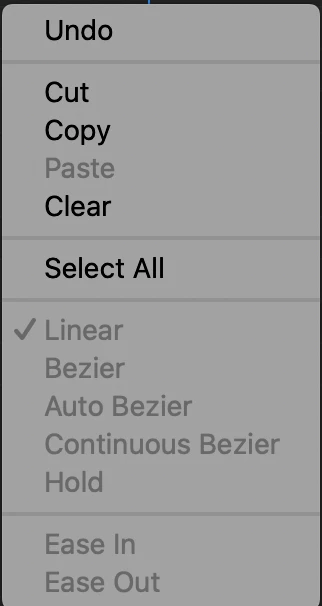
Hello, is it possible to use bezier for keyframes with opacity, for the movement of the mask, whether that be up, down, left or right, and expansion? At the moment it won't let me, they are just greyed out. Thanks in advance!


Screenshot 2020-11-05 at 16.46.41.png

TOPICS
Editing , Effects and Titles
461
Translate
Report
Community guidelines
Be kind and respectful, give credit to the original source of content, and search for duplicates before posting. Learn more
community guidelines

correct answers 1 Correct answer

Community Expert , Nov 10, 2020 Nov 10, 2020

Answer is no.

The keyframes for the Path do not have temporal or spacial values.

If they did they would produce strange behavior.

Translate
Community Expert ,
Nov 07, 2020 Nov 07, 2020

Ae you talking about 'Opacity' keyframes or 'Mask Opacity keyframes'? Either way, I can change both. Are you selecting and right clicking on the keyframes themselves?

Screenshot 2020-11-07 at 14.49.04.png

Translate
Report
Community guidelines
Be kind and respectful, give credit to the original source of content, and search for duplicates before posting. Learn more
community guidelines
Community Beginner ,
Nov 10, 2020 Nov 10, 2020

Hi thanks for your reply, i was talking about mask path

Translate
Report
Community guidelines
Be kind and respectful, give credit to the original source of content, and search for duplicates before posting. Learn more
community guidelines
Community Expert ,
Nov 10, 2020 Nov 10, 2020
LATEST

Answer is no.

The keyframes for the Path do not have temporal or spacial values.

If they did they would produce strange behavior.

Translate
Report
Community guidelines
Be kind and respectful, give credit to the original source of content, and search for duplicates before posting. Learn more
community guidelines