Participant
October 14, 2022
Question

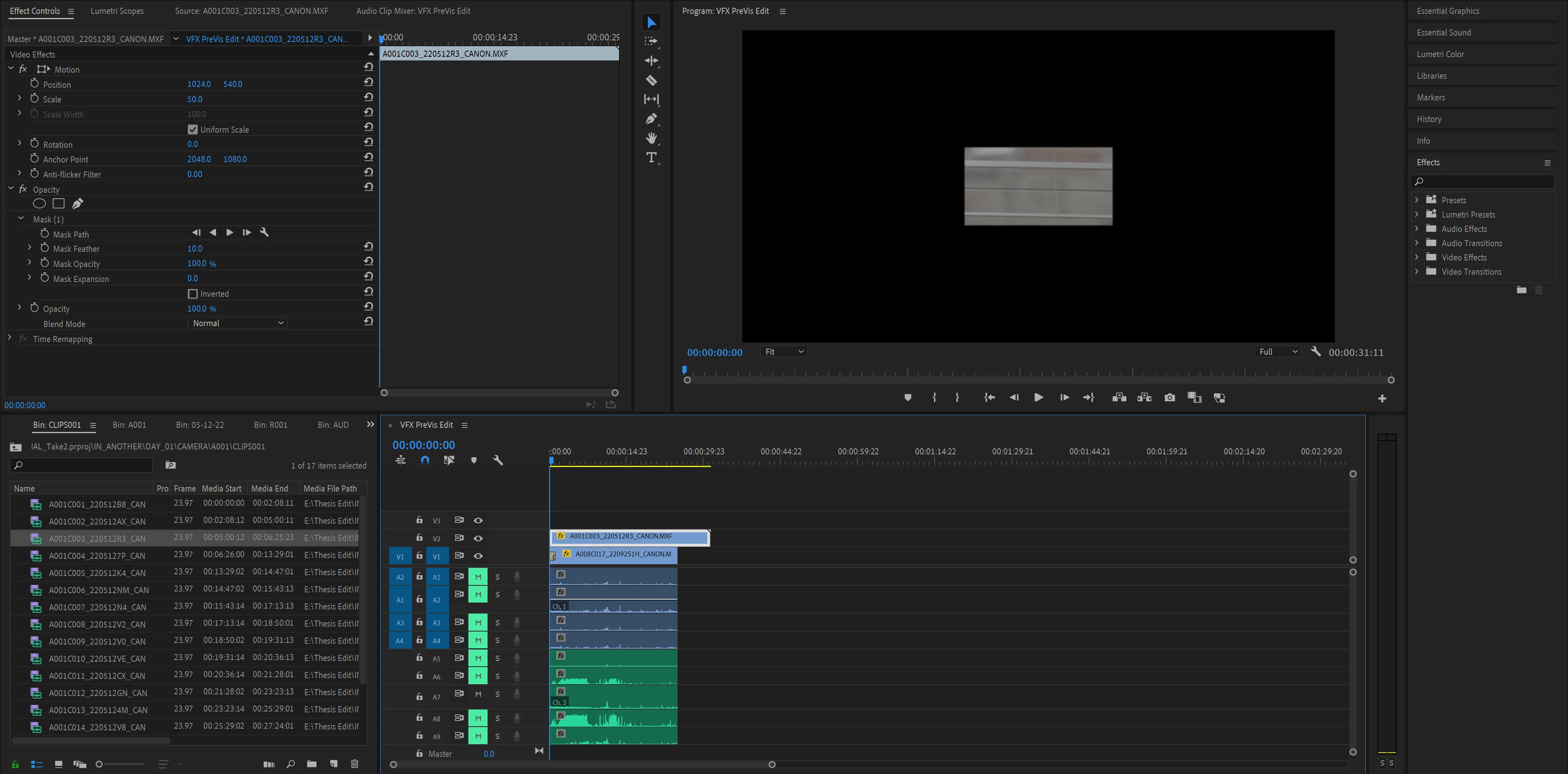
Opacity mask not showing layer underneath

  • October 14, 2022
  • 2 replies
  • 411 views

Hello,

My opacity mask is not showing the video layer underneath it. I don't know what I am doing wrong.

 

This topic has been closed for replies.

2 replies

Ann Bens
Community Expert
Community Expert
October 15, 2022

It's not showing as clip in V1 starts with a transition.

Most likely cross dissolve. First frame will start as black.

Legend
October 15, 2022

and if Ann is right as to the cause of the problem, if you want both v2 and v1 to fade in, you should either nest the 2 clips and apply the dissolve to the nest or put a short clip of black and v3 and dissolve a keyframe the opacity to create a fade from black...

Legend
October 15, 2022

Don't have a clue what's going on, but let's start with the basic info...  Please tell us your system specs: OS version, Premiere version, amount of RAM, Hardware specs including graphics card and your source properties and sequence settings.    Did you create the mask by click on the rectangle below the opacity title in the effects controls?   If you try adjusting the amount of opacity, which is set at 100% now, do you see any difference?   If you toggle the visibility of video track 2 off, do you see the underlying layer?