
timd26450075
Participant
August 22, 2017
Answered

Open captions are not visible when I export my video (Premiere Pro 14.9 and earlier)

  • August 22, 2017
  • 6 replies
  • 32392 views

Dear sir/madam,


I'm working on a interview and like to add captions to support the speaker with text.

I made allready "open" captions that are shown in my display. The text will also change when i modify it in premiere.

Unfortunately, when I export my video, it will not contain the captions.


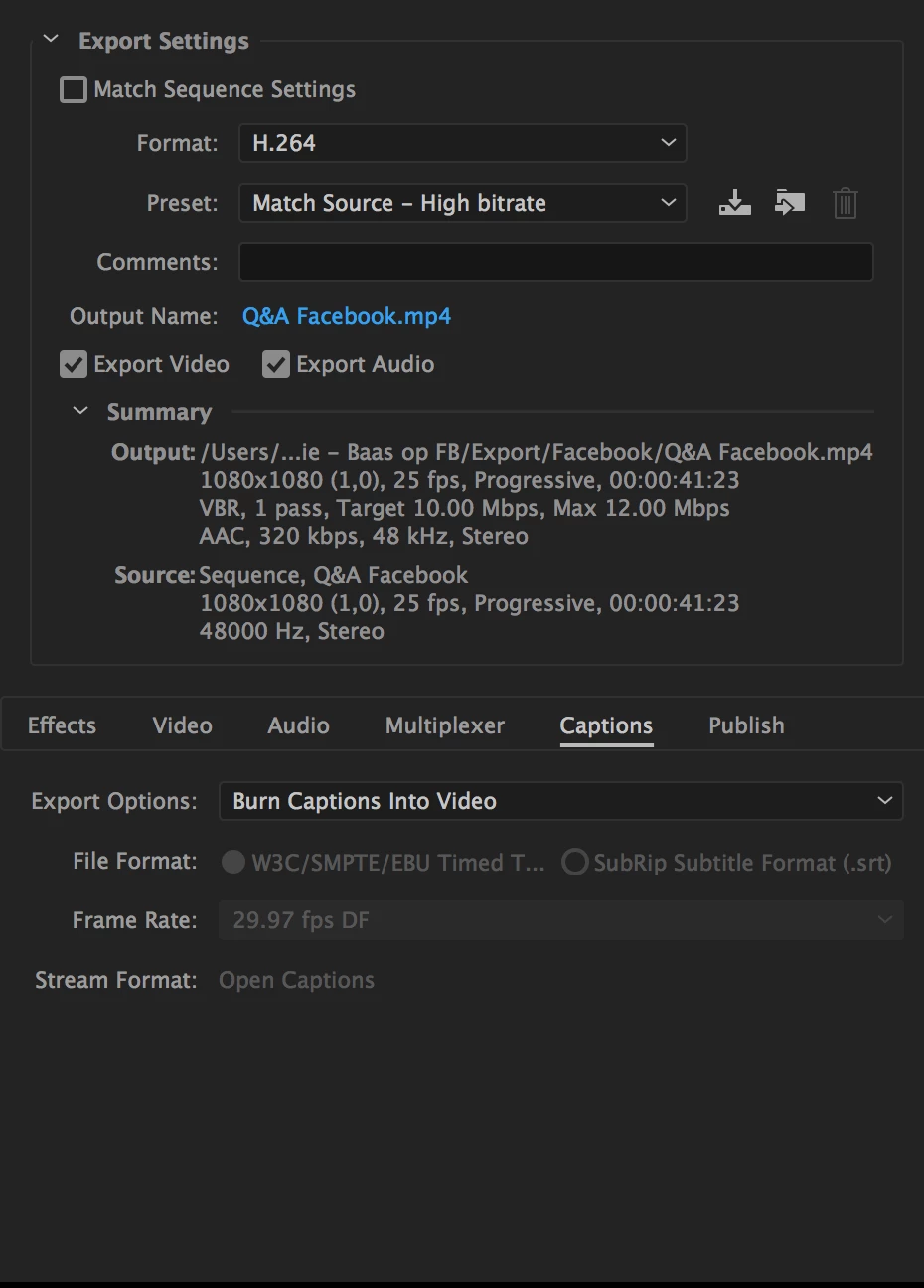
I did not choose the embed option, but went for the option that burns the captions in my video.

The specs i use are: 1080x1080, H.264, Match source - High bitrate, 25fps.


The captions are also set in the same frames per seconds as my sequence is.

I hope you can help me out with this weird problem!


Kind regards,


Tim de Kler
This topic has been closed for replies.
Correct answer kulpreet singh

Excuses, I forget to incluud the screenshot in my last message.

Here you go.


Thanks for the screenshot, Tim de Kler. We are aware of this issue & we have reported this issue to the concerned team.

Our Engineering team is working on a fix and it will be out soon.

Workaround: Do not queue and export from Premiere Pro. Let me know if that helps.

-Kulpreet Singh

6 replies

Participant
June 6, 2021

Hi,

too late, but hope helps others, use the link:

https://youtu.be/J0ELzLSmkXs


Good luck!

Participant
March 21, 2021

Hey, I had the exact same issue. I was trying to export it into QuickTime, but when I switched the exporting format to H.264 the captions were there! I hope this helps.

NorthWoods
Participating Frequently
December 11, 2020

Here it is late 2020 and I still have problem. Premeiere will not create burned in captions either directly from Premiere or through Adobe Encoder. What does it take to get this fixed? Sitting here spinning my wheels. Time is money Adobe!

NorthWoods
Participating Frequently
December 11, 2020

As an update, I was able to successfully export the captioned video file directly from Premiere after creating a brand new project, importing only an exported mp4 file of the finished video and the caption file, then exporting. It does not seem like it should have been a memory issue, as I quite a bit of memory and this was not a big project, just a 30 second spot. 

jayaech86
Participant
December 16, 2020

REPORTING IN FROM 12-16-20! 


Solved it, thanks to this RedditT hread: https://www.reddit.com/r/premiere/comments/7glrvz/help_open_captions_not_appearing_in_export/

"On export make sure to go to the captions tab and click "Burn into video".


That worked rendering my open captions into the video. 

Known Participant
May 5, 2019

I have the same issue. This is not fixed on my system. I cannot queue subtitled timelines - every one has to be exported from Premiere separately.

My system macOS Mojave 10.14.4 and the very latest versions of Adobe software.

iMac (Retina 5K, 27-inch, Late 2015)

4 GHz Intel Core i7

32 GB 1867 MHz DDR3

AMD Radeon R9 M395X 4 GB

Jui Shan Two
Participant
January 21, 2019

Hi

I found another way to burn the caption in AE, also, I can change the appearance as detailed as I want.

This guy is genius!

The scientific Swede: Importing SRT subtitles in After Effects

For your reference.

kulpreet singh
Inspiring
August 24, 2017

Hi Tim de Kler,

In which application or media player are you checking the playback?

Are you able to see your captions if you import your final footage (exported video) back in Premiere Pro?

Please attach a screenshot of your Export Settings (captions).

Thanks,

Kulpreet Singh

timd26450075
Participant
August 24, 2017

Hi Kulpreet,

I export the video's in a qeue to media encoder. Like you asked, I made a screenshot of the export settings of the captions.

I open my video's in Quicktime. The captions should be burned into the video, but it just doesn't work.

Hope you can help me out.

Thanks,

Tim de Kler

Participant
January 13, 2019

Thanks for the screenshot, Tim de Kler. We are aware of this issue & we have reported this issue to the concerned team.

Our Engineering team is working on a fix and it will be out soon.

Workaround: Do not queue and export from Premiere Pro. Let me know if that helps.

-Kulpreet Singh


Hi

I recently downloaded the 2018 premiere cc for my win 7. (It said that this wasnt the newest veraion because i needed win 10 for the newer version)

I experienced the same problem when wanting to export in encoder.

Another video was exported just fine so i dont really understand where is the difference between them, programwise..?

Is my version have this bug?

Thanks