
Participant
May 24, 2018
Question

Open Captions timings change every time we reopen Premiere

  • May 24, 2018
  • 5 replies
  • 1195 views

Hello,

Me and my team have been working with open captions for a few years now. We create a lot of videos which need embedded subtitles and open captions are great because we can change the style and font to match client's brand style. We used to create titles, but changing the style on all of them one by one was a nightmare and open captions solved that problem.

However, nothing is perfect and we find that the timings on our open caption track keep changing every time we open premiere. This is very frustrating because we like to have them disappear when we cut to another clip, otherwise it creates a jarring effect. So, we spend quite a lot of time adjusting them to the cuts, only to have to redo all work next time we open Premiere.
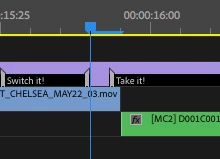
We, sometimes, opt for a solution which is making each caption longer than what we need and make an edit on the caption track like below. Of course this is not ideal and makes a very messy timeline.
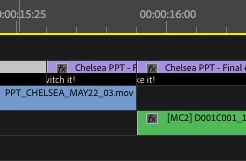
I wish this problem is fixed. It seems a minor thing but if I'd tell you how many times we had to reexport videos because of jerky subtitles. Perhaps, it would help if the caption handle snap frame by frame or magnetically to edits in the timeline.

Is anyone else facing this issue. What's your workaround?

Thanks,

T

This topic has been closed for replies.

5 replies

Participant
June 17, 2022

I'm trying to add captions to my own video and the times keep changing themselves. This always happens when I try to speed something up or slow something down as well if I set the value to 0 by accident, and then it won't change to the value I want it to be. It's starting to get on my nerves and the whole reason I rarely use premiere 😞

Stan Jones
Community Expert
Community Expert
June 17, 2022

This is an old thread from a PR version before the current workflow.


What version of PR are you using?


Please post a screenshot showing an example of what you mean.


Stan


Participant
June 17, 2022

Unfortunately i can't get a screenshot right now but I'm using v 14.0 (I've had trouble updating it in the past so I never bothered before but I might now) - I can explain the problem though.


For instance, working with the captions, I tried to change the end/start time of two separate captions to 00:00:24:49 but as soon as I hit the enter key it would automatically revert to 00:00:25:05


I'll try updating it and see if that changes anything now but if it doesn't, advice is welcome. I'll find other methods to making captions if I can't figure this out.

Inspiring
December 18, 2020

I'm having this exact problem as well. Really bizarre and frustrating.

Stan Jones
Community Expert
Community Expert
December 5, 2020

What version did you update to? (This is an old thread.) 14.6.0?


Please post screenshots: the Capton Panel, the Project Panel with the srt selected), and the timeline.


Stan

Participant
December 5, 2020

2020 after updated to the latest version, this problem happen to me too!

It looks like everytime we reopen, it change to 25fps (our srt file and timeline is based on 23.976fps).

ADOBE PLEASE FIX THIS PROBLEM!

Participant
April 25, 2020

Yeah, I just wasted a lot of time with Premiere Pro. The caption times kept readjusting by themselves, again and again. And when I put them into the timeline, they did not appear. Scrapped the whole thing. But better luck to you!