
hallundad36390444
Inspiring
November 8, 2016
Question

Open captions: Type caption text here - won't change...

  • November 8, 2016
  • 7 replies
  • 9869 views

Hey all!

My open captions worked just fine before. But then they didin't. The problem I have is that after I have written the new caption it won't change, it allways says (type caption here)...

It looks like this:
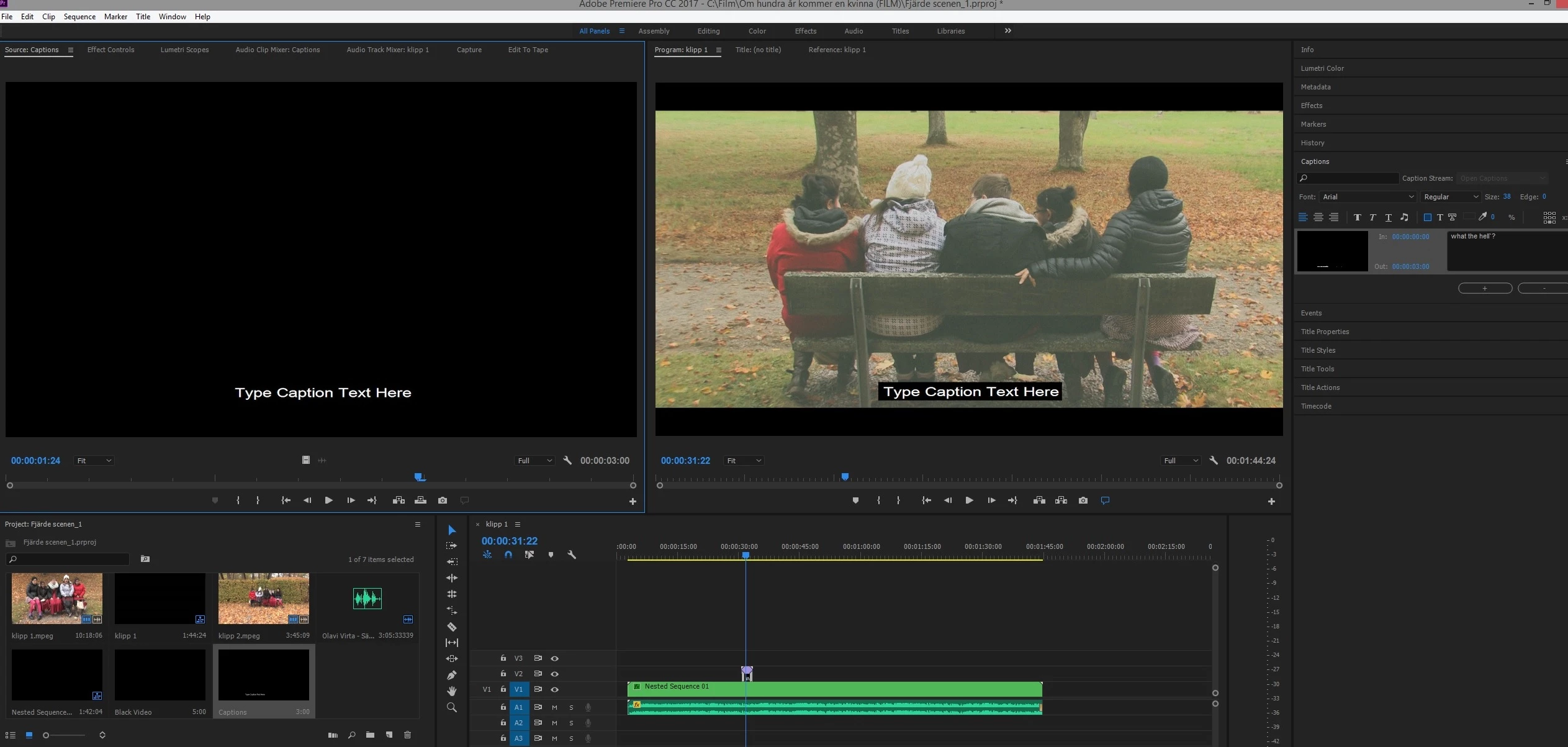
Sometimes when I click on the purple open caption box in the timeline I can see the caption i've written, but if I do anything else, the "type caption here" text turns up again...

Jakob.

    This topic has been closed for replies.

    7 replies

    Participant
    January 30, 2019

    30/01/2019, and the bug is still not fixed. I am forcing myself to remain polite, but Adobe is seriously, SERIOUSLY getting on my nerves.

    Stan Jones
    Community Expert
    Community Expert
    January 30, 2019

    I hear your frustration, but this thread started in 2016, and there have been changes in many versions since. The main issue presented in the beginning of this thread is not present for me currently.

    What specific dot version of PR are you using?

    Is the problem that the "type caption here" remains on the screen?

    There is an intermittent problem with the captions not updating correctly in the program monitor, but I believe that is different than the one originally reported here.

    Participant
    July 13, 2018

    The same issue in July. Working for a while only after rebooting the application. It is really annoying, captions are extremely buggy.

    Stan Jones
    Community Expert
    Community Expert
    July 13, 2018

    Max, what specific dot version of PR? This thread started in 2016, and there is no detail to the reports of issues in the 2018 version. There have been caption relevant changes, and I'm trying to track what is actually working and not.

    Participant
    July 13, 2018

    Stan, The newest one, 12.1.1 Build 10. There are no updates so far

    It's unsupportable, I figured out by using a standard text tool and making sub clips with all the captions inside

    Participant
    May 31, 2018

    June 2018 and this exact thing is happening to me.

    Adobe - how can this not have been fixed yet?

    Sonic Debris
    Participant
    March 26, 2018

    I am also having this exact issue in March of 2018, with a rapidly approaching deadline. I'm facing using the title tool which is obnoxious for this kind of application. I've also reported the bug, but apparently the reports are just going into a hole, because fixing the captioning feature should not take the better part of a year to fix.

    mtthewrubiin
    Participant
    March 26, 2018

    i fixed this, but i apologize to let you know that i cannot remember how! but.. um, there's a way? somehow?

    MarVar
    Known Participant
    October 14, 2017

    Still not fixed. Great, I have couple of days to the deadline. Adobe, your products keep disappointing be all the time. I don't think they're worth the money. This has been on the table for almost a year now, and it's still not fixed. I mean, your caption tool doesn't work. That's quite crucial element.

    edit: May I add, that closed captions don't work either. They don't show up on video.

    Kevin-Monahan
    Community Manager
    Community Manager
    January 27, 2017

    Hi Jakob,

    I assume that you have solved your issue by one of the following:

    • Resetting the workspace
    • Updating Premiere Pro
    • Adding the caption to the Timeline
    • Selecting the caption in the Timeline

    Please report back if that is not the case.

    Thanks!
    Kevin

    Kevin Monahan - Sr. Community and Engagement Strategist – Adobe Pro Video and Audio
    Participant
    April 25, 2017

    Hi Kevin,

    I'm also experiencing this issue, and I've tried everything you suggested.

    Do you have any other ideas?

    Legend
    July 17, 2017

    I experienced a variation of this issue where open captions were working, then today I noticed they said "Type caption text here" despite the many captions having non-default text. I scrubbed the timeline, removed/replaced the captions, tried using the captions in a new sequence, all to no avail... finally exited/restarted Premiere and the captions are now back. I'd been running Premiere for many hours so something seems to have gone awry in that time.

    Stan Jones
    Community Expert
    Community Expert
    November 8, 2016

    It appears to be a workspace issue:

    Re: Closed Captions not working Premiere CC2017

    Mo Alani
    Community Expert
    Community Expert
    November 8, 2016

    Reset your Workspace to default