
Participating Frequently
November 26, 2021
Answered

Oversaturated Colours and Exposure when exporting HLG3 videos

  • November 26, 2021
  • 2 replies
  • 33879 views

Hello all,

I've tried everything and read all of the articles out there (including this one) regarding how to use HLG3 on premiere and have tried all of the different settings. As you can see the footage looks great after doing some very minor color correnton and once I hit Export the video looks like this. The only setting that makes the video look normal is if you export it as H.264-HLG by which it isn't redable on the computer and you can't upload it to YouTube.

I have the latest Premiere Pro update and I get the same result in both premiere and video encoder.
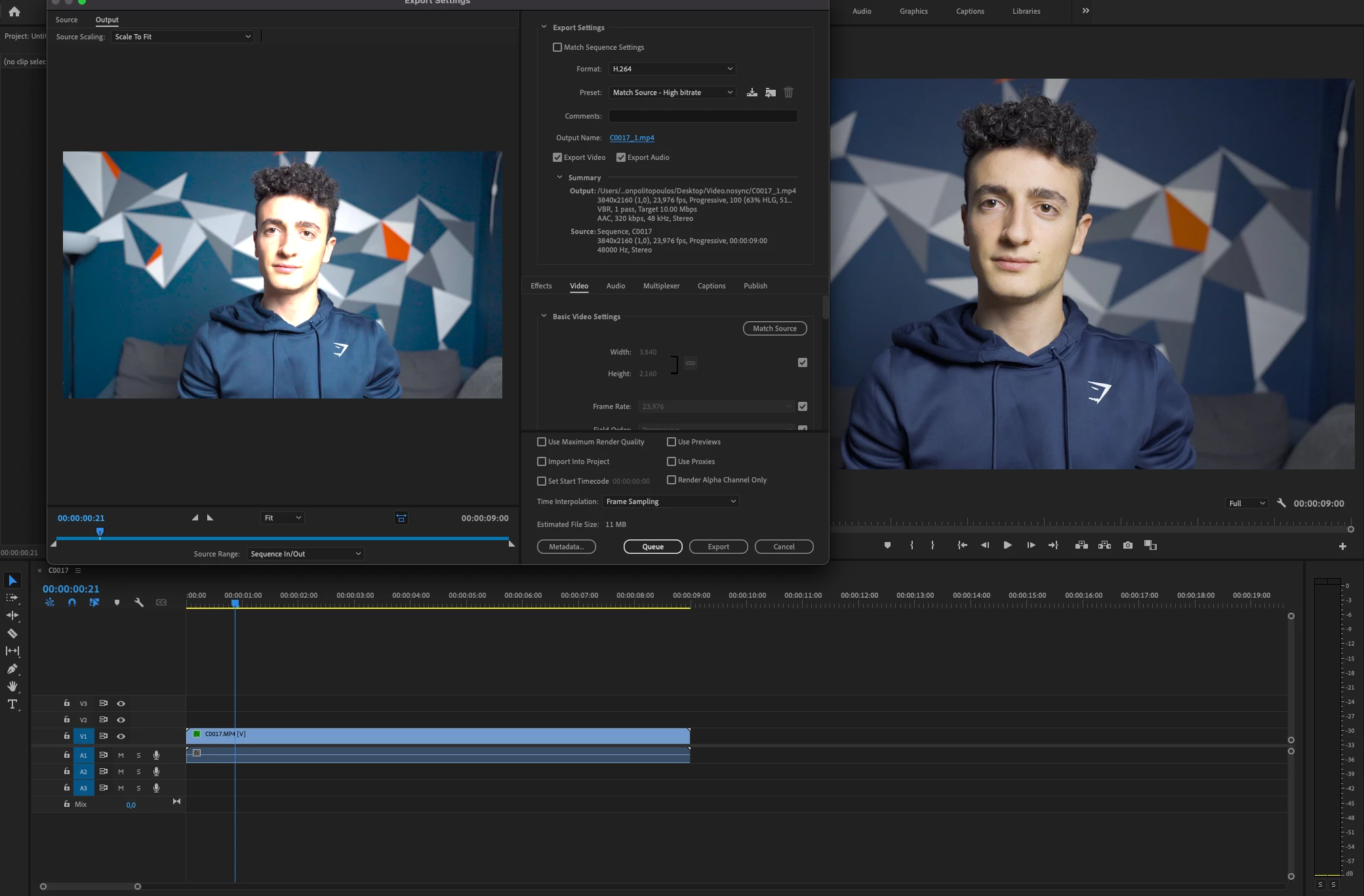
Camera: Sony A7C

Picture Profile: HLG3

Color mode BT.2020


Does anyone know how to fix this? 

Thank you!

This topic has been closed for replies.
Correct answer R Neil Haugen

So you set the clip to Rec.709 in the Project panel, Modify/Properties ... override to Rec.709, and then set the Sequence to Rec.709, and the export out is wrong still ... that correct?


If so, in the Export panel did you go down Video tab settings and check for the color management applied there?


Neil

2 replies

Participant
April 9, 2024

Same issue 

R Neil Haugen
Legend
April 9, 2024

No clue what's going on unless you actually tell us. Including your OS, media, and color management settings. Including screengrabs drag/dropped directly into this reply box is good.

Everyone's mileage always varies ...
R Neil Haugen
R Neil HaugenCorrect answer
Legend
November 26, 2021

So you set the clip to Rec.709 in the Project panel, Modify/Properties ... override to Rec.709, and then set the Sequence to Rec.709, and the export out is wrong still ... that correct?


If so, in the Export panel did you go down Video tab settings and check for the color management applied there?


Neil

Everyone's mileage always varies ...
Participating Frequently
November 26, 2021

Hello Neil

Thank you for your answer and it did fix my issue. What I didn't do is set both the Clip and the Sequence to Rec.709. However, is this something that I have to do every time that I import new clips and create new projects?


Constantine

R Neil Haugen
Legend
November 26, 2021

Maybe. The color management options within Pr have been expanded quite a bit in the new version. But they don't have a single CM place in the UI for users to either set the behavior for a specific projecct or clip, or a deferred default behavior for the app.


You can apply changes in the clips to an entire bin of clips at a time, thankfully. And typically it seems (at least for now ... ) that after setting the override in a bin to Rec.709, creating a sequence from a clip will create a Rec.709 sequence.


So ... after importing media, always check the CM for the clips before adding to sequences.


Neil

Everyone's mileage always varies ...