
Inspiring
November 30, 2017
Answered

P: Adjustment Layer and Morph Cut conflict

  • November 30, 2017
  • 4 replies
  • 2612 views

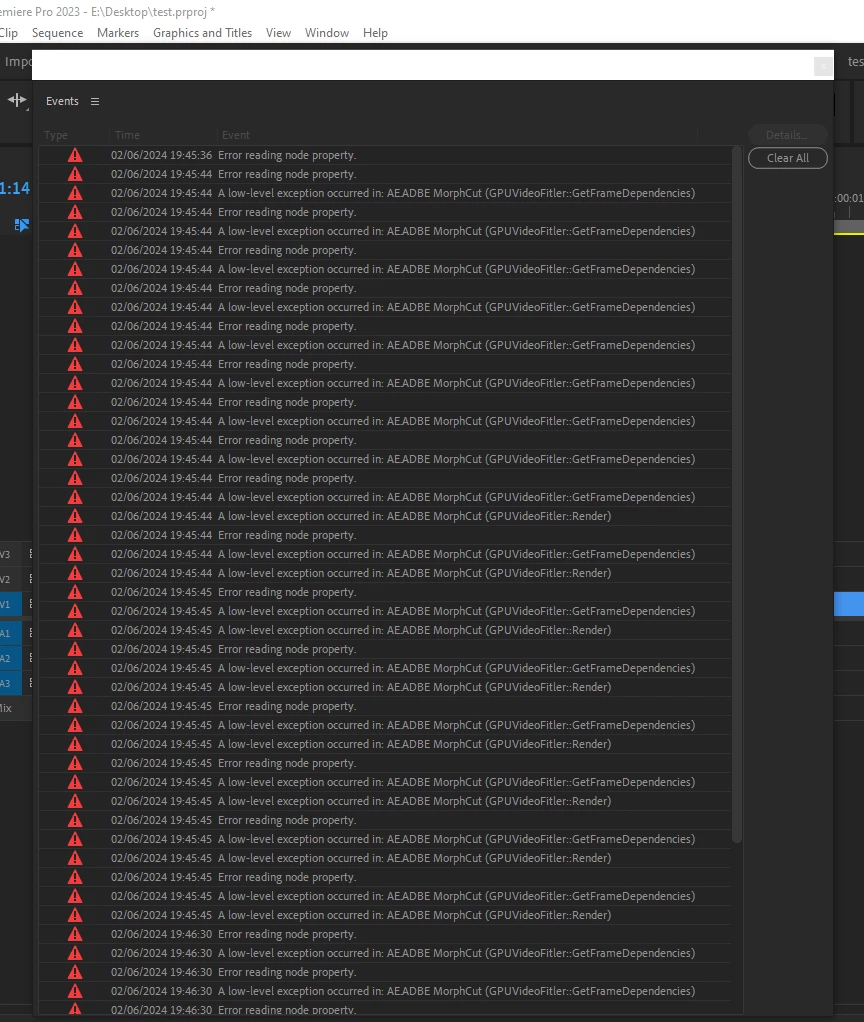
   I really like that Premiere has the ability to apply transitions to the Adjustment Layer, this makes it possible to create multi-layered complex transitions from several different effects. But when I apply Morph Cut to the Adjustment Layer, Premiere crashes.
Tested on Premiere Pro v23.6.0, 24.3.0 and 24.4.1
   

Also, if you use the effects of third-party plugins (BorisFX Sapphire, BCC, Red Giant Universe, etc.), then when adding key frames, the effect takes the value of one of the key frames and freezes, that is, no animation occurs. This is a very old problem that has been around for many years.
Best Regards
Yuri

This topic has been closed for replies.
Correct answer Ann Bens

Dont think your are suppose to add Morph Cut to Adjustment Layers but just to video clips.

4 replies

Community Manager
August 8, 2024

hi @Video_555 ,


This crash fix is available in the 24.6 beta version, As Morph-cut is not meant to be applied on the Adjustment layer and should be used on the media clip hence errors and asserts are expected with the message.


Thanks,

Maanvig

R Neil Haugen
Legend
June 3, 2024

Ann is correct ... Morph must be applied directly to a clip.

Everyone's mileage always varies ...
Video_555Author
Inspiring
June 10, 2024

But all other effects and transitions affect the  bottom layer when I apply them to adjustment layer

Richard van den Boogaard
Community Expert
Community Expert
June 10, 2024

If you want this, consider nesting all the clips and then apply the Morph Cut effect to a junction of the two nests.


If it doesn't work one way, do things another way.


Hope this helps.

Ann Bens
Community Expert
Ann BensCommunity ExpertCorrect answer
Community Expert
June 2, 2024

Dont think your are suppose to add Morph Cut to Adjustment Layers but just to video clips.

Video_555Author
Inspiring
June 10, 2024

But all other effects and transitions affect the bottom layer when I apply them to adjustment layer

Ann Bens
Community Expert
Community Expert
June 10, 2024

That is correct, but morph cut is a whole different ball game.

You are using morph cut incorrect.

It designed to fixed shots that have a single talking head and a static background

https://helpx.adobe.com/premiere-pro/using/morph-cut.html

Participant
November 30, 2017

During crash system freezes and the screen displays an array of faulty pixels

Premiere Pro CC 2018 - attempting to transition between downscaled 1080p ProRes422 in .MOV container in a 720p sequence

Anyone having success with Morph Cut on a similar system? or similar failure?

Kevin-Monahan
Community Manager
Community Manager
November 30, 2017

Hi OrangeEntheogen,

Sounds odd. However, whenever I hear of transitions having problems, I always suspect the render order pipeline. You need to place this transition at a different place in that pipeline. Usually, you can do this by applying an effect to the clip (scale in this case), nesting the clip, trimming the nested clip, then add the transition. Does that work now?

Thanks,
Kevin

Kevin Monahan - Sr. Community and Engagement Strategist – Adobe Pro Video and Audio
Participant
November 30, 2017

Hi Kevin,

Your description of the basic underlying principle of Morph Cut in relation to render order was great. I nested my clips and the Morph Cut still wouldn't render however when I also removed the adjustment layer from above I was able to render successfully, which makes sense as the adjustment layer would have been muddling the pipeline...but now I can't use the adjustment layer - which is critical to my workflow...have any suggestions? haha