
Participating Frequently
March 5, 2023
Answered

Pas de son avec les vidéos

  • March 5, 2023
  • 5 replies
  • 608 views

Bonjour

Je rencontre un problème avec la dernière version de Première Pro 2023 v23.2.0 build 69.
iMac 27' avec Mac OS Monterey v12.6.3.

Lorsque je glise mes vidéos contenant de l'audio dans la time line, le son associé à la séquence n'apparait pas dans la time line et ma séquence est muette, par contre j'entends le son dans la fenêtre de prévisualisation de la séquence.

Autre notification : si à la création du projet je demande la création d'une séquence contenant tous les fichiers du projet, l'audio cette fois apparaît bien avec les séquences.

Merci de votre aide

Philippe
This topic has been closed for replies.
Correct answer Ann Bens

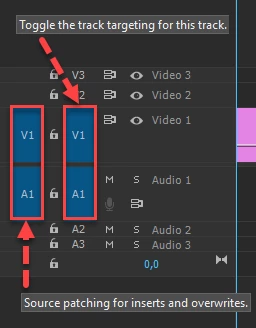
The most common user error is not source patching the track.
Solved by first opening clip in Source Monitor. Then drag/insert into timeline.

5 replies

Participating Frequently
March 6, 2023

I found the way to separate audio and video, it's OK

thanks again

Philippe

Participating Frequently
March 6, 2023

Hello Ann

It's OK thanks so much.

I don't find how to separate Vidéo and audio

Have a nice day

Philippe

Participating Frequently
March 5, 2023

Many thanks Ann

I will try this.

Best regards

Philippe

Ann Bens
Community Expert
Ann BensCommunity ExpertCorrect answer
Community Expert
March 5, 2023

The most common user error is not source patching the track.
Solved by first opening clip in Source Monitor. Then drag/insert into timeline.

Participating Frequently
March 5, 2023

Après essai la première séquence glissée contient l'audio mais toutes les autres séquences n'ont pas d'audio et sont muettes