Participant
October 18, 2018
Answered

Photos and videos not showing in source or preview in Premiere Pro

  • October 18, 2018
  • 6 replies
  • 16293 views

When I import images, they show up in the media browser and I can drag them into the sequence. But the images don't show when I play the preview or in the source section.

    This topic has been closed for replies.
    Correct answer Harold Silva

    Youre working in the wrong mode

    This is alfa mode and you have to work in COMPOSITE VIDEO check photos:
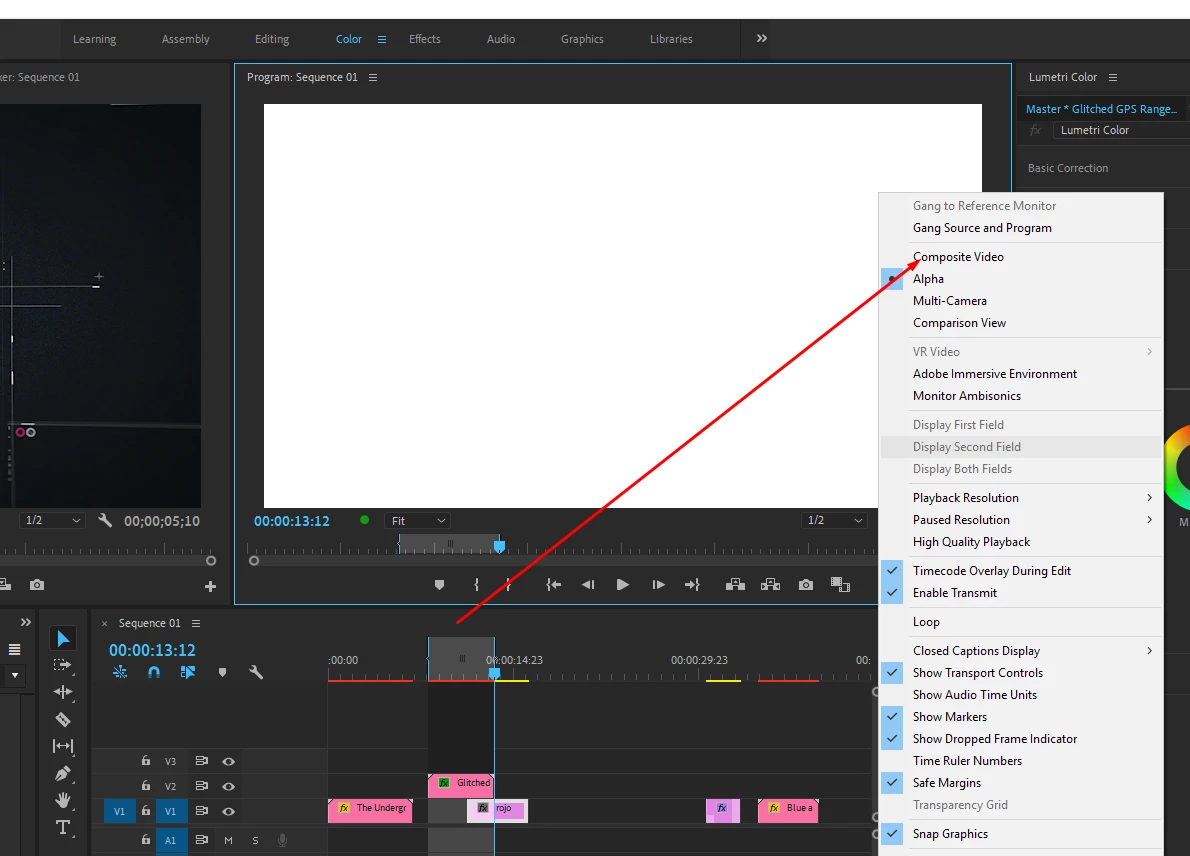
    try to change in program monitor :

    6 replies

    Participating Frequently
    October 30, 2024


    Ritght Click on the Clip --->  Scale to Frame Size ---> Done (nasharzfilms.com)


    Nasharz Films
    Participant
    October 12, 2021

    this worked for me each time I have this issue. Clear media cache and close and restart the program.  https://helpx.adobe.com/premiere-pro/kb/clear-cache.html

    Participant
    November 19, 2022

    THANK YOU!

    Randune23
    Inspiring
    May 21, 2021

    I'm not having the same issue as you but my is similar in that PP will not preview certain files.  My issue is pictures that are in the main bin.  I click on an image and the preview does not show up.


    But I click on a movie file like this...

    And the preview shows up just fine.  Then also, I'll be in another bin in the same project, click on a picture, and the preview appears.  WTH???


    To preview it I have to double-click on it and then it appears in the Source window and it shows up. 


    WTHX2.


    Randy


    Participating Frequently
    October 30, 2024

    Ritght Click on the Clip --->  Scale to Frame Size  (nasharzfilms.com)

    Nasharz Films
    Averdahl
    Community Expert
    Community Expert
    October 18, 2018

    It seems like a GPU driver issue. I would have tried to upgrade to the latest graphic card driver.

    Participating Frequently
    October 30, 2024

    Ritght Click on the Clip --->  Scale to Frame Size ---> Done (nasharzfilms.com)

    Nasharz Films
    Ann Bens
    Community Expert
    Community Expert
    October 18, 2018

    Start importing regular footage instead of jpg.

    See how that goes.

    ls9310397Author
    Participant
    October 18, 2018

    I'm having the same issue with video as well

    Harold Silva
    Community Expert
    Harold SilvaCommunity ExpertCorrect answer
    Community Expert
    October 18, 2018

    Youre working in the wrong mode

    This is alfa mode and you have to work in COMPOSITE VIDEO check photos:
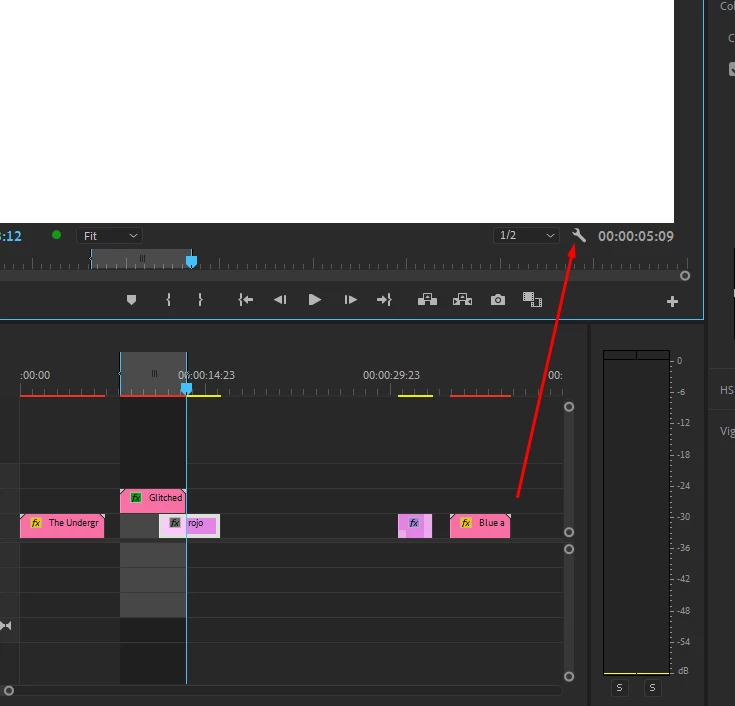
    try to change in program monitor :

    Harold Silva B.
    Shivangi_Gupta
    Community Manager
    Community Manager
    October 18, 2018

    Hi LS,

    Sorry about this issue.

    Please check if the issue persists if you change the renderer.

    FAQ: How to change the Video Renderer in Premiere Pro?

    Let us know if it helps.

    Thanks,

    Shivangi

    ls9310397Author
    Participant
    October 18, 2018

    I've tried that as well. and it doesn't change anything
