
Inspiring
March 13, 2019
Answered

Placing .avi movie clips on the Timeline Premiere Pro 2.0

  • March 13, 2019
  • 2 replies
  • 1172 views

Hello

A quick search of Google, when trying to discover how to put imported .avi movie clips on the Timeline (Sequence?) tells me this:

How do I drag video to timeline in Premiere?

Double-click a clip in a Project panel or Timeline panel to open it in the Source Monitor. In the Source Monitor, do one of the following: To drag all audio and videotracks of the clip, drag from anywhere inside the main viewing area. To drag only the video track of the clip, drag from the Drag Video Only icon .24 Oct 2016

When I do that, nothing happens. It looks as if the imported files have a loudspeaker icon next to them, but the .avi files in my desktop folder are definitely movie clips and not just audio ones:
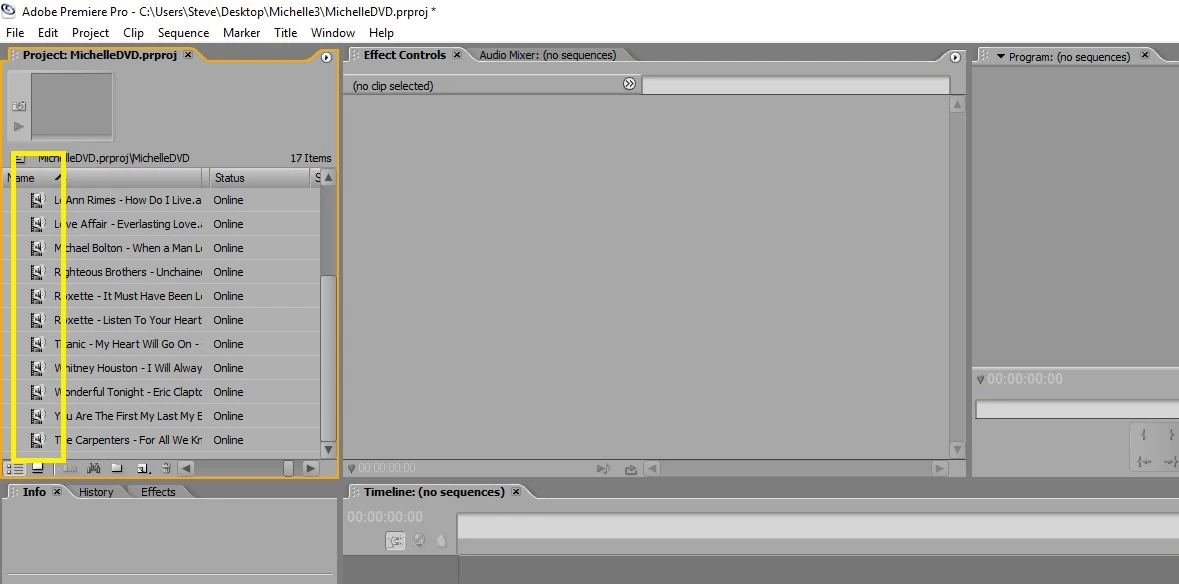
Any advice, please?

Thanks!

    This topic has been closed for replies.
    Correct answer John T Smith

    H.264 will not work inside an AVI wrapper http://forums.adobe.com/thread/854115

    says VLC will convert in reply #6 http://forums.adobe.com/thread/1172956

    -or convert with https://handbrake.fr/ open source transcoder/converter

    2 replies

    SteveH59Author
    Inspiring
    March 13, 2019

    Many thanks to you both for all your help.

    I will try to get the hang of Pro 2.0 but , in the meantime, I will stick with Prem 11.

    Thanks again

    Steve

    Peru Bob
    Community Expert
    Community Expert
    March 13, 2019

    Please use the free MediaInfo and post a screenshot the properties of one of your media clips in tree view:

    MediaInfo

    SteveH59Author
    Inspiring
    March 13, 2019

    This is what Tree View gives me, Bob:

    General

    Complete name                            : C:\Users\Steve\Desktop\Michelle3\AVI_files\Berlin - Take My Breathe Away.avi

    Format                                   : AVI

    Format/Info                              : Audio Video Interleave

    File size                                : 15.9 MiB

    Duration                                 : 2 min 6 s

    Overall bit rate                         : 1 055 kb/s

    Writing application                      : Lavf58.12.100

    Video

    ID                                       : 0

    Format                                   : AVC / AVC

    Format/Info                              : Advanced Video Codec

    Format profile                           : Main@L3.1 / Main@L3.1

    Format settings                          : CABAC / 3 Ref Frames / CABAC / 3 Ref Frames

    Format settings, CABAC                   : Yes / Yes

    Format settings, RefFrames               : 3 frames / 3 frames

    Codec ID                                 : H264

    Duration                                 : 2 min 6 s

    Bit rate                                 : 910 kb/s

    Width                                    : 1 280 pixels

    Original width                           : 1 280 pixels / 1 280 pixels

    Height                                   : 720 pixels

    Original height                          : 720 pixels / 720 pixels

    Display aspect ratio                     : 16:9

    Frame rate mode                          : Variable / VFR

    Frame rate                               : 25.000 FPS

    Color space                              : YUV

    Chroma subsampling                       : 4:2:0 / 4:2:0

    Bit depth                                : 8 bits / 8 bits

    Scan type                                : Progressive

    Original scan type                       : Progressive / Progressive

    Bits/(Pixel*Frame)                       : 0.040

    Stream size                              : 13.7 MiB (86%)

    Color range                              : Limited

    Color primaries                          : BT.709

    Transfer characteristics                 : BT.709

    Matrix coefficients                      : BT.709

    Audio

    ID                                       : 1

    Format                                   : AAC LC

    Format/Info                              : Advanced Audio Codec Low Complexity

    Codec ID                                 : FF-2

    Duration                                 : 2 min 6 s

    Bit rate                                 : 128 kb/s

    Channel(s)                               : 2 channels

    Channel layout                           : L R

    Sampling rate                            : 44.1 kHz

    Frame rate                               : 43.066 FPS (1024 SPF)

    Compression mode                         : Lossy

    Stream size                              : 1.98 MiB (12%)

    Alignment                                : Split accross interleaves

    Interleave, duration                     : 23  ms (0.58 video frame)

    Peru Bob
    Community Expert
    Community Expert
    March 13, 2019

    Premiere Pro 2.0 was created well before the H264 codec of your file.  It is not a supported file in version 2.0.

    You may want to consider downloading the trial of Premiere Elements 2019 or consider subscribing to Premiere Pro CC.