
Participant
February 1, 2023
Resuelto

Play Back Laggy on Mac Mini M2

  • February 1, 2023
  • 8 respuestas
  • 2744 visualizaciones

I noticed two issues

1-I have a Mac Mini M2 Pro with two LG 4k displays connected. During playback from both the time-line and Preview the footage stick and laggs. All file formats including ProRes. If i change the resolution with both monitors i get the same issue. It only resolved when i remove one display, playback returns to normal. 

2-Also i noticed when closing the effects popup menue there is a 4-5 second lag. 
Mejor respuesta de distinctit

I found a temporary solution for my issue with Premier by following these steps:

  1. Avoid using Premier in full screen mode.
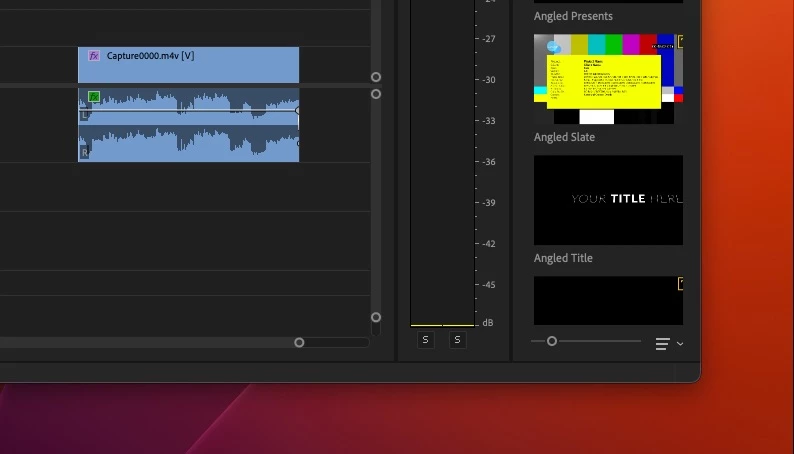
  2. Resize the Premier window slightly smaller so that it doesn't fill the entire screen, leaving a one-inch gap on the right and one-inch gap at the bottom of screen. Refer to the attached image for a visual guide.


8 respuestas

Participant
October 25, 2023

I'm having the same issue - choppy play back and dropped frames on a16" macbook pro with 92gb of ram, 

just trying to cut 720p footage - Adobe this is NOT good enough -your service isn't cheap yet I'm constantly having to fix something - it actually ends up costing a lot more due to lost time and fixing fundemental issues with your software time to take a leaf out of Black magic's book and re-design premiere so people can actually use it to make a living out of using your software.


Participant
September 17, 2023

I fixed it in my case. My second monitor was connected using HDMI to HDMI. I changed it to a Thunderbolt to HDMI cable, and the sluggishness is fixed. Even though the second monitor was not actually being used. Obviously the HDMI was taxing the graphics capability of the Mac Mini M2 Pro.

Participating Frequently
August 2, 2023

I found the opposite, that I had jerky playback unless I did go into full screen mode.

Participant
July 28, 2023

Same issue when it wasnt an issue as of last week. Come on Adobe lets get your tech working in something other than child's play mode. Some of us have to work for a living using your stuff.

Participant
July 24, 2023

Exact same issue here, but with an M2 Ultra Studio.
Resizing the Premiere workspace window smaller than my desktop fixed it immediately. Thank you for hte suggestion. I hope Adobe fix this strange bug. 

cfrash
Participant
May 9, 2023

It worked! Thanks for the tip!  I resized my main screen as you suggested and playback is smooth again; while running two monitors. Something is clearly broken or at least buggy in thier code. I'm hoping Adobe adresses this ASAP. Not being able to run two screens at thier full screen size is criminal, let alone a basic functionality of an NLE. 

distinctitAutorRespuesta
Participant
May 8, 2023

I found a temporary solution for my issue with Premier by following these steps:

  1. Avoid using Premier in full screen mode.
  2. Resize the Premier window slightly smaller so that it doesn't fill the entire screen, leaving a one-inch gap on the right and one-inch gap at the bottom of screen. Refer to the attached image for a visual guide.


cfrash
Participant
May 8, 2023

I'm having the same issue as you @distinctit. M2 Mac Mini Pro (base model). Running PP 22.6.2. I have two older Dell 24" monitors connected via Mini Display Port (single cable / no adaptors) and working primamrly with ProRes LT and 422 footage (Multicam and Single clips). For three days everything was fine, then suddenly major and minor lag issues with playback from the timeline. I thought it was the read speed on my external HD, so I connected a OWC Raid to it and still having this issue. Swapped ports, ran Premiere in Rosetta, even ended up hooking the second monitor up via HDMI - all still presented lag in playback, The only time this issue is resolved is when I only have one monitor connected to the machine. I'm struggling to understand why this is happening. Can't upgrade to 23 yet becasue of some compatability issues with the rest of my team but I"m going to assume that's the version you were on.  Hope Adobe adresses this....