Inspiring
October 13, 2021
Answered

Playback and render is getting worse

  • October 13, 2021
  • 1 reply
  • 432 views

I'm working on a very short (59sec) little edit, and I'm getting bad pixelation during playback, and also when rendering. I'm ot using any effects/filters/plugins... and it's getting worse. Playback is set to Full. The original file does not have ay of the pixeltion in it. It happens when someone moves fast. When I play back the unedited clip in the movie preview window, it pixelates, but at different places. When I render, the pixels appear at the same place as during playback. But they will appear at different places each time I open premiere again.

 

I have already:

Manually cleared the cache

High Quality playback is ON 

Shutdown/restarted computer

Moved file from my external to internal drive

Did a full option-reset of premiere.


thanks


This topic has been closed for replies.
Correct answer Averdahl
quote

When I play back the unedited clip in the movie preview window, it pixelates, but at different places.


By @drmdzh1


Assumig this is some form of MPEG files such as mp4 files the MPEG Importer in Premiere Pro has for a very long time had issues with many MPEG files. One way to solve it is to simply rewrap the files. It´s fast and works 99 out of 100 times for issues like this.


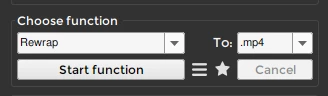
Download Shutter Encoder encoding|converting video FREE PC|Mac and rewrap the file/s using the setting below. Import the new files and use those as source file/s.


If the files come from a cellphone you are better off by using the Conform option in Shutter Encoder to conform it to constant frame rate.


1 reply

Averdahl
Community Expert
AverdahlCommunity ExpertCorrect answer
Community Expert
October 13, 2021
quote

When I play back the unedited clip in the movie preview window, it pixelates, but at different places.


By @drmdzh1


Assumig this is some form of MPEG files such as mp4 files the MPEG Importer in Premiere Pro has for a very long time had issues with many MPEG files. One way to solve it is to simply rewrap the files. It´s fast and works 99 out of 100 times for issues like this.


Download Shutter Encoder encoding|converting video FREE PC|Mac and rewrap the file/s using the setting below. Import the new files and use those as source file/s.


If the files come from a cellphone you are better off by using the Conform option in Shutter Encoder to conform it to constant frame rate.


drmdzh1Author
Inspiring
October 13, 2021

Thanks. It's a .mov file to start with, but I will give this a shot.