
Participant
March 5, 2018
Answered

Please help me export this Quicktime file?

  • March 5, 2018
  • 1 reply
  • 1274 views

Hello,

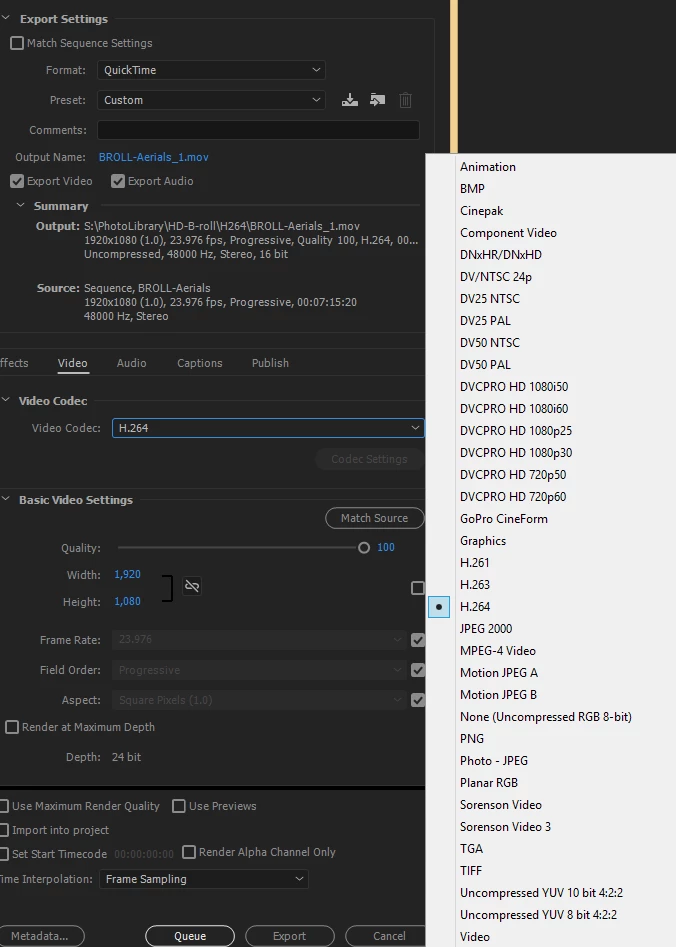
I'm editing out parts of a video and need to save the final cuts in the same format I imported them in (MOV). I need to export with these settings:

.mov file, 1920x1080, 23.976 framerate. (29.97 might be fine too.)

I cannot manage this with any of the Quicktime codecs I have tried. I know H.264 format would be ideal but I need to submit them in .mov format. Any ideas? H.264 video codec lets me edit the dimensions but I get an "error compiling movie" error when I try it. I'm using Windows 10 and Premiere Pro 2017.
    This topic has been closed for replies.
    Correct answer Jax24135

    I wouldn't expect QuickTime Player to recognize a lot of the QT drop-down formats.

    If Cineform exported fine, you should be able to drop your Cineform file into Media Encoder and export without much (if any) quality loss.

    I was going to recommend an h.264 export with VBR Bitrate Encoding (and manually change the extension to ".mov"), but since these are aerial shots - it might not pay off. You can limit the bitrate under QuickTime to what you'd prefer.

    1 reply

    Jax24135
    Inspiring
    March 5, 2018

    Can you export as anything else? That doesn't sound like a QuickTime-only error.

    Try exporting as Cineform and roundtripping it back to PrPro to export your .mov.

    If Cineform fails to render, render out small chunks of your Sequence to find the problematic area.

    juliah77Author
    Participant
    March 5, 2018

    Well, that is interesting. I'm actually not able to successfully export a few types of Quicktime codecs I tested. They rendered OK. But when I try and open in Quicktime Player, I get  "Additional software is required for Quicktime to playback this media."

    I brought a Cineform one back into Premiere though. What Codec should I export it as after that?

    The Cineform took over 20 minutes to render and is 4 GB. Yikes. I have dozens of these to edit and resave; the original .movs are only around 500-900MB. Any ideas on reducing filesize too would be appreciated.

    Jax24135
    Jax24135Correct answer
    Inspiring
    March 5, 2018

    I wouldn't expect QuickTime Player to recognize a lot of the QT drop-down formats.

    If Cineform exported fine, you should be able to drop your Cineform file into Media Encoder and export without much (if any) quality loss.

    I was going to recommend an h.264 export with VBR Bitrate Encoding (and manually change the extension to ".mov"), but since these are aerial shots - it might not pay off. You can limit the bitrate under QuickTime to what you'd prefer.