

PNG Image Sequence Going Crazy in Edit
Hello all,
I've spent an hour looking through the forums here and haven't found a solution to my problem. I have two simple PNG image sequences (with transparency) I'm looking to layer over single layers of video. This has always been super simple in the past, but all of a sudden I'm having inexplicable problems.
Here is what I'm seeing (both in the timeline and in the export):
Password: hooper
For your information, the BIG HOOPER logo is one PNG sequence, but the little "H" bug in the lower right is a completely different image sequence in a different folder. I have no idea why it is blending them. They are in no way touching or on the same video channel or anything. It's like my computer doesn't know which image sequence it is looking at.
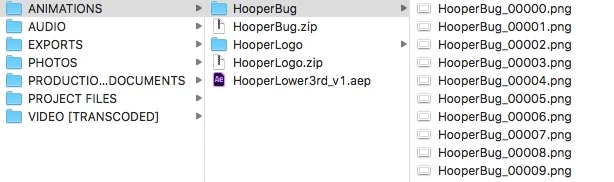
For reference, here is my folder structure. The HooperBug is the little "H" and the HooperLogo is the big logo. They should not be blending, flashing, or anything.
Thank you in advance for your help! Obviously this is a client job and I'm very confused.
Michael
 AdChoices