
Participant
May 3, 2020
Question

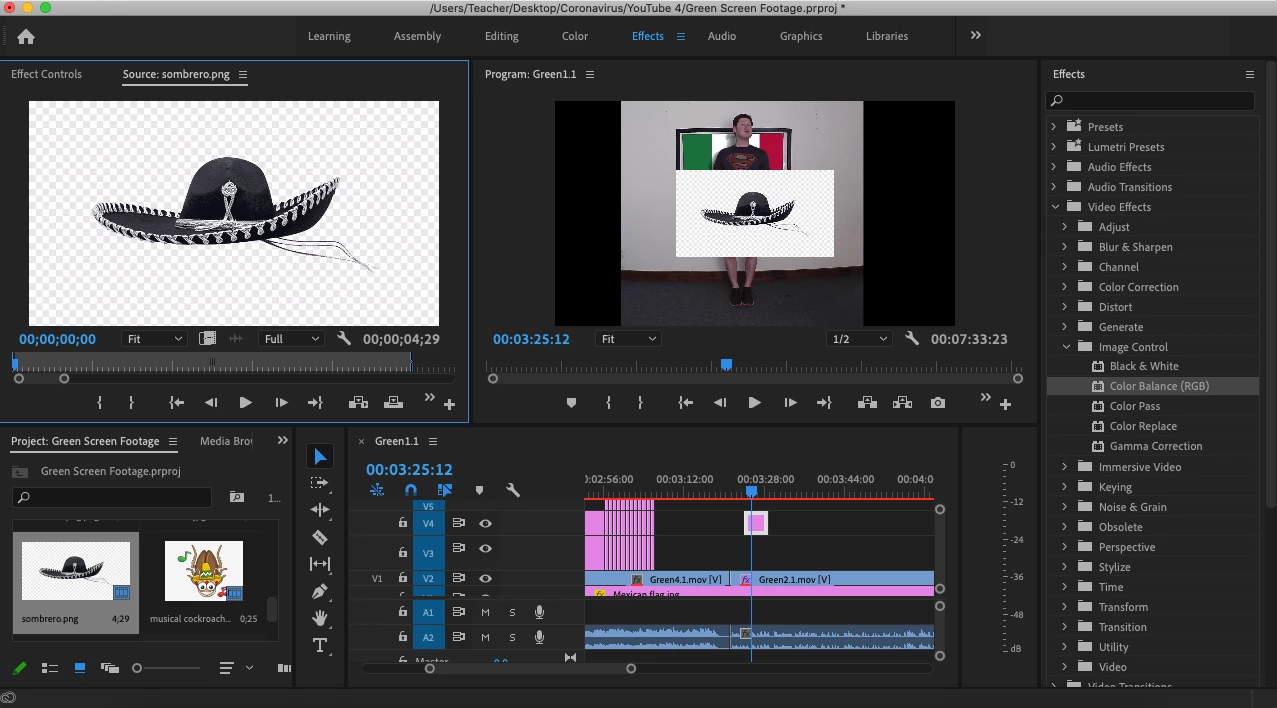
PNG image still showing checkered background in Premiere Pro

  • May 3, 2020
  • 3 replies
  • 16708 views

Hi everyone, I'm absolutely new here, but I feel this shouldn't be rocket science. I am trying to input a simple PNG image in a video, but when I bring the file into PP, the transparent checkered background is, well, not transparent. Help me out! I've unchecked the transparency grid in the source view, and I can't find any information about this in the forums or online.
This topic has been closed for replies.

3 replies

Inspiring
May 3, 2020

If you load it to the source monitor and toggle of Transparency Grid (remove the checkmark)

you should see black where the transparency is. Do you?

What originated this PNG graphic? Are you confident it contains transparency?


MtD

Community Expert
May 3, 2020

It's not uncommon when getting images online that the transparent background is actually burned into the image. If that's the case, you might want to bring this into Photoshop and remove the background yourself.

Ann Bens
Community Expert
Community Expert
May 3, 2020

As the image shows a checkered backgroud in the project window this means its not transparant.

Transparancy shows as black,

Open image in Ps remove the background so its real transparant.

Save and import into Pr.