
Answered
ppro panel install error: -411
I'm trying to package and install a CEP Panel for Adobe Premiere Pro.
However, I encountered an error with code -411.
I'm unable to find information about this error code.
please help me.
- MacOS Ventura 13.4
- Adobe Premiere Pro 2023
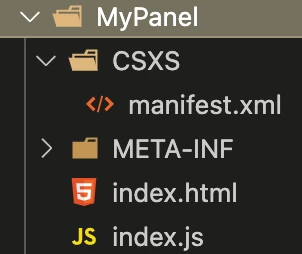
My Panel Structure is like this.
# certification
./ZXPSignCmd-64bit -selfSignedCert US NY MyCompany MyCommonName abc123 MyCert.p12
>> success
# sign
./ZXPSignCmd-64bit -sign MyPanel/ MyPanel.zxp MyCert.p12 abc123 -tsa http://timestamp.digicert.com/
>> success
>> MyPanel.zxp has created.
# install
./UnifiedPluginInstallerAgent --install /Users/user/dev/etri_2023_plugin/MyPanel.zxp
Installing extension with file path = /Users/user/dev/etri_2023_plugin/MyPanel.zxp
Failed to install, status = -411!
 AdChoices