andystock
Inspiring
December 10, 2016
Answered

Première Pro 2017 Effects Not Working

  • December 10, 2016
  • 6 replies
  • 13503 views

Hello,

When in Première Pro 2017 and I add a Lumertri color correction it the clip doesn't reflect the changed I make.  When I do the same thing in 2015 version it works perfectly.  I've had to use 2015 until I can figure this out but I have a student video thing due next week and I'd prefer to use the newer program, am I missing something?

Thanks!
    This topic has been closed for replies.
    Correct answer andystock

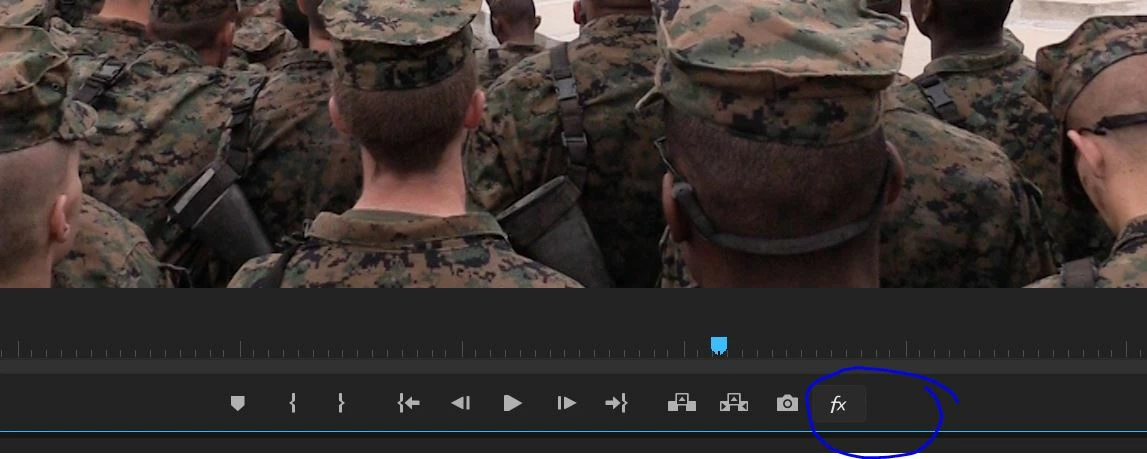
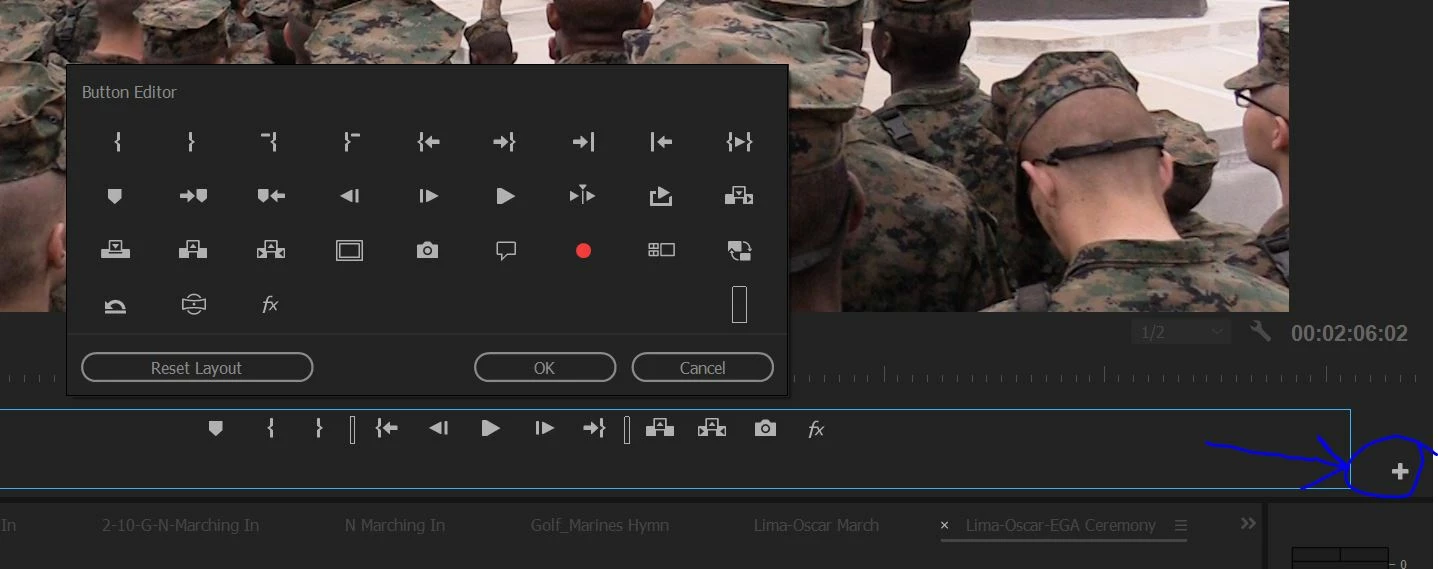
    I found the setting, it's called Global Effects Mute.  It was enabled by default on PP 2017 for some stupid reason.  Once I toggled that it was fixed.  Like I said, I still use 2015 because of performance problems.  And I'm editing on all SSD's and my GPU is AMD FirePro W9100 with 32GB VRAM.  CPU is i7-5930k overclocked to 4.2 Ghz.  Needless to say it shouldn’t be slow.

    You may have to click on the plus button on the lower right side of the preview window to be able to see the Fx mute button, see images below.

    6 replies

    MyerPj
    Community Expert
    Community Expert
    October 30, 2019

    Just a note for the forum mods. This is another perfect example of what is wrong with the nested comments and the way dates are displayed. After a quick look thru trying to find the current comment, I then searched for 2019, I got nothing. Then I remembered I saw one of Ann's comments from today on another thread I thought I remembered it use the minutes ago to display that instead of a much preferred date/time. So, I searched for 'm ago' and found the new comment.


    <geesh>


    Participating Frequently
    May 2, 2017

    I only get a "preview" in the program monitor when I am clicking and holding my mouse down over the sliders for all effects. Once I release, nothing. I have to render it manually each time to "preview" the effects in my monitor.

    I've been using Adobe since 1996. This is unacceptable and silence from Adobe is just so awesome thanks

    This thread is exactly my problem 100% the same. No effects working.

    andystock
    andystockAuthorCorrect answer
    Inspiring
    May 2, 2017

    I found the setting, it's called Global Effects Mute.  It was enabled by default on PP 2017 for some stupid reason.  Once I toggled that it was fixed.  Like I said, I still use 2015 because of performance problems.  And I'm editing on all SSD's and my GPU is AMD FirePro W9100 with 32GB VRAM.  CPU is i7-5930k overclocked to 4.2 Ghz.  Needless to say it shouldn’t be slow.

    You may have to click on the plus button on the lower right side of the preview window to be able to see the Fx mute button, see images below.

    Participating Frequently
    May 2, 2017

    Dear AndyStock.

    Words cannot express to you how grateful I am. You are absolutely correct. That stupid setting fixed everything!!!! Thank you so much you are a truly awesome person. It has been decided

    Why on EARTH would adobe have global ALL FX off by DEFAULT on 2017?? My God Adobe. LOL FAIL much.

    I hope you have a wonderful day Andy knowing you - without hyperbole - saved my life and my work and I wish you all the best.

    Love the community here, we're the glue. We are.

    Participating Frequently
    May 2, 2017

    Pretty sad that Vegas Pro does high shelf GPU professional editing flawlessly vs. Adobe in 2017. So sad. What happened? Headache after headache.

    I hope that I find this "show effects" setting that fixed the problem for you Andy Because I am screwed without it. Thanks man.

    andystock
    andystockAuthor
    Inspiring
    May 2, 2017

    One thing I found was a little button under the preview window that says "Show effects" or something like that.  Once I enabled that button it was fixed.  However, performance in 2017 still sucks compared to 2015 so I don't even use 2017.

    Participating Frequently
    May 2, 2017

    Where is that setting I can't find it. Thank you for saving my life here, this is so frustrating I can't do any work.

    Program monitor? I couldn't find it in the wrench menu.

    Vidya Sagar
    Adobe Employee
    Adobe Employee
    December 13, 2016

    Hi Andystock,

    Is this happening with all projects, new projects  or just with the project files created in Premiere pro CC 2015 & converted into CC 2017?

    Thanks,

    Vidya Sagar.

    andystock
    andystockAuthor
    Inspiring
    December 13, 2016

    I've only used it on projects that I converted from 2015 but I can test it out with a brand new project I guess but it's kind of a pain to move everything.  Shouldn’t it work regardless?

    Kat Gilbert
    Legend
    December 10, 2016

    Moved to Premiere Pro as the Lounge is not for technical answers. If you find that this is not helpful forum please let us know.