Participating Frequently
December 20, 2024
解決済み

Premier Pro - Lip Sync Issue

  • December 20, 2024
  • 返信数 4.
  • 4361 ビュー

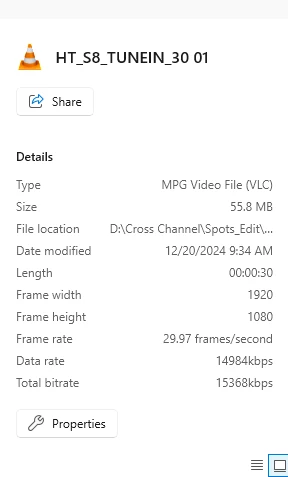
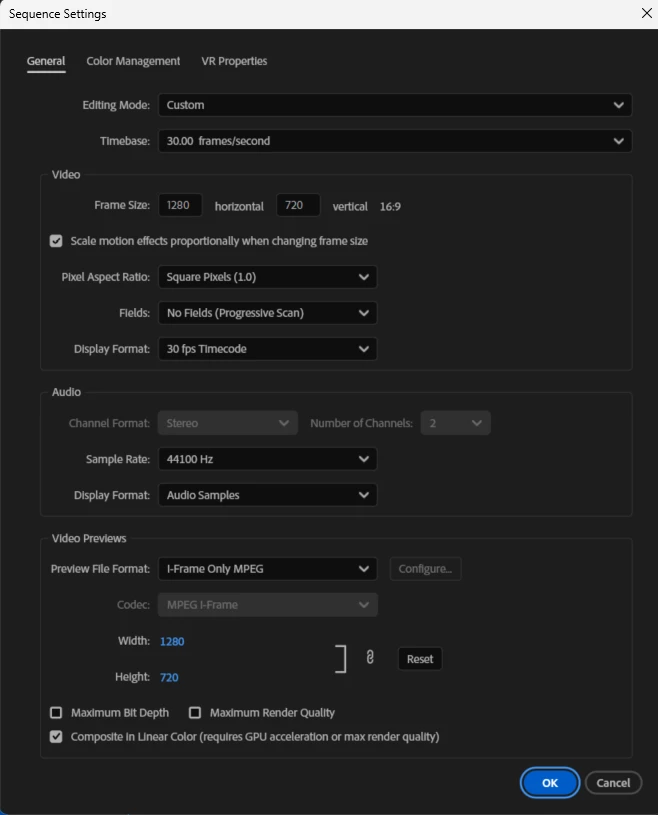
How do I fix a Lip Sync error? I have a video file (MPG) that plays perfectly. However once imported into Priemier Pro V25.0 the sync gets messed up by approx 10-15 nanoseconds or so. Is there something in the sequence settings that I am missing? I never had this issue before. I am very new to video editing. 
 

解決に役立った回答 jamieclarke

There is a potential fix in beta version 25.2.0 build 22 or higher

返信数 4

Participant
June 18, 2025

I found a quick easy solution last night - take your video from Premiere Pro, import it into Premiere Rush and re-export, it fixed my lipsynch issue quickly and easily saving a ton of time.  I had a presentation that I urgently needed to get up to Paris and this had it there within half an hour of the issue almost devistating me

Averdahl
Community Expert
Community Expert
December 23, 2024

I think your audio may be Dolby Digital (AC3) and Pr 25 and Pr 24 has trouble with that, causing the audio and video out of sync by approx 20-24 frames. You can check the audio codec by opening the clip in VLC and then press Ctrl+J.  Look for Stream A and check if the Codec says anything about AC3 or Dolby Digital.


If it does, Pr 25 cannot handle it correctly. But if you open the Creative Cloud app you can download Premiere Pro 23.6.8 that can handle the audio correct with no sync issues.


Try that and report back! 🙂


quote

How do I fix a Lip Sync error? I have a video file (MPG) that plays perfectly. However once imported into Priemier Pro V25.0 the sync gets messed up by...


By @valerie_6452


valerie_6452作成者
Participating Frequently
December 23, 2024

OMG! Thank you! You are a life saver lol. Happy Holidays!

jamieclarke
Community Manager
jamieclarkeCommunity Manager解決!
Community Manager
December 23, 2024

There is a potential fix in beta version 25.2.0 build 22 or higher

Peru Bob
Community Expert
Community Expert
December 23, 2024

Just a shot in the dark:


Try Preferences > Audio Hardware and set Input to None.

If that doesn't work, try creating a new project and import the old one into it.

valerie_6452作成者
Participating Frequently
December 23, 2024

Unfortunatly that did not work. I am at a loss. 

Peru Bob
Community Expert
Community Expert
December 23, 2024

Try running it through Shutter Encoder and re-encode it?
https://www.shutterencoder.com/en/

Peru Bob
Community Expert
Community Expert
December 21, 2024
quote

the sync gets messed up by approx 10-15 nanoseconds or so. 


By @valerie_6452


Nanoseconds or frames?

I wouldn't think you could notice a few nanoseconds out of sync.


Are you waiting long enough for the audio to finish conforming after importing?


valerie_6452作成者
Participating Frequently
December 23, 2024

Honestly I am not entirely sure. I can unlink the audio from the video and move the audio over by around half a second to match the video . But then there is no audio at the beginning of the video and no video at the end with the audio. 

Yes, I have waited.