
Participant
July 26, 2018
Answered

premier pro not showing video?

  • July 26, 2018
  • 4 replies
  • 4808 views

I have tried with .MOV and .MP4 files and I have the same outcome. New to premier pro, and want to start using it but this is really ruining my experience. This is what I am looking at. Maybe I'm missing something stupid? Please help!
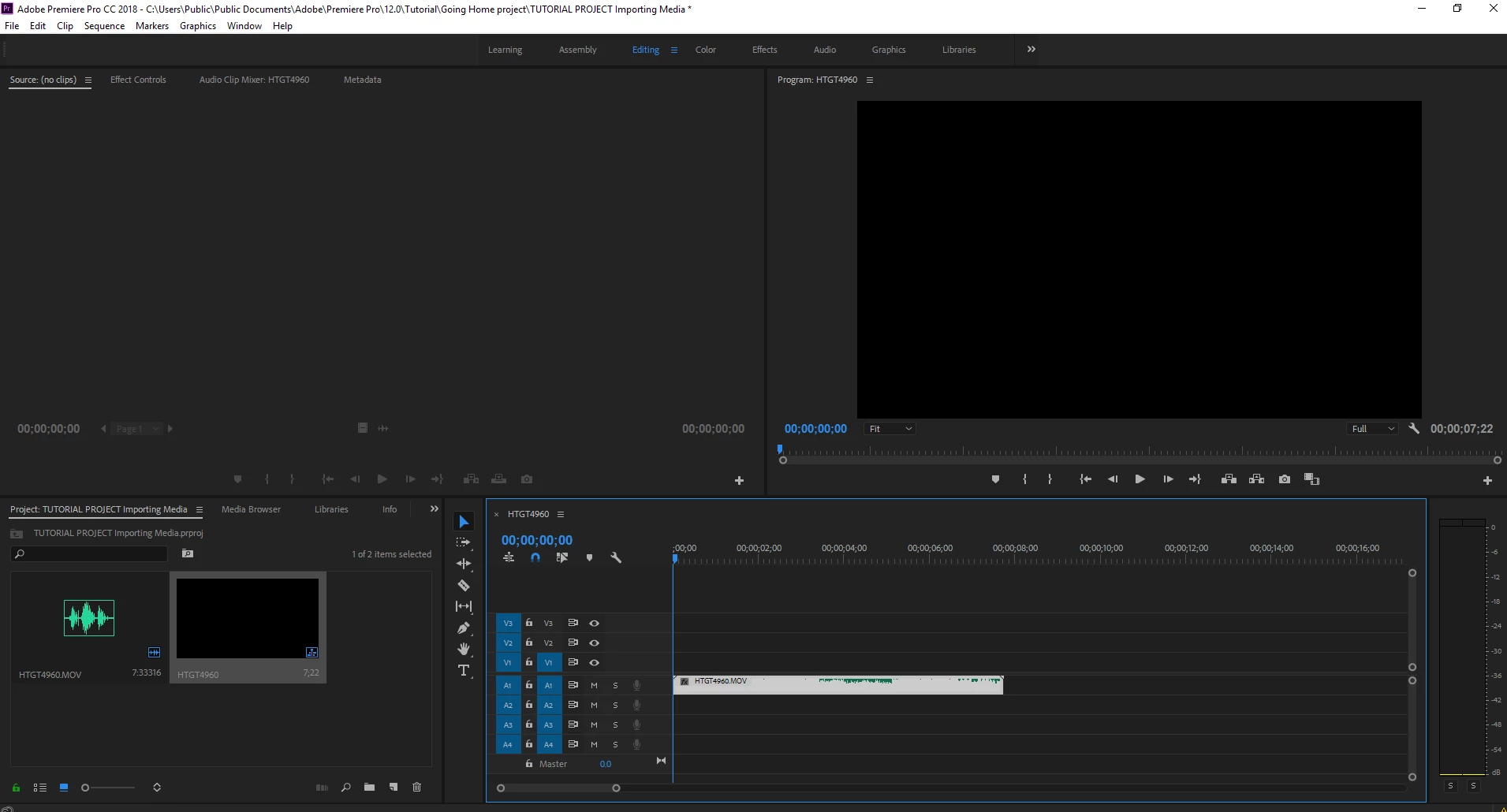
    This topic has been closed for replies.
    Correct answer evab47591500

    Which one of the scenarios applies to you?


    I didn't see video on import. Now I have converted my videos to 720p and I can see them now! I only hope the quality is still good.

    4 replies

    Participant
    August 29, 2018

    im having the same problem. I’ve been using this for YEARS, I consider myself a very big intellectual when it comes to selecting the correct render settings, and have been using the same exact settings for years on my camera as well as the editing software, totally came out of no where, and I have tried LITERALLY everything from updating my computer, all the drivers, adobe applications, changing settings and reder settings, and way more. So when I say it seems like there’s nothing that is fixing this, there is NOTHING that seems to be fixing this. All my files are .MP4 like they ALWAYS have been. I’ve been using the same codec like I ALWAYS HAVE BEEN. This makes zero sense, seriously.

    evab47591500
    Inspiring
    September 3, 2018

    Me too, I'm getting along just fine with this program but now I don't understand anything of it anymore. Have tried so much but nothing works.

    Ann Bens
    Community Expert
    Community Expert
    September 3, 2018

    There are two scenarios:

    No audio or video on import (as in the original question) or

    Audio and video on import but no audio or video showing in timeline.

    If its the first clean out media cache,

    If its the latter make sure the tracks are source patched.

    Participant
    August 27, 2018

    To whom it may concern.. this is the 4th time I have had issues with PP CC.. i'm currently editing a major film and twice I had lost audio. then added additional tracks and moved the audio into those tracks and it worked.. same with video.. now I the display monitor is not showing any video on my time line.. and will not show any video.. I am half way through my editing on this film and cannot loose everything that I have done so far.. I want to know why this keeps happening.. please I need this fixed ASAP..

    Christopher Maggard

    Creepy Attic Productions

    Vidya Sagar
    Adobe Employee
    Adobe Employee
    August 29, 2018

    Hi Christopher, 

    Sorry for the issue. Is there a preview when you change the renderer? Steps: FAQ: How to change the Video Renderer in Premiere Pro?

    What are the system specs(OS, RAM, GPU, CPU)? What is the exact dot version of Premiere Pro? Steps: FAQ: How to find the exact version of Premiere Pro you're using?

    Is this happening with all projects? Try with a new project.

    Thanks,

    Vidya

    Vidya Sagar
    Adobe Employee
    Adobe Employee
    July 26, 2018

    Hi cmoney111,

    Sorry for the trouble with the issue. Change the renderer in the project settings & check the issue. Here are the steps: FAQ: How to change the Video Renderer in Premiere Pro?

    Thanks,

    Vidya

    Participant
    March 23, 2022

     Thank you very much, I had the same problem and now after I followed th instructions it works <3<3<3<3 It took me nearly 3 hours to get there hahahah 


    Participant
    March 13, 2024

    yes sir my same problum is  on your picture

    John T Smith
    Community Expert
    Community Expert
    July 26, 2018

    More information needed for someone to help... please click below and provide the requested information

    -Troubleshooting https://forums.adobe.com/thread/2261475

    -Premiere Pro Video Editing Information FAQ http://forums.adobe.com/message/4200840