
Exit
  • Global community
    • Language:
      • Deutsch
      • English
      • Español
      • Français
      • Português
  • 日本語コミュニティ
  • 한국 커뮤니티
0

Premier Pro Workspace / interface issues and crashing

New Here ,
Oct 03, 2017 Oct 03, 2017

So I have Premier Pro install on two machines and on both machines  you get odd interface issues and some often crashing when saving.

Windows 7 & Windows 10 64-bit 11.1.2 (22) Build
This is what it looks like when you minimize and maximize. Also the girl who uses this machine says other work space items don't show sometimes
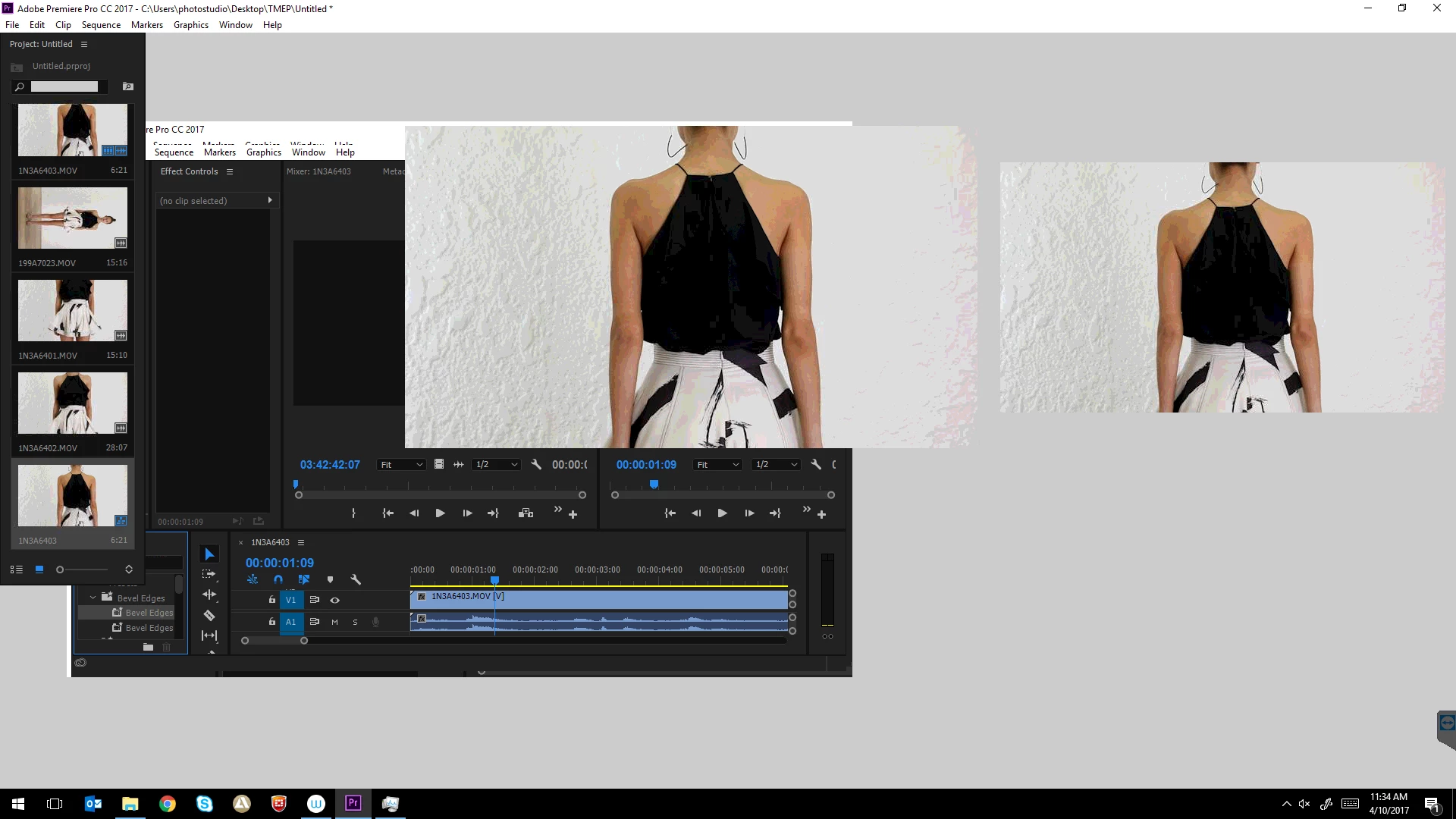
What I have tried. Complete uninstall of all Adobe products, new user profile, adobe removal tool, ccleaner, then a complete reinstall. Deleted preferences folder, tried creating a new project. I tried changing project settings for Renderer and tried changing scratch disk locations.

Any help would be greatly appreciated as I'm completely lost as to how two completely different machines with different OS are so buggy.

Specs: Windows 7 & Windows 10 64-bit 11.1.2 (22) Build

Machine 1 Hardware: http://speccy.piriform.com/results/CKDtAYyRnCRgHmkzwkkRFZc

Operating System

Windows 10 Pro 64-bit

CPU

Intel Core i7 6700 @ 3.40GHz:

37 °C

Skylake 14nm Technology

RAM

16.0GB Dual-Channel Unknown @ 1066MHz (15-15-15-36)

Motherboard

Gigabyte Technology Co. Ltd. Z170-HD3-CF (U3E1):

28 °C

Graphics

DELL P2417H (1920x1080@60Hz)

2047MB NVIDIA GeForce GT 730 (Gigabyte):

37 °C

Storage

232GB Samsung SSD 850 EVO 250GB (SSD):

30 °C

Optical Drives

HL-DT-ST DVDRAM GH24NSD1

Audio

High Definition Audio Device

878
Translate
Report
Community guidelines
Be kind and respectful, give credit to the original source of content, and search for duplicates before posting. Learn more
community guidelines
LEGEND ,
Oct 03, 2017 Oct 03, 2017

This seems like a redraw issue.  Look to the GPU and it's driver for a solution.

Translate
Report
Community guidelines
Be kind and respectful, give credit to the original source of content, and search for duplicates before posting. Learn more
community guidelines
New Here ,
Oct 03, 2017 Oct 03, 2017

Yeah I thought so too. I have tried 3x graphics card in the machine and the same issue, I have updated the driver. The funny thing is another 3rd machine with the exact same graphics card is not having any issue like this.

Translate
Report
Community guidelines
Be kind and respectful, give credit to the original source of content, and search for duplicates before posting. Learn more
community guidelines
Contributor ,
Oct 03, 2017 Oct 03, 2017

Did you use the latest nVidia driver or did you let Microslop Windoze install a driver?

Translate
Report
Community guidelines
Be kind and respectful, give credit to the original source of content, and search for duplicates before posting. Learn more
community guidelines
New Here ,
Oct 03, 2017 Oct 03, 2017

Got the drivers from nVidia's website, so i have the latest ones and its still bricked.

Translate
Report
Community guidelines
Be kind and respectful, give credit to the original source of content, and search for duplicates before posting. Learn more
community guidelines
Contributor ,
Oct 03, 2017 Oct 03, 2017

Interesting. Is your version the Creator's Update? I found that in Win 10 Pro 1703, Media Encoder would not use the cores / threads at anywhere near maximum. I encoded the same sequence and settings in Windows 7 HP and what a difference. All threads were 80% - 100%

Could it be that the GT 730 is a weaker card with very limited CUDA cores? It does seem to be a redraw issue. Have you tried for fun an nVidia driver from a few months ago? I once didn't update drivers for 6 months cause newer ones seemed to cause more problems.

Translate
Report
Community guidelines
Be kind and respectful, give credit to the original source of content, and search for duplicates before posting. Learn more
community guidelines
New Here ,
Oct 04, 2017 Oct 04, 2017

This issue also occurs on a windows 7 machine sadly but yes it is 1703.

So I formatted the whole machine, did not install any graphics card drivers and it works perfectly (although the resolution is low). Then I tried just letting windows 10 install the drivers and as soon as windows install graphics card drivers it screws up again.

It's funny, no video card driver and it works smooth as anything. So I guess it is driver related, but if I also try to install the drivers from the Nvidia site it stops working.

GTX730 does have very limited CUDA cores but the application still works on other machines with that card and I tried a slightly better card in terms of CUDA cores still the same problem.

Translate
Report
Community guidelines
Be kind and respectful, give credit to the original source of content, and search for duplicates before posting. Learn more
community guidelines
New Here ,
Oct 04, 2017 Oct 04, 2017

It works on a new project with 1x 10mb video but as soon as you import a few videos even tiny ones it just starts screwing up. Also works if i uninstall all drivers using Display Driver Cleaner tool then the machine is limited to 1280x1024 resolution.

Translate
Report
Community guidelines
Be kind and respectful, give credit to the original source of content, and search for duplicates before posting. Learn more
community guidelines
New Here ,
Oct 05, 2017 Oct 05, 2017
LATEST

I'm ordering a Geforce GTX 1060 so I'll see how that goes

Translate
Report
Community guidelines
Be kind and respectful, give credit to the original source of content, and search for duplicates before posting. Learn more
community guidelines