
Premiere 2017 crashing - Ultra key?
Premiere Pro v2017 (11.0.1.6) has been crashing a lot when using the Ultra key filter. Also, it’s been dropping frames a lot. See the partial sequence image below, where I have had to render sections to make it playback smoothly.
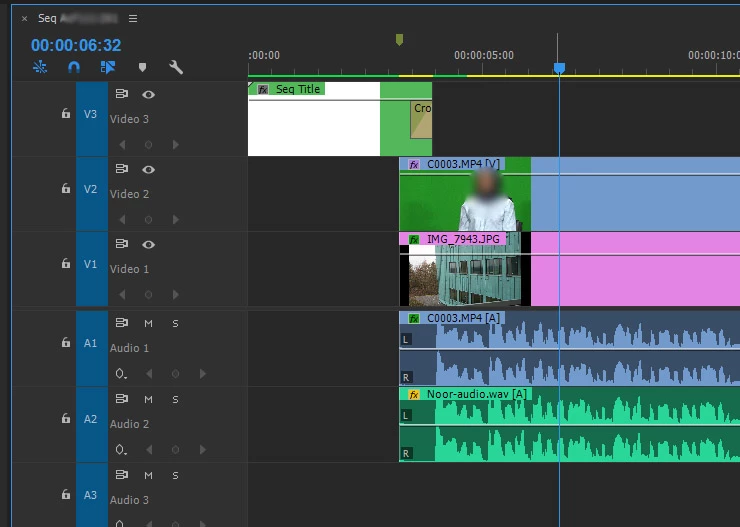
First the Nvidia graphics driver complains, quits, and re-starts itself;
Unable to recover from a kernel exception. The application must close. Error code: 3
(subcode 2) (pid=4104 tid=1160 adobe premiere pro.exe 64bit)
Followed by premiere saying it must close. (crash report below).
The media is XAVC-S 1080p50 in a matching sequence. I have tried various drivers from Nvidia,
- 376.33-quadro-grid-desktop-notebook-win8-win7-64bit-international-whql.exe
- 375.86-quadro-grid-desktop-notebook-win8-win7-64bit-international-whql.exe
- 368.39-quadro-grid-desktop-notebook-win8-win7-64bit-international-whql.exe <<< Current driver
In that “reverse version order” but no change.
So, I rebuilt the project in Premiere 2015.2 and no crashes. (And did not need to render the bits I previously needed to.)
Crash report for Adobe Premiere Pro.exe |
|
5822ef8f |
nvoglv64.DLL |
|
5750ed19 |
40000015 |
000000000142e3d2 |
1008 |
01d25b8695c37b7d |
C:\Program Files\Adobe\Adobe Premiere |
C:\Windows\system32\nvoglv64.DLL |
1b1dad1f-c77a-11e6-8168-80c16efaeee9 |
HP Z400 single 6 core CPU
Windows 7
24 GB Ram
Separate OS and Media drives
Nvidia Quadro 4000 graphics card.
 AdChoices