
adamt18510785
Inspiring
June 29, 2022
Answered

Premiere 22.5 Creating a new project is a nightmare

  • June 29, 2022
  • 3 replies
  • 4048 views

Is there a way to get rid of this new project file template thing.
It's obnoxiously slow, has none of the file management shortcuts, the create button is greyed out, even though it's what you have to click and the templates are stupid. Can I just go back to regular legacy file management, why did they make this terrible UI thing, there’s plenty of things like sticky sliders and legacy issues they could have worked on. 


I find it much easier and faster to open a blank project and save it as a new one then to go through this new project loader
This topic has been closed for replies.
Correct answer Ann Bens

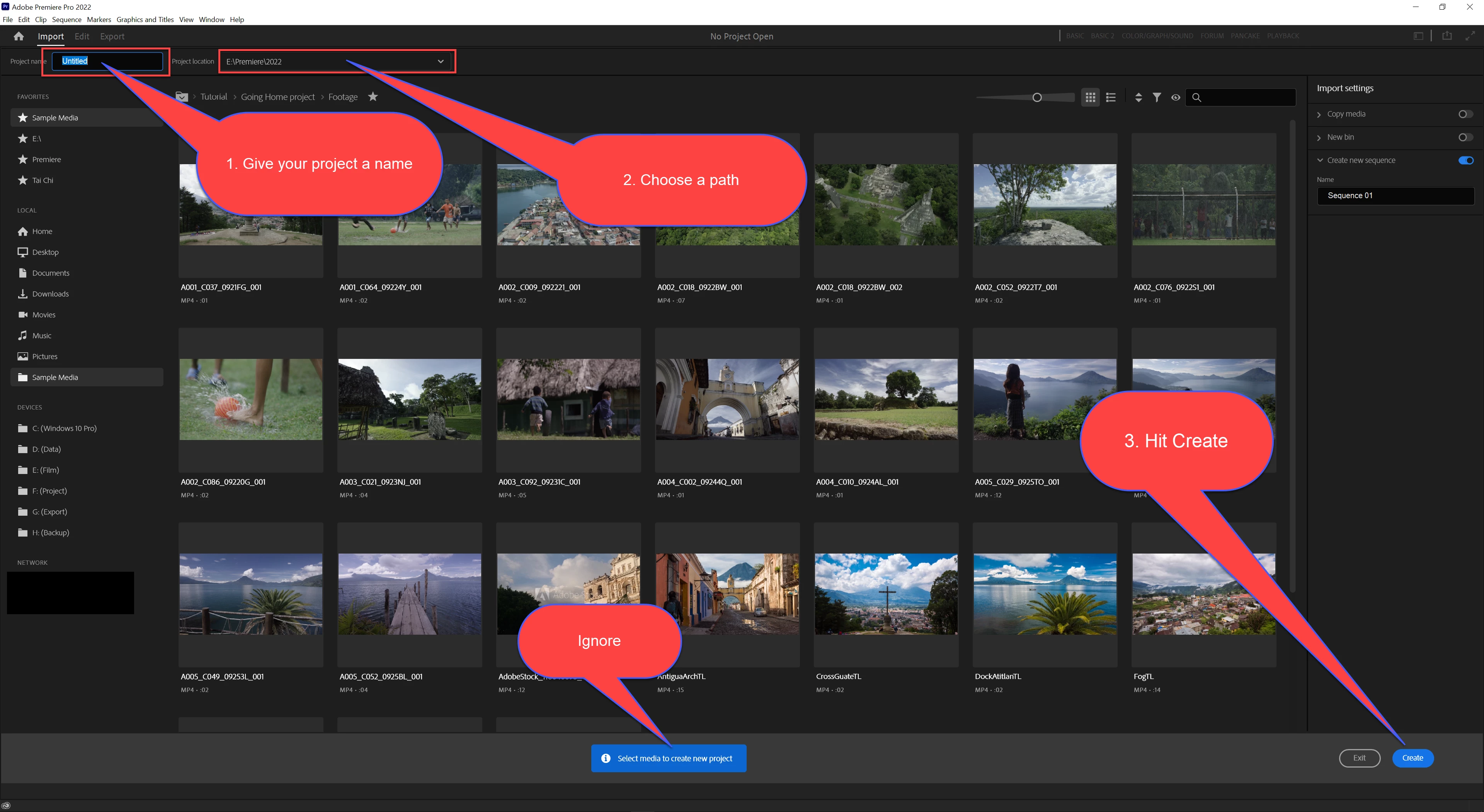
Give project name and path and hit create: that is all.

Proceed as usually.

3 replies

Participant
December 17, 2022

totally agree! Is this designed and build for professionals or is this now a mix of iMovie and Final Cut X all rolled into one? "Give project name and path and hit create" - why create extra steps, that are buggy, unclear and combersome? This is a nightmare when opening new projects, I dont want to see random stock media – stop adding features for the sake of it, because some Gen Z had a "great idea" in a branding meeting while tweeting #goals to their friends. Madness!! The extra step to export is also a nightmare. If you want to play with the kids, make 2 versions PRO and Commercial for the influrncer who needs pictures to guide them on their path... 

adamt18510785
Inspiring
June 29, 2022

It's like no product testing for this:
No cancel button and if you home tab and open the project you are in, this get stuck in a window. 


Participant
October 27, 2022

i'm with adamt here, this UX is total garbage


I've followed this thread and still can't figure out how to create a project, create button is greyed out and every action takes forever to load.  


laughable man... if it wasn't wasting so much of my time 

R Neil Haugen
Legend
October 27, 2022

Type a project name.


Select a project location on disc.


Make sure nothing is selected in the middle file import area (no stars on any files or folders). And nothing blue in the options upper right.


Now the Create button should be blue, click it and build your project as always.


Neil

Everyone's mileage always varies ...
Ann Bens
Community Expert
Ann BensCommunity ExpertCorrect answer
Community Expert
June 29, 2022

Give project name and path and hit create: that is all.

Proceed as usually.

adamt18510785
Inspiring
June 29, 2022

wow it's like you didn't read anything i said. 


R Neil Haugen
Legend
June 29, 2022

No, she's very aware of the situation.


The only thing that might be said to be left out is to first make sure nothing is selected in this 'page'.


Then simply ... as she says and shows ... do what you've always done.


Type a Project Name, set a Location, click Create.


And build your project as you always have done. Via Project panel and/or MediaBrowser panel.


Neil

Everyone's mileage always varies ...