
Participant
December 6, 2018
Question

Premiere CC 2019 - Audio Gain OK Button Greyed Out While Calculating Peak Amplitude

  • December 6, 2018
  • 7 replies
  • 2424 views

Hi,

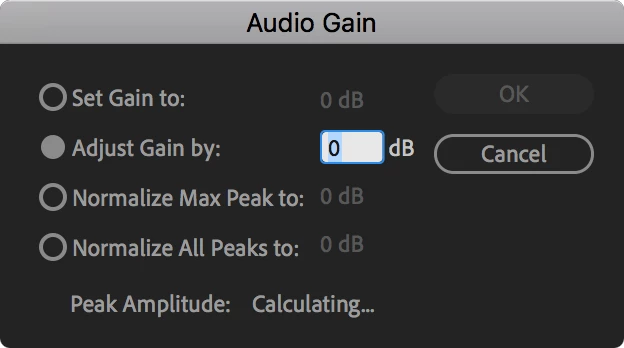
Premiere 2019 on the Mac (13.0.1 Build 13) has introduced an odd feature; if you use the Audio Gain function, you can't commit any changes until the Peak Amplitude has been calculated. The OK button is greyed out until the calculation finishes, as you can see in the screenshot below.

This is irritating, as I usually don't use the peak amplitude when making adjustments. I just eyeball the waveform and adjust up and down from there. Now, I have to wait for this calculation which, depending on the length of the clip, can take a very long time. It's even worse when trying to batch adjust several clips in the Project window.

Is this a bug to be fixed, or something that can be turned off?
This topic has been closed for replies.

7 replies

PZombley
Participant
August 7, 2019

Here's a "fix", this should happen at the "generating peak files" stage, and in the background, automatically, so it's ready when you need it.

This is ridiculous, that A, it takes 10 minutes for a 30 minute clip, and B, that it has gone this long without a solution.

I have 5 sequences, there goes an hour of my work day just so I can raise the volume. But hey, at least we got that next new sparkly feature that no one uses, right? Who needs fixes when they can implement stuff that's good for publicity instead?

Adobe, a few months ago you sent a survey asking what you could do better. THIS is what you can do better.

Participant
April 17, 2019

13.1.0 (build 193)

Still same problem!

Participating Frequently
January 26, 2019

I've been using version 12.1.1 which allows instant changes to the audio gain. I've just updated to 13.0.2.  My video clips are often longer than an hour, so the time needed to make a simple change to audio gain is ridiculous.  What is even more annoying is that when I save and re-open the project,  if I want to change the gain again, the process has to calculate all over again.  I will have to revert to 12.1.1 until this bug is sorted, although 12.1.1 has it's own annoying bugs.

This very same audio gain bug was apparent in versions of PP before 12.1.1, so it's frustrating to say the least, that's it's reappeared. Please Adobe fix it!

Known Participant
January 15, 2019

13.0.2 Premiere... same issue. Don't recall this issue in Previous versions of premiere.

In my specific case, these are long form 30-45 min AVCHD clips. "OK" button grayed out for a good 20+ seconds before you can select it. Audio peaks should be determined with the clip is ingested and conformed by premiere. Any further pauses (small though they may seem) are productivity killers.

Participant
December 16, 2018

Updated to version 13.0.2 (Build 38). This is still an issue.

mathieut88570682
Participant
December 27, 2018

Hi, Since the update it's still long but much better for me (5 minutes for a 2 hours video)

Participant
January 9, 2019

same issue

Imac 10.14 premiere 2019

Legend
December 7, 2018

I have in the past noticed superior performance adjusting the Set Gain To parameter compared to the Adjust parameter.

Participant
December 9, 2018

Hi Jim,

Unfortunately the button is still greyed out regardless of which setting you choose.

mathieut88570682
Participant
December 7, 2018

Hi,

The same here ! I have to wait 10/15 minutes just for that...