
Inspiring
January 15, 2021
Question

Premiere CC not loading all footage

  • January 15, 2021
  • 3 replies
  • 669 views

Premiere Pro 2020 won't load all footage when the program is launched. It seems to be hanging on footage shot with a Sony FS5. Everytime I launch the program I have to manually relink the media. The blue progress bar never shows that loading is complete even after I've manually relinked media.

Is this a software or hardware issue?

I recently replaced my pegasus RAID, but admittedly, my Mac is getting old.
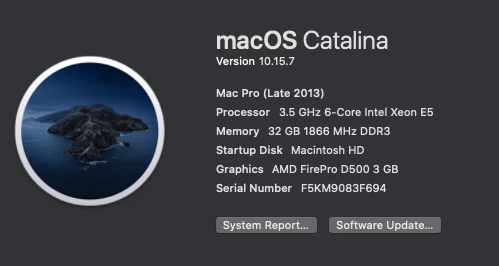
Any ideas?

Thanks,

Paul Roberts

This topic has been closed for replies.

3 replies

R Neil Haugen
Legend
January 19, 2021

I would re-import those F55 clips but use the MediaBrowser panel to do so. Getting all the meta from those clips properly into Premiere is crucial. And the MB panel is best for the complex and spanned-type clips.


Neil

Everyone's mileage always varies ...
Inspiring
January 19, 2021

Is there a way to do that without having to re-edit all those clips back into the timeline? These clips make up somewhat over half of my one-hour documentary. That's a lot of re-editing I'd like to avoid if possible.

By the way, many of the FS5 clips are still loaded on launch of Premiere.

Paul

R Neil Haugen
Legend
January 19, 2021

This would be something that someone like @3897611 would have much more practical knowledge than I. If he's "paying attention" ... but as he is in Scandinavia, so there's a good chance if he responds would be tomorrow US time.


Kevin would also be able to posit something perhaps.


Neil

Everyone's mileage always varies ...
Kevin-Monahan
Community Manager
Community Manager
January 15, 2021

Hi Paul,

I am so sorry and do understand your problem. I've been editing a lot in my spare time lately and come up against problems like this, as I also am working from a backup of my original RAID and doing a lot of relinking. It's tedious. 

First thing, it is great that you have a good idea about your problem; your F55 footage. Before going to extremes, you may want to do standard troubleshooting measures before trying other things (like deleting media cache, trashing preferences, repairing folder permissions, running Disk Utility). As Salvo just suggested, importing your project into a brand new project can help, as well. It tends to rewire the project. Please try that too.

I mean, this F55 footage should be fine. Thing is, I'm not sure of the format of these files. Probably XAVC, yes? Are they CF based files coming from the camera? Looking at the brochure for the camera, it appears so. Were they imported via the Media Browser on your original RAID? They should be for smooth operation, but commonly, editors import the footage incorrectly. If the card based media is imported via any other way, that metadata might not have been included with the files. Either that, or when you moved the media to the new RAID, the metadata did not come over with the data transfer. Sometimes these sidecar files can get trashed by mistake, etc. The metadata is important, why? For a few reasons from Premiere Pro's operational standpoint. From what engineers tell me, it's stuff like: spanned clips, timecode, media differentiation, etc.


  • This problem makes me wonder if ingesting these files once more would help them relink to your project better and you'd be clear of the issue.
  • If these files are already deleted (likely), sometimes renaming the media files can work. Once you do that, you may still have to relink those files at least once.
  • Of course, if you transcoded the footage, you might also be free of the problem. 


I will keep an eye out and ask around about other potential fixes, but that's all I have for you right now. Come back with any questions. I hope we can assist here on the forum. If not, we also have call/chat folks standing by.

Regards,
Kevin


Kevin Monahan - Sr. Community & Engagement Strategist – Pro Video and Audio
Inspiring
January 19, 2021

Hi Kevin,

I tried deleting the media cache, trashing preferences, and running first aid on disk utility (couldn't figure out how to repair folder permissions). I still have the same issue.Running disk first aid gave me this warning:

Could this be a hardware issue?

I also tried to import the current project into a new project, but the project wouldn't import. Premiere just locked up (bouncing beach ball). I've often had similar problems recently when trying to import sequences. They just want import, and stuff hangs up.

Other problems I've had recently are:

If I don't launch Premiere and After Effects immediately after booting up the computer, they each hang on the launch screen. So, if I want to launch either program, I have to reboot. Also Premiere locks up every time I close the program, and I have to force quit.


Regarding the FsS5 clips. They aren't clips I migrated from an older drive. They are brand new, recently shot clips. I imported them through "command I."

I'm not sure what to do next. Any help is appreciated.

Thank you,

Paul


Inspiring
January 15, 2021

sometimes people start a new project and import the old project from the new locations ( hd, etc. ) and it works.


Inspiring
February 11, 2021

Sorry for the late reply to suggestions--been busy. A couple of things I've observed.

I've tried the previous suggestions but I still have the same issue of clips not loading.

I've shot some new things with the Fs5 and this time imported them through the media browser. They are among the clips that don't load automatically. One interesting thing is that sometimes, most of them load, and other times none of them load. That seems to be the case with most of the FS5 footage, plus, I've recently discovered, linked AE comps, which have become unlinked. When I go to relink the AE comps, Premiere simply locks up--bouncing beach ball.

Other things I've noticed are:

--Premiere and After Effects won't launch unless the computer has initically booted up, or restarted.

--Premiere won't quit, and has to be forced quit. However, another smaller project quit just fine today.

--I tried to import my entire Premiere project into a new project. No dice. Dynamic link doesn't work.

Any ideas are appreciated.

Thanks,

Paul