
Participant
March 2, 2017
Question

Premiere CC2017 Dolby audio activation issue

  • March 2, 2017
  • 1 reply
  • 1807 views

Hi

I have deployed Premiere cc 2017 via the Creative Cloud Packager (serial) to our classroom machines and our students get the below message when importing videos with Dolby audio,
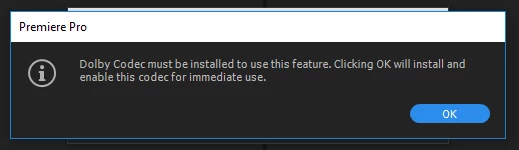
Is it possible for this codec install to be scripted? As sometimes the install errors

Thanks

This topic has been closed for replies.

1 reply

alisterblack
Inspiring
March 2, 2017

Hi michaelrowlands,

When installing with a serial number did you use the VIDEO serial number? Creative Cloud Enterprise serial numbers come in VIDEO and NONVIDEO variants. This is because Adobe need to account for numbers of 3rd party codecs used. Therefore you should use the VIDEO serial number to ensure all codecs are licensed correctly. Note that you can re-serialise without having to re-install by using a license package.Creative Adobe Creative Cloud license package

See also this thread FAQ: MP4, MOV, AVCHD files import without audio in Premiere Pro CC (2015.3) and CC 2017

Participant
March 2, 2017

Hi Alister

I see "CCSV VIDEO" (the one I used) and "CCSV VIDEO SN201"

I will try serializing with SN201

Thanks

Michael