
Participant
June 6, 2024
Question

Premiere File Corrupted? Unsure what is happening

  • June 6, 2024
  • 2 replies
  • 331 views

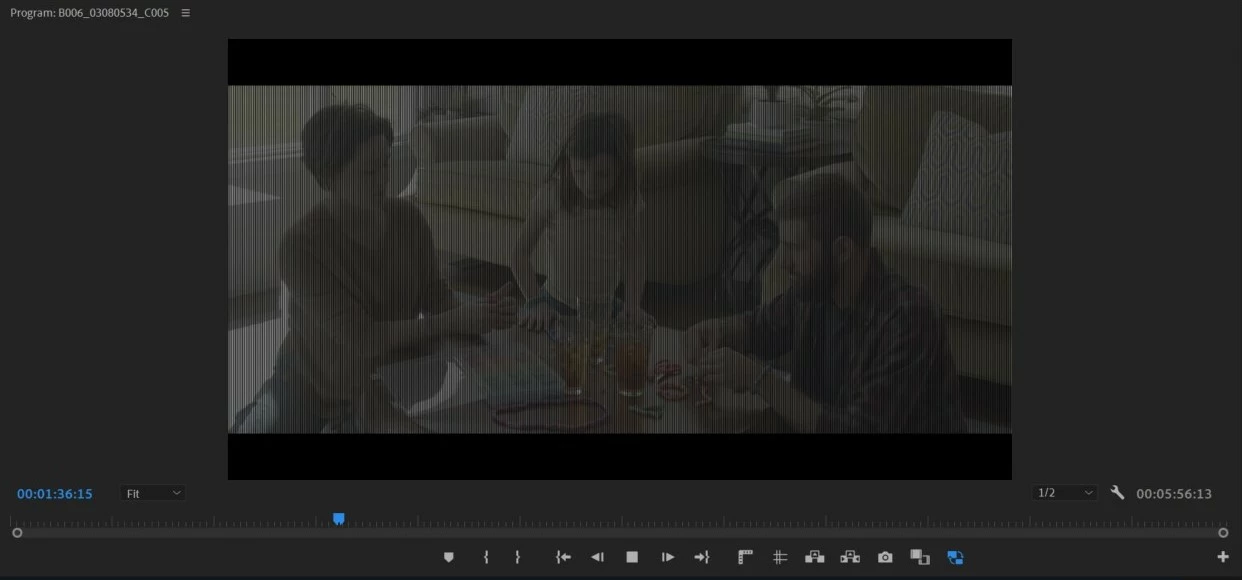
I have been working on a long project in Premiere these past couple months and I opened it up today to see the footage messed up. (Attached a photo) 

All of the footage on the timeline is like this. I exported it and about half came out normal and the other half didn't. Even the footage in my bins look like this. 

I tried moving it to a new sequence and loaded an old save file with no luck. 

Is there any way I can fix this without needing to start over?
This topic has been closed for replies.

2 replies

R Neil Haugen
Legend
June 6, 2024

And try going into the Project settings, Mercury Acceleration option, set that to Software Only. Does that fix? If so, it's a GPU or GPU driver issue.

Everyone's mileage always varies ...
Ann Bens
Community Expert
Community Expert
June 6, 2024

Lately We are seeing a lot of these vertical bars: bug floating about?

Community Expert
June 6, 2024

Please look in your auto save folder usuall where you have the project saved and hopefully there is a recent auto save version of the project which will help you.