

Premiere immediately crashes on splash screen - no errors or logs (MacOS)
Imgur mirror: https://imgur.com/LgRLDAq
Hi there,
The video above shows the issue I'm experiencing clearly.
Here's some background - we initially saw this issue on one of our workstations that had Premiere 2018, 2017 and 2015 installed (for legacy purposes). We were trying to research a fix when the same thing happened to me. Premiere 2017 and 2015 worked fine while we had this issue with 2018.
My fix was as follows:
• Sign out of Adobe CC on the user affected by the issue
• Sign out of the user on MacOS
• Sign into a different user
• Sign into a different Adobe CC account on that user
• Open Premiere Pro to the project choice screen
• Close Premiere Pro
• Sign out of Adobe CC
• Sign out of the user
• Log into the affected user
• DO NOT sign into Adobe CC, but launch Premiere Pro
• Accept License Agreement
• Sign into Adobe CC when prompted
This worked fine... until it didn't. The fix also worked on the other workstation, but then it didn't.
Here's a list of what we've tried so far:
> Uninstall all Adobe apps & Creative Cloud, then run the Adobe cleaner. Reinstall Creative Cloud and Premiere.
> The steps listed above.
> Delete the MacOS user, create a new one and start over.
The last one in the list is what I did this morning. By 17:00 it was failing again. It started when I tried to load fonts with Universal Type Client (we're a big company so this is necessary) only to have Premiere not detect them. I also updated my Black Magic Desktop Video software and drivers before this, but hadn't yet restarted the machine. None of this happened the first time I had the issue.
Interestingly, other applications still work and Premiere Pro launches on other MacOS users. Changing Creative Cloud account on the local user doesn't make a difference, and signing in with my account another user also doesn't cause issues.
Personally, I have no idea what the issue is and I'm now out of options. Error and crash dialogs do not appear and I cannot find any error or crash logs, but perhaps I'm looking in the wrong place.
Here are my machine's specs:
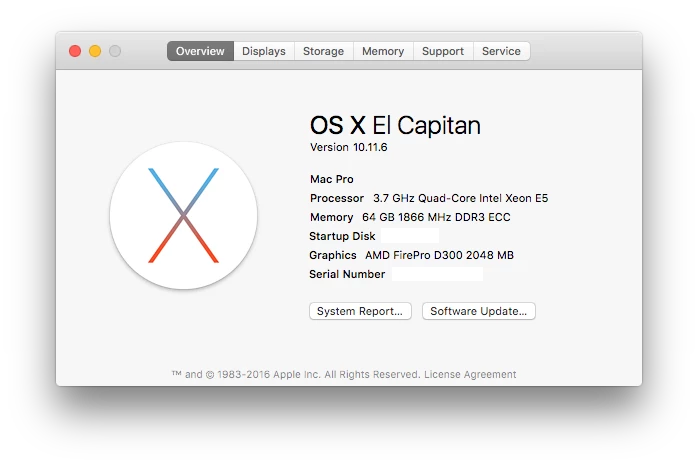
If there's anything else you think you should or if you have any questions, please let me know.
Many thanks,
Bevan
 AdChoices