
Participant
April 16, 2019
Answered

Premiere lowering the quality of the source footage at import.

  • April 16, 2019
  • 4 replies
  • 5982 views

For the past few months, I've experienced a weird issue with Premiere Pro, where the .mov files I recorded using my DSLR were almost always losing quality (color distortion, brightness, color banding) when being imported into any project. I tried different project/sequence settings, different file locations (internal and external), pre-rendering the files but nothing works. The source file itself is being interpreted like that right after import – it is not an issue with the playback quality or resolution. The lower quality remains after export as well.

Here's an example (on the right is the proper original file opened in QuickTime, on the left is the Premiere source panel):
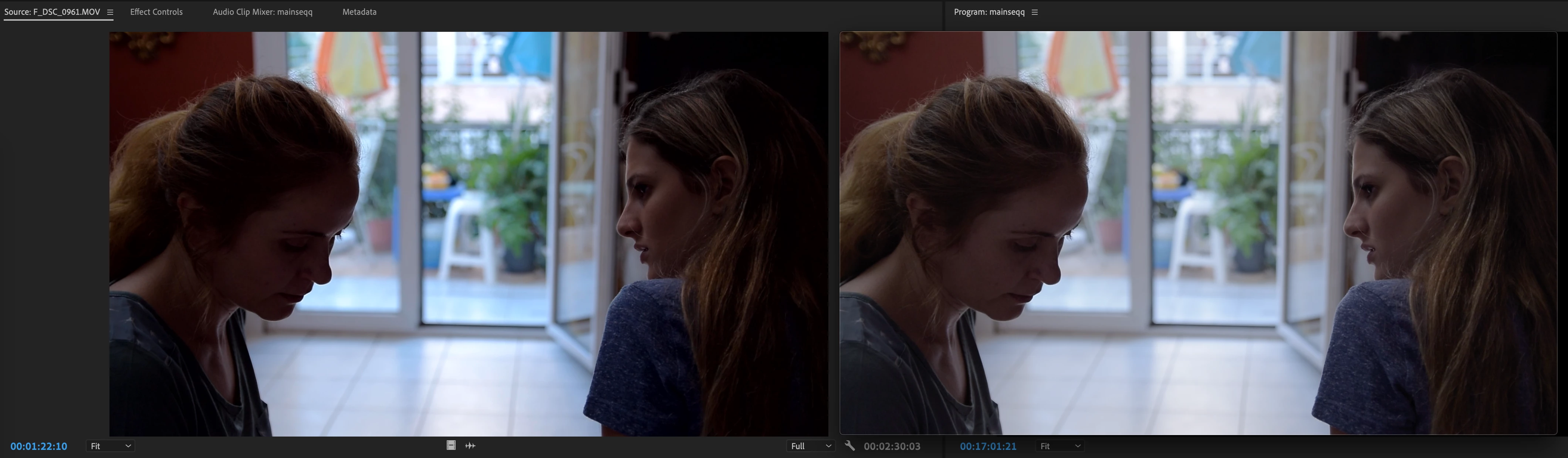
Thanks in advance.

This topic has been closed for replies.
Correct answer Daniel Monico

@Daniel Monico 


If your source footage is interlaced, then your Sequence should also be interlaced.


Can you confirm if your source footage is 1080i29.97 or 1080p23.976?


This seems to have been the issue! The videos were delivered to us as interlaced Upper Field First. Even if the timeline were the same, it did not resolve the issue. However, going into Modify > Interpret Footage and changing the Field Order to Progressive in the source footage fixed the problem! Thank you!

4 replies

Warren Heaton
Community Expert
Community Expert
November 15, 2021

What is the Playback Resolution set to?


What is the Paused Resolution set to?

Daniel Monico
Participating Frequently
November 15, 2021

They are both a Full. The lower resolution / pixelation is also seen in the final export. 

Daniel Monico
Participating Frequently
November 15, 2021

I am experiencing this same issue at the moment and am wondering if this was ever solved. I have MP4 files I received from a client that play perfectly crisp when opened in Quicktime. However, once I bring them into Premiere, the files lose quality even before I create a sequence. We have tried this on multiple devices and same issue. Once we create a sequence using the file, double checking that they are the same sequence settings as the source, same issue. Quality is noticeably reduced especially on smaller text and logos throughout the video. Cannot figure out why this is happening!

R Neil Haugen
Legend
November 15, 2021

By "quality" what do you mean? From your description I've no idea. Are you losing resolution so it's a pixelated image? What?


Neil

Everyone's mileage always varies ...
Daniel Monico
Participating Frequently
November 15, 2021

Correct, on screen text and logos become pixelated. I have attached examples here as well - One is from opening the MP4 in Quicktime. The other is the file once brought into Premiere. This is even more noticeable on other text and company logos throughout the video, but due to client privacy, cannot share it all on this thread. 

Community Manager
April 16, 2019

Hi algormortis,

Please let us know what is the source of these media files (the camera and the codec used)? Also, were these recorded directly in the camera or an external recorder was used? Were these shot using any HLG or Log profiles? Let us know, we're here to help.

Thanks,

Sumeet

Participant
April 16, 2019

thanks. here's the file info:

Type: MPEG Movie

File Size: 402.56 MB

Image Size: 1920 x 1080

Frame Rate: 23.976

Source Audio Format: 48000 Hz - 16 bit - Stereo

Project Audio Format: 48000 Hz - 32 bit floating point - Stereo

Total Duration: 00:02:30:03

Pixel Aspect Ratio: 1.0

Alpha: None

Video Codec Type: MP4/MOV H.264 4:2:0  (Full Range)

The footage was recorded without using any external recorders and without any Log profiles. I did use Nikon's neutral profile though. The camera was a Nikon D5300.

also, here are my current sequence settings (the issue arises when importing though, even if I have no sequence in the project):

Inspiring
April 16, 2019

Are you Mac or WIndows based?

MtD

Inspiring
April 16, 2019

As a test, toggle off (or on) Enable Display Color Management:

MtD

Participant
April 16, 2019

Interesting. It was turned off, but when I turned it on, the footage got even worse, even darker.