
Participant
October 1, 2025
Answered

Premiere Mobile App Export to Desktop App - Broken

  • October 1, 2025
  • 3 replies
  • 1762 views

I am thrilled to start playing with the Premiere mobile app, but can find ZERO support on how to open an exported project from the mobile app on the desktop app.

1. In the mobile app, I have a project with 5 clips. I've done some basic trimming to the clips, that is all. I hit Export to "Premiere desktop (beta)" and get a success.
2. I go to my Creative Cloud app, files tab > projects, and sure enough I see the project! 5 clips and a project file. Mission success.
3. When I open Premiere Pro (beta) and select "open project" and navigate to the "cloud media" folder (Adobe > Premiere Pro (beta) > 25.5 > Cloud Media) no files show up whatsoever.
4. Back in Creative Cloud app, files tab > projects I download all the clips and project files (a painstaking process in itself — first have to "move" all of the files from the "projects" folder into the "files" folder because no download options exist in "projects").
5. Premiere Pro (beta) nor any other version of premiere is able to open the .otio files

All the videos I see simply showcase the mobile app side of things, and call it successful after the export. I can find no documentation for how to get the project open on the desktop app, and have spent several hours today trying to figure it out to no avail.

Is anyone experiencing the same issue? Without the ability to send a mobile project to desktop for finishing, I see no way Premiere (mobile) has any differentiation whatsoever from any other mobile editing solution.
Correct answer bbb_999

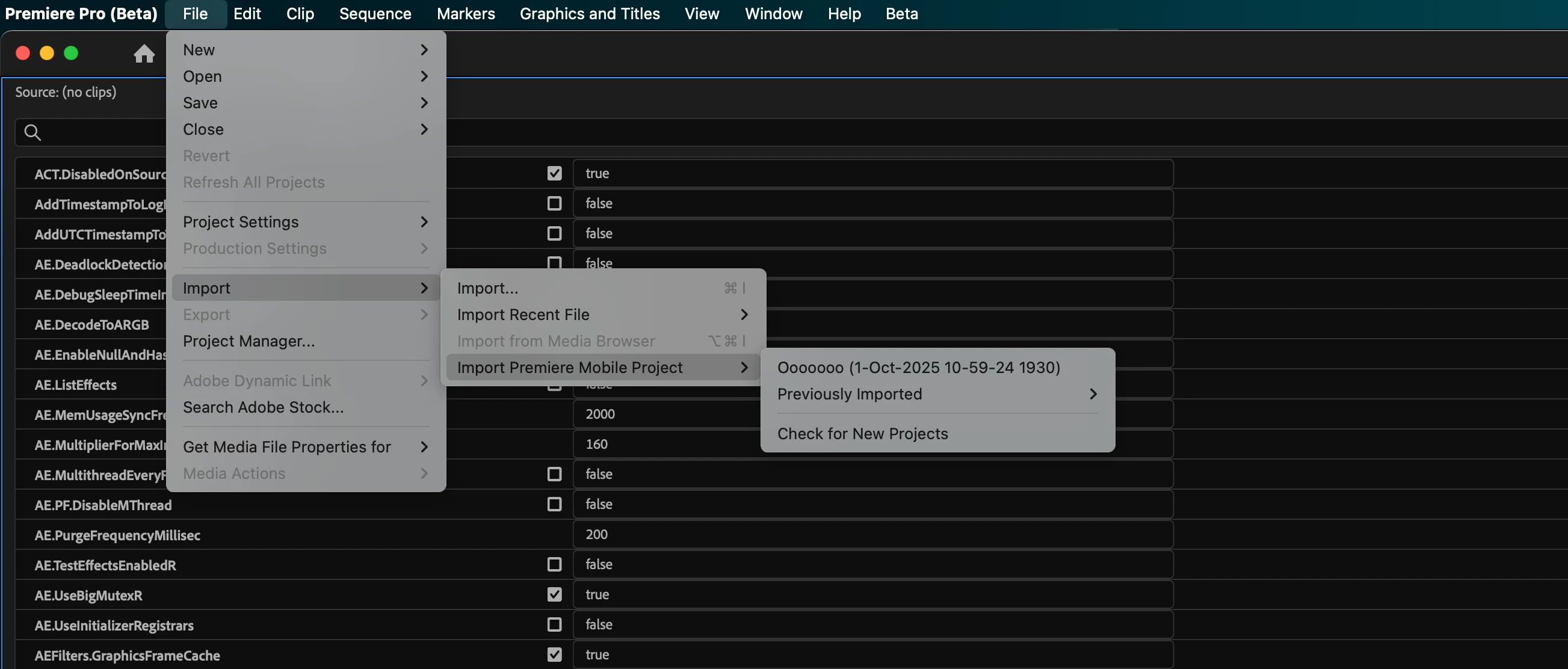
In the current PPro beta, you can get to your shared mobile projects from File --> Import --> Import Premiere Mobile Project.

From there, you can also check for newly shared projects, and re-import previously imported projects. 

3 replies

John T Smith
Community Expert
Community Expert
October 27, 2025

This discussion needs to be moved to the correct forum


Premiere on iPhone - Adobe Product Community

Participant
October 6, 2025

For some reason the File -> Import ->Import Premier Mobile project item is not active for me. Anyone had the same? How to resolve?

Adobe Employee
October 7, 2025

Something broke in a recent beta build of Premiere Pro, sorry! The team is on it already.

Adobe Employee
October 10, 2025

This is now fixed as of Premiere Pro desktop version 25.6.0x96, which was released yesterday, or maybe this morning.

bbb_999
Community Manager
bbb_999Community ManagerCorrect answer
Community Manager
October 1, 2025

In the current PPro beta, you can get to your shared mobile projects from File --> Import --> Import Premiere Mobile Project.

From there, you can also check for newly shared projects, and re-import previously imported projects. 

Participant
October 20, 2025

Hello,

I'm running into a similar problem, but I believe my failure point is the upload/sync itself, even though the mobile app reports success.

My Current Status:

  1. Mobile App: I tap "Export to Premiere desktop (Beta)" and receive a successful confirmation message on my iPhone.

  2. Desktop App: When I go to File -> Import -> Import Premiere Mobile Project the import dialog box is completely empty (no projects listed). No popup shows up either.

  3. Cloud Status: I have checked the Creative Cloud web app and the CC desktop app under both Files and the Projects tab. The project is not visible in my Adobe cloud storage anywhere.

    I've restarted my device and signed in and and out of Creative Cloud multiple times. I can't locate the exported file anywhere.

Bruce Bullis
Community Manager
Community Manager
October 20, 2025

Is it possible that you're signed into your phone, and your desktop, with different Adobe accounts or IDs?