
Participant
October 1, 2025
Answered

Premiere Mobile App Export to Desktop App - Broken

  • October 1, 2025
  • 3 replies
  • 1762 views

I am thrilled to start playing with the Premiere mobile app, but can find ZERO support on how to open an exported project from the mobile app on the desktop app.

1. In the mobile app, I have a project with 5 clips. I've done some basic trimming to the clips, that is all. I hit Export to "Premiere desktop (beta)" and get a success.
2. I go to my Creative Cloud app, files tab > projects, and sure enough I see the project! 5 clips and a project file. Mission success.
3. When I open Premiere Pro (beta) and select "open project" and navigate to the "cloud media" folder (Adobe > Premiere Pro (beta) > 25.5 > Cloud Media) no files show up whatsoever.
4. Back in Creative Cloud app, files tab > projects I download all the clips and project files (a painstaking process in itself — first have to "move" all of the files from the "projects" folder into the "files" folder because no download options exist in "projects").
5. Premiere Pro (beta) nor any other version of premiere is able to open the .otio files

All the videos I see simply showcase the mobile app side of things, and call it successful after the export. I can find no documentation for how to get the project open on the desktop app, and have spent several hours today trying to figure it out to no avail.

Is anyone experiencing the same issue? Without the ability to send a mobile project to desktop for finishing, I see no way Premiere (mobile) has any differentiation whatsoever from any other mobile editing solution.
Correct answer bbb_999

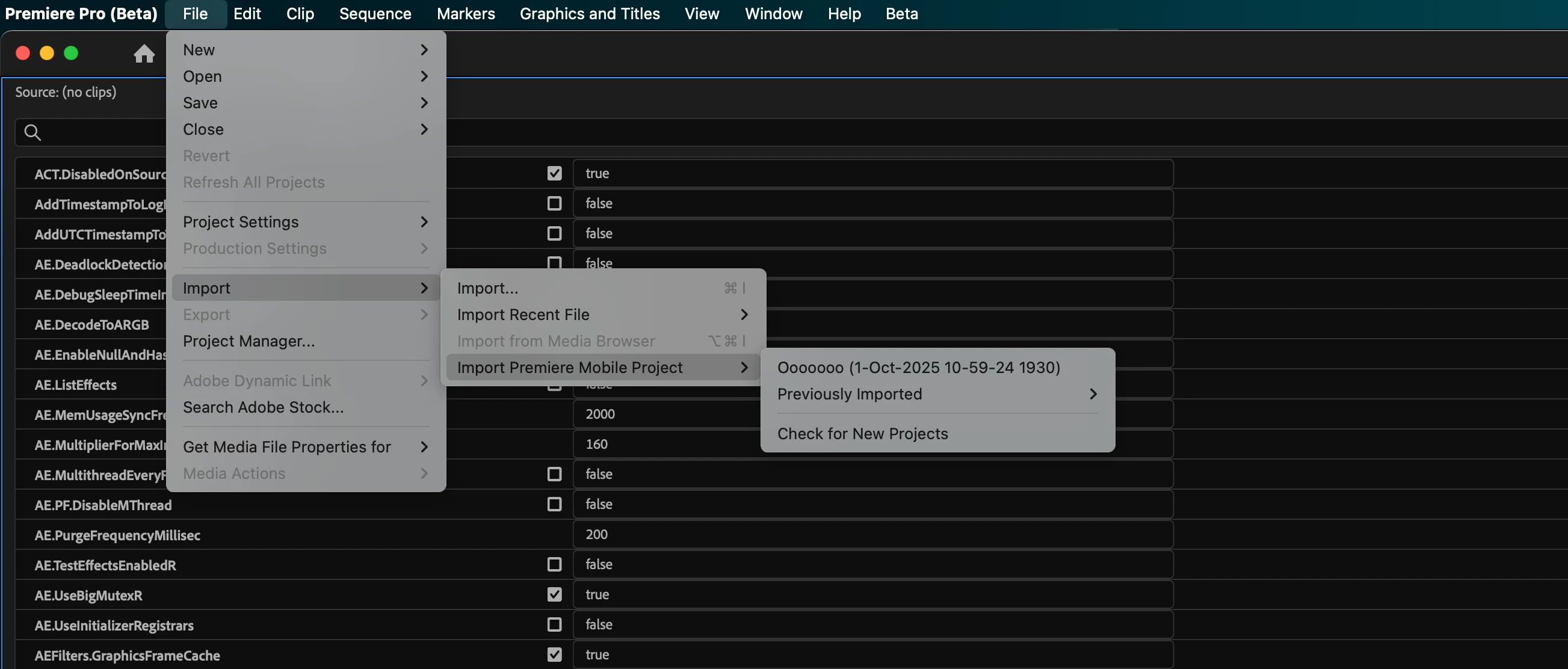
In the current PPro beta, you can get to your shared mobile projects from File --> Import --> Import Premiere Mobile Project.

From there, you can also check for newly shared projects, and re-import previously imported projects. 

3 replies

John T Smith
Community Expert
Community Expert
October 27, 2025

This discussion needs to be moved to the correct forum


Premiere on iPhone - Adobe Product Community

Participant
October 6, 2025

For some reason the File -> Import ->Import Premier Mobile project item is not active for me. Anyone had the same? How to resolve?

Adobe Employee
October 7, 2025

Something broke in a recent beta build of Premiere Pro, sorry! The team is on it already.

Participating Frequently
October 27, 2025

Hi,
I have to work on a high priority project for the most important tradeshow of the year in 10 days and counted on Adobe to get this workflow work exchanging projects between mobile Premiere and Premiere Pro on my Windows computer.

This is what the workflow should look like:
I installed the Premiere App on my iPhone 17 Pro and iPad, have to edit the pre edited project then on Premire Pro on my Windows Laptop. Currently on the Laptop,  I installed version 25.5.0 – there I cannot find any possibility where to import my project from the iOs Premiere App. 

Yesterday, I created a first test project in the iOs App, exported it (I think successfully) and tried to to the final edits in Premiere Pro.  The result: I could not find any way to get this projet opened.

Could someone please confirm, that that in this version there is no possibility to import the pre edited project?

I checked in the Creative Cloud Desktop App and I can find the project there:

Strange thing, I find only a file *.OTIO. Is that correct?

Please indicate a workaround or tell me a version of Premiere Pro; I should install, to get this project done, thanks! Please help @Bruce Bullis.


Hi all,
I got a hint from another hread to install Premiere Pro beta (26.0.0 BETA) and the import option appears and works.
Works o.k. but not all files are available (got an error "frame substitution recursion attempt aborting....)

bbb_999
Community Manager
bbb_999Community ManagerCorrect answer
Community Manager
October 1, 2025

In the current PPro beta, you can get to your shared mobile projects from File --> Import --> Import Premiere Mobile Project.

From there, you can also check for newly shared projects, and re-import previously imported projects. 

Participant
October 1, 2025

Yes!! Fantastic, thank you so much 👍