
Exit
  • Global community
    • Language:
      • Deutsch
      • English
      • Español
      • Français
      • Português
  • 日本語コミュニティ
  • 한국 커뮤니티
0

Premiere - MXF Footage Slow Motion Squeezed and Half Green

New Here ,
May 23, 2023 May 23, 2023

I am working with VariCam LT slow motion footage. When I open the footage in Premiere it is squeezed and half of the viewer is green.


I am using a Mac Studio with the M1 Max


MXF File details: Wrapper type: MXF OP1b (type: SingleItem GangedPackages MultiTrack Stream Internal) File generated by: Panasonic, P2 (3.0) AVC Unconstrained Bitstream Format: Sony
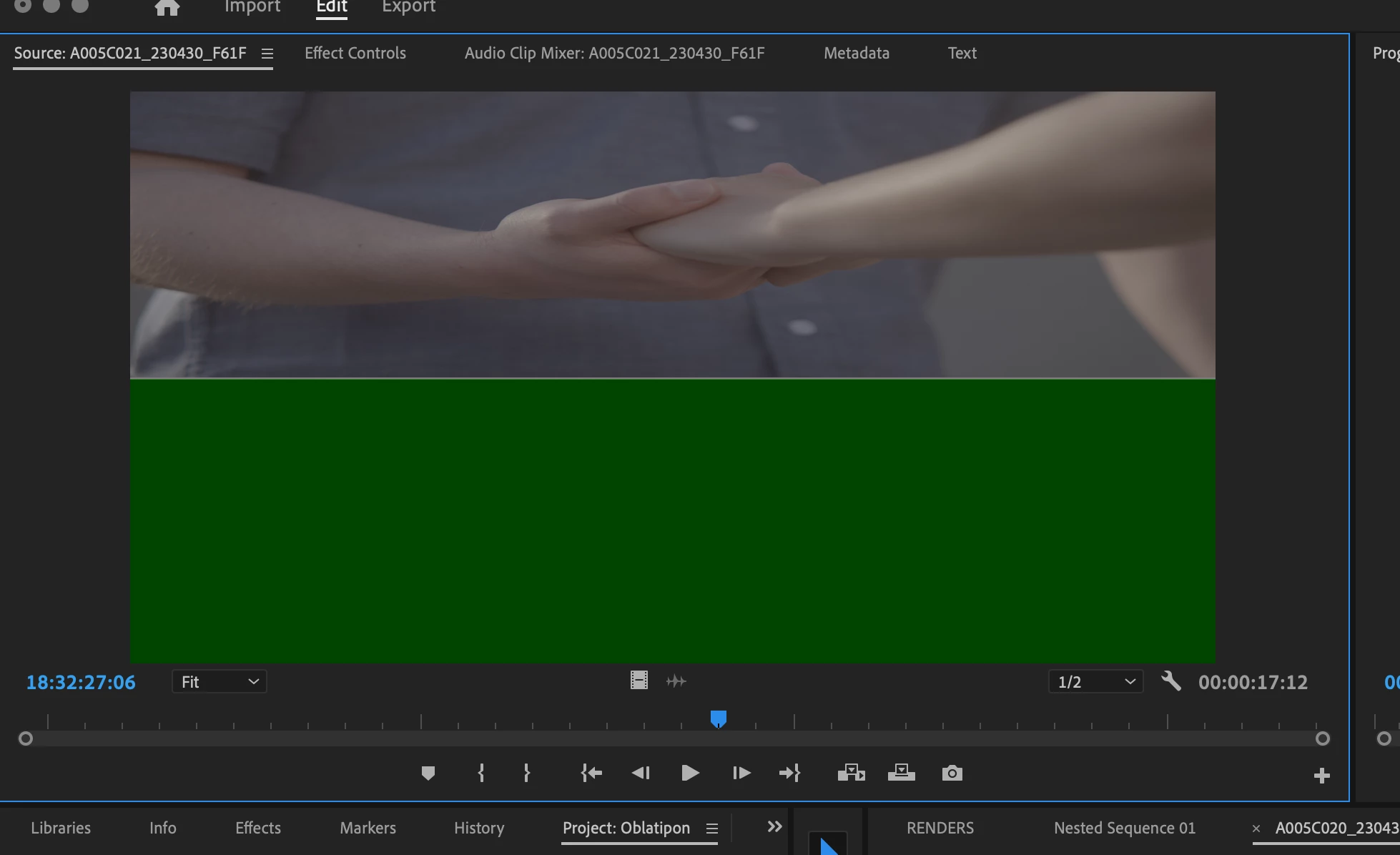
 

Screenshot 2023-05-23 at 11.45.27 AM.png


Any thought. on how to fix this? All other footage from the camera works fine. This just happens on the slow motion footage.

763
Translate
Report
Community guidelines
Be kind and respectful, give credit to the original source of content, and search for duplicates before posting. Learn more
community guidelines
Community Expert ,
May 23, 2023 May 23, 2023

If it was a PC, i'd say it might be your display driver, but I'm not sure how they work regards Macs. Also, you might have a mis-match with your sequence settings and the clips you are using.

Translate
Report
Community guidelines
Be kind and respectful, give credit to the original source of content, and search for duplicates before posting. Learn more
community guidelines
New Here ,
May 23, 2023 May 23, 2023

It does it even in the preview monitor. Standard speed clips play fine. Anything that is high speed, green bar...

Translate
Report
Community guidelines
Be kind and respectful, give credit to the original source of content, and search for duplicates before posting. Learn more
community guidelines
Community Expert ,
May 23, 2023 May 23, 2023

Green bar = the Bottom 1/2 of the screen, right?

And what is the High Speed, did you interpret footage?

Translate
Report
Community guidelines
Be kind and respectful, give credit to the original source of content, and search for duplicates before posting. Learn more
community guidelines
New Here ,
May 23, 2023 May 23, 2023

Yes, and yes. I've tried that. Still has green at the bottom of the screen. This is a new issue. I've been working with this kind of footage in premiere for years with no issue.

image.jpg

Translate
Report
Community guidelines
Be kind and respectful, give credit to the original source of content, and search for duplicates before posting. Learn more
community guidelines
New Here ,
May 23, 2023 May 23, 2023

I can open the footage in Resolve. This only seems to be happening in Premiere.

Translate
Report
Community guidelines
Be kind and respectful, give credit to the original source of content, and search for duplicates before posting. Learn more
community guidelines
Adobe Employee ,
May 23, 2023 May 23, 2023
LATEST

Hi @flashfwdfilms,

Sorry for the anomaly. Did you import the footage from Media Browser, or did you cherry pick the footage from one of the folders containing the footage and then import it? You may need to copy the entire contents of the CF card to your computer and then import it via Media Browser. Can you try that as a test? I hope that works.


Thanks,
Kevin

Kevin Monahan - Sr. Community & Engagement Strategist – Pro Video and Audio
Translate
Report
Community guidelines
Be kind and respectful, give credit to the original source of content, and search for duplicates before posting. Learn more
community guidelines