
Known Participant
August 22, 2017
Answered

Premiere opening Media Encoder and moving files

  • August 22, 2017
  • 1 reply
  • 2381 views

I put files into a MS Windows folder under within root project MS folder. Then I open Premiere to import them. Media Encoder opens and them puts copies of these clips into the root folder of the project and these are the ones which Premiere recognizes. How do I stop Media Encoder from opening and if not how do I at least get it to put the encoded files in the folder which there came from?
    This topic has been closed for replies.
    Correct answer kulpreet singh

    Hi Keithf72052612,

    When I go to import the media from the Windows folder called B-rollAUgust 22 Media Encoder opens and then puts the files in the correct bin but also puts the original media into the Windows root folder Dance17

    That happens because you are Ingesting your media files and creating proxies.

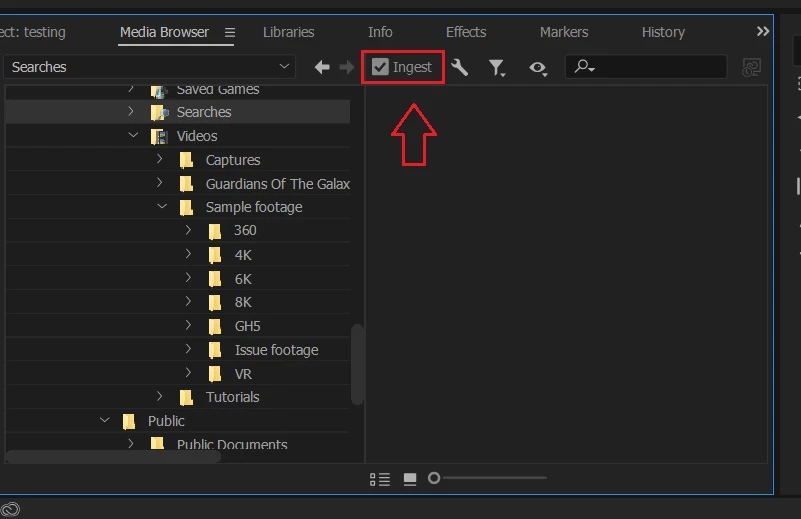
    Uncheck this option (in Media Browser) and Adobe Media Encoder will not launch while importing media.

    Thanks,

    Kulpreet Singh

    1 reply

    Graeme Bull
    Community Expert
    Community Expert
    August 22, 2017

    Can you write down your steps of bringing in footage to your project? Usually if you import, it doesn't make a copy and just references the footage wherever it is.

    Known Participant
    August 22, 2017

    I can ad some info but I did write the steps.  I copy the files from the camera's media chip to a folder which is within the project folder/ For example if I have a project called Dance17 and the Windows main folder is called Dance17 I might have a sub folder called B-roll august 22. This is where I put the camera's media. I then open Premiere and created a bin within the project called b-rollAug22. When I go to import the media from the Windows folder called B-rollAUgust 22 Media Encoder opens and then puts the files in the correct bin but also puts the original media into the Windows root folder Dance17

    kulpreet singh
    kulpreet singhCorrect answer
    Inspiring
    September 15, 2017

    Hi Keithf72052612,

    When I go to import the media from the Windows folder called B-rollAUgust 22 Media Encoder opens and then puts the files in the correct bin but also puts the original media into the Windows root folder Dance17

    That happens because you are Ingesting your media files and creating proxies.

    Uncheck this option (in Media Browser) and Adobe Media Encoder will not launch while importing media.

    Thanks,

    Kulpreet Singh