

Whaea
Participating Frequently
March 31, 2020
Answered

Premiere opens on all my desktops - Mac

  • March 31, 2020
  • 3 replies
  • 852 views

Hello.


I have multiple desktop windows on my computer that I swipe between. In the last week Premiere has started to occupy all of my windows. I dont know what changed, I havent adjusted any settings. Thank you in advance.
This topic has been closed for replies.
Correct answer Jeff Bugbee

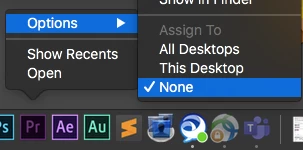
Look at your Dock settings.


3 replies

Jeff Bugbee
Community Expert
Jeff BugbeeCommunity ExpertCorrect answer
Community Expert
April 3, 2020

Look at your Dock settings.


Whaea
WhaeaAuthor
Participating Frequently
April 3, 2020

wow! thank you so much. something so simple, I feel silly lol

Peru Bob
Community Expert
Community Expert
April 3, 2020

I'm a Windows guy, not a Mac guy.  That's why I was confused.

Whaea
WhaeaAuthor
Participating Frequently
April 3, 2020

ooooh I see. All good. My bad, I should of mentioned that. Have now edited the title. 

Peru Bob
Community Expert
Community Expert
March 31, 2020

Can you explain in a different way, perhaps show a screenshot.  Maybe it is just me, but I don't quite understand the question.


Whaea
WhaeaAuthor
Participating Frequently
April 3, 2020

Hi Peru Bob.

I cant really take a screenshot because its an action of a 2 finger swipe to another desktop...but basically I have at least 5 desktops where I have different work going on, maybe a script open to edit from in one desktop and in another desktop window I have a browser open to check on emails etc etc... but now as I open my Premiere projects the timeline/workspace is open in every desktop covering my other work too. 


Here is a guy who had the same issue but it was unresolved. https://community.adobe.com/t5/premiere-pro/premiere-open-on-all-desktops-mac/td-p/10187763?page=1


thanks again. In the meantime I continue to edit but its slowing me down and just annoying. I have a feeling its something simple like unticking a box somewhere but I just cant find that box lol.


T