
Participant
November 27, 2017
Answered

Premiere Pro 12.0

  • November 27, 2017
  • 2 replies
  • 3267 views

Hello Team,

How do I get the 12.0 version of Premiere.  I have an editor who has sent me files that used 12.0 and I can't view his files.  I have the most updated version of Premiere CC, but it is 11.

How do I solve this issue?

Thomas

Email Removed

[personal information removed per policy - https://forums.adobe.com/docs/DOC-3731]

[This is an open forum, not Adobe support, please do not post personal information]
    This topic has been closed for replies.
    Correct answer Ann Bens

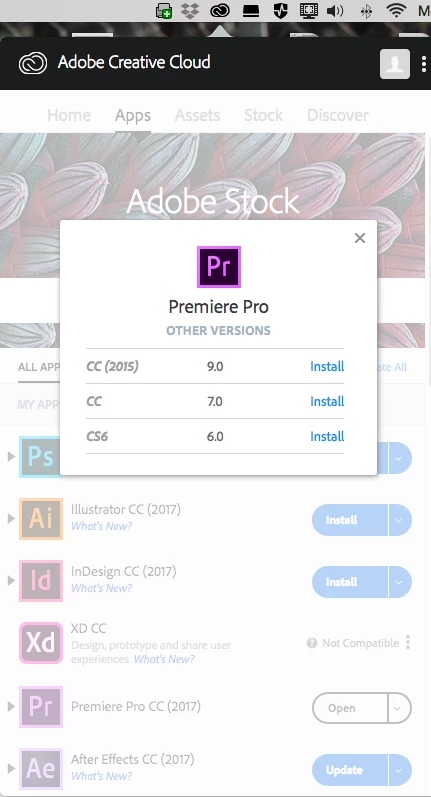
    I believe so... My Apple is a OS X Yosemite 10.10.5.  The Adobe icon at the top right on my Mac (which shows the updates for CC) only has 2017.  There is the "Pr" app logo.  To the right of that it says "Premiere Pro CC (2017).  To the right of that is an "Open" dropdown, the other CC apps (Not Premiere) with the same dropdown that say "Install"

    When I click on the "Open" drop down, I'm given the opions to download CC(2015) 9.0 / CC 7.0 / CS6 6.0.


    For Premiere 2018 you need OS 10.11 or higher.

    2 replies

    R Neil Haugen
    Legend
    November 27, 2017

    John has correct information.

    I'll add that when you do upgrade to the newer version, in the Install dialog box, go to "Advanced Options" and uncheck the "Remove prior versions" option, which will allow you to now keep your prior version available if you have any problems with 2018.

    Also, save-as or copy your 2017 project files, and import the copies into new projects in 2018. Leaving the previous version installed and using copies of old projects in the new version means you always have a way to keep working if something goes wonky in the new version.

    Neil

    Everyone's mileage always varies ...
    Participant
    November 27, 2017

    Yep.  Thats how I've updated all my Premiere accounts, and thanks for the quick reply. Premiere Pro CC only has 2017 available for download.  How do I download 2018?

    Ann Bens
    Community Expert
    Community Expert
    November 27, 2017

    Update your CC app.

    On a side note the CC app now shows Premiere as Premiere Pro CC not as Premiere Pro 2018.

    John T Smith
    Community Expert
    Community Expert
    November 27, 2017

    CC desktop lists applications as "Up to Date" when they are not

    -http://helpx.adobe.com/creative-cloud/kb/aam-lists-removed-apps-date.html

    -and added step https://forums.adobe.com/thread/1529654