
edit_droid
Participant
May 12, 2022
Answered

Premiere Pro 22.4.0 Color Labels Gone & Problem

  • May 12, 2022
  • 4 replies
  • 5609 views

I just upgraded to Premiere Pro 22.4.0 and now when I open my (incredibly large) project all of my color label changes on my numerous timelines are gone. Everything has been reset back to either some old color state or to violet/iris. So much work lost! In addition, when I attempt to change the color of a group of clips on the timeline, it changes the color of all clips. Look: 
 

https://youtu.be/gAz63t_eyac

Correct answer Ann Bens

4 replies

NataliaTsiurpita
Participant
June 19, 2023

I know what exactly can help, cause I've just fixed it, guys! But remember: this way will delete your keyboard shortcuts so save it. 

Delete folder with Adobe Premiere programs cash

Way:

C:\Users\Keal2\OneDrive\Documents\Adobe\Premiere Pro\23.0      

Folder which you need to delete: Profile(.....)


Thats all, then just open your project


Participating Frequently
May 6, 2024

I wished so hard it would work for me... It didn't. All of my labels are gone forever it seems

Participant
June 26, 2024

Im having the same issue


Participating Frequently
June 20, 2022

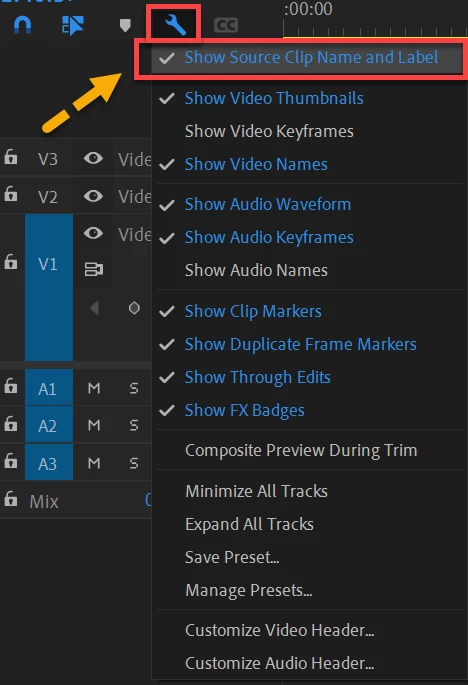
I still have this happen. When I toggle the 'Show Source Clip..." it restores SOME of my color lables. However, looking closer I see that many on my timeline are not restored. I use labels to indicate animation cycles, revised sections, different versions of source material etc. and it's important to how I go over my edits with directors. Having all of this valuable at a glance data stripped out and just seeing blank areas is a huge loss. I wish this would be TRULY fixed. I never had this issue until recently when I transfer projects from laptop to final edit computer- a process I MUST do for my job. I wish this would be addressed and fixed for real. 

Participating Frequently
June 20, 2022

^ Above, my original project, all labels intact.  Indicatons of temp audio, sound FX tracks, and replaced tracks intact, animation cycles and cycle changes clearly labeled in timeline. 


^ On first open on the edit machine, all color labels dumped. Hours of work across en entire project, vanished. needless to say not a fun sight. 


Upon toggling the "Show Source Clip..." wrench, SOME of the lables thankfully return. At first glance, this is awesome. However, notice that on the timeline, the finer level of lables indicating cycles are still missing. Hours of work of what are some of my most crucial labeling in order to effectively do my job editing this are Still missing. The problem has not been *truly* been fixed. It probably works for most people dealing with far fewer smaller labels than I use, but for projects like mine the problem still exists and is highly annoying as I lose a ton of work. Years of using premiere and I've only had this problem recently.

Ann Bens
Community Expert
Community Expert
June 20, 2022

Under the hamburger menu in the timeline there is a setting for audio waveforms.


Ann Bens
Community Expert
Ann BensCommunity ExpertCorrect answer
Community Expert
May 13, 2022

edit_droid
Participant
May 16, 2022

That worked. It's back to normal.

Participating Frequently
May 6, 2024

Didn't work for me

Community Manager
May 13, 2022

Hi edit_droid,


We're sorry to hear about this. Try toggling the Source Source Clip Name and Label option from the wrench menu on the timeline. Let us know if it helps.


Thanks,

Sumeet