
Premiere Pro 22.5 on MacBook Pro M1 MacOS 12.5 wont import 10-bit DJI Mini 3 Pro video files
So i bought a DJI Mini 3 pro drone and learned how to use it and set the video files to H.265 D-cinelike MP4 for best dynamic range.
I also bought a MacBook Pro M1 14" for video editing.
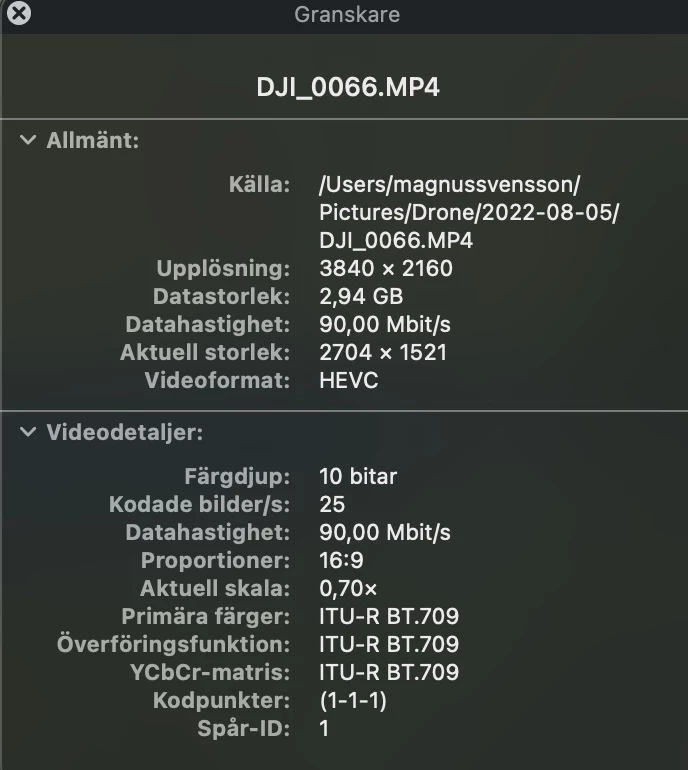
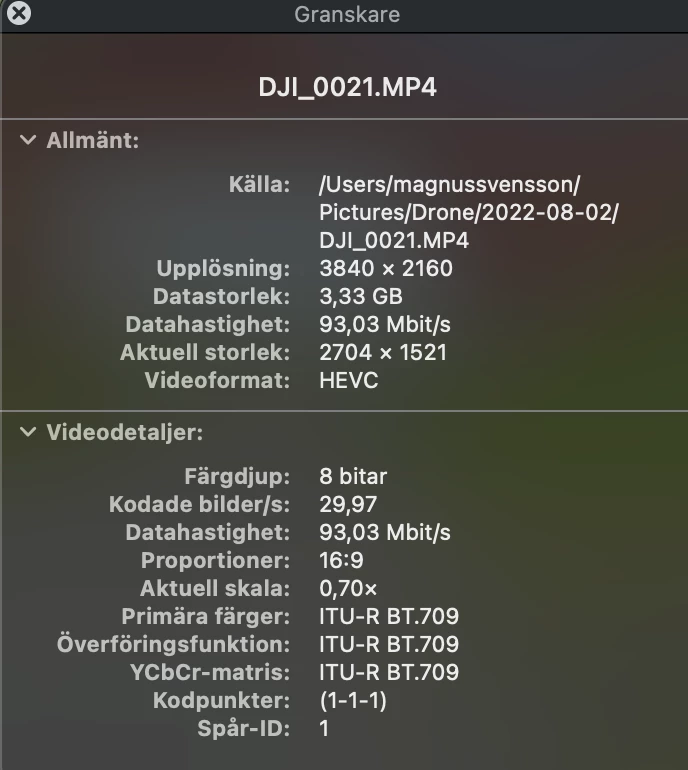
I'm a long time subsciber to the Adobe Photography plan with Ps and LrC and I thought the logical choice would be to upgrade to the full Adobe plan to get access to Premier Pro so I just tried the evaluation of Premiere Pro and while it will import 8-bit "Normal" H.265 MP4 from my drone, it won't even consider the 10-bit "D-Cinelike" more flat color profile.
I tried installing the free version of DaVinci Resolve and it imports and edits the same files without a problem.
Are the 10-bit H.265 MP4 files unsupported by Premiere Pro or is this a bug?
I'm enclosing the Quicktime details about the two files, as I said, the first 10-bit is a no go while the second 8-bit will import into Premiere Pro.
 AdChoices