

Copy link to clipboard
Copied
Ok, just updated to v 25.1 opened my projects in progress to find out that none of them uses my iGPU to decode.
Went on checking it with different formats that are decoded (h264 8-bit 4:2:0, h265 8-bit 4:2:0, h265 10-bit 4:2:0, h265 10-bit 4:2:2) by the iGPU - all of them show 0% load.
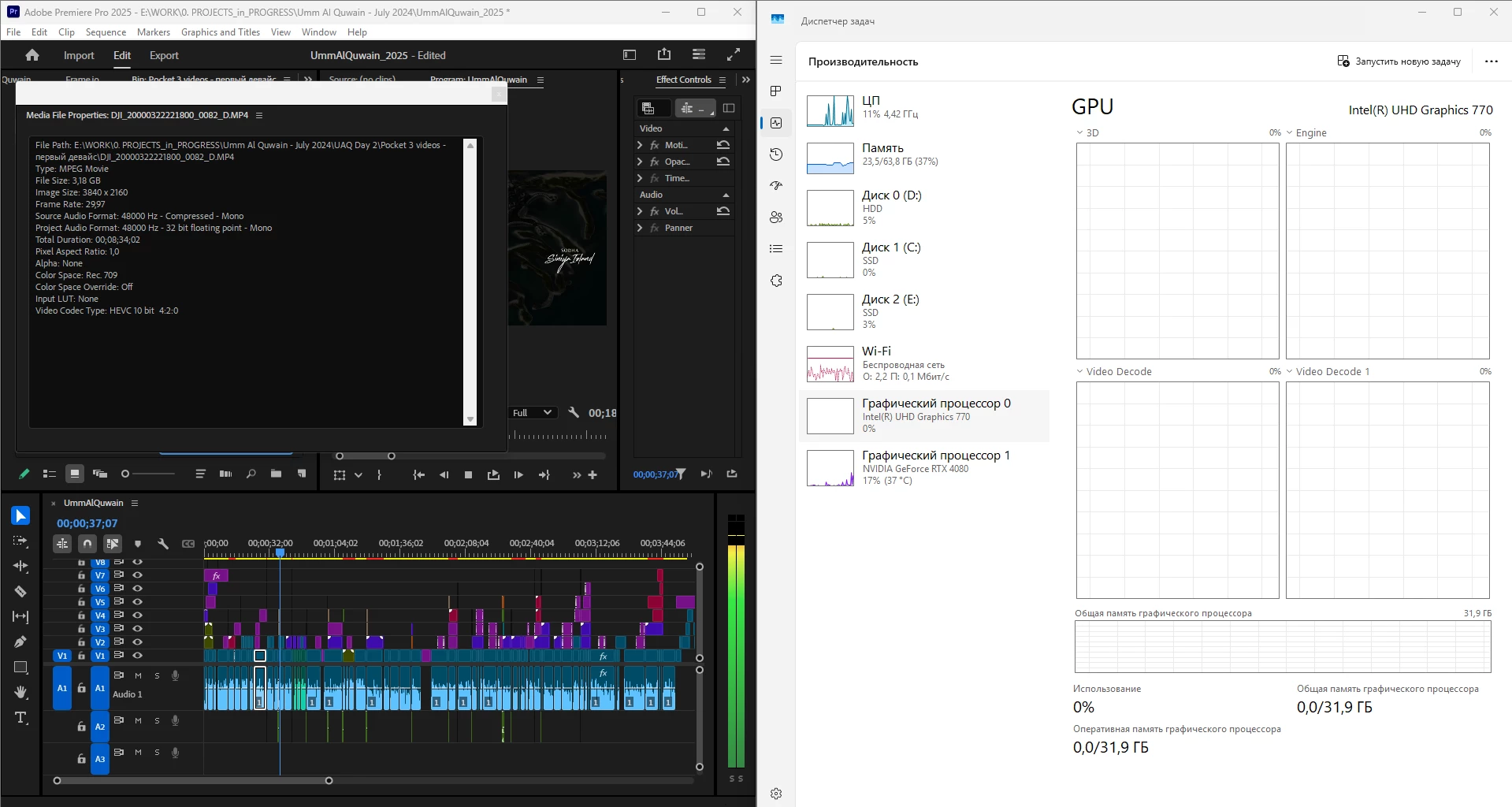
What is going on, guys? Why is it "new version - new bugs" thing every time? My CPU immediately started being loaded more, like by 60% all the time, even though my GPU does the decoding, whereas on the previous versions the average CPU load was 20-30% with the iGPU doing all the decoding job.
Yes, I tried reinstalling both Premiere Pro (as well as resetting its cache, preferences and plugins via the start+shift menu) and all the drivers.
Steps to reproduce? Open a project or create one, import a knowingly decoded video, put it on your timeline, press Play. Watch the the Windows Task manager - Performance graphs.
i7 14700K, RTX 4080, 64 Gb ram, SSDs, Win 11 24h2
Hi all,
Thanks to everyone who contributed to this thread and thanks to those people we’ve spoken to via video call.
I’d like to summarize the changes we made in v25.1, the impact, and possible changes in the future.
As @mayjain has mentioned, in v25.1, we changed GPU priority so that an Nvidia GPU will be given priority over an Intel GPU when decoding H.264 in 8-bit 4:2:0. Note that in more complex sequences, Premiere Pro uses both GPUs, splitting the load between them.
Based on our tes
...Hi All,
Apologies for the inconvenience caused. We have addressed a major issue discussed in this post, where HEVC files in non-English folder paths may not be decoded via Hardware.
We truly appreciate your support and collaboration in investigating this issue. While beta builds are not recommended for production, they
...Copy link to clipboard
Copied
I think I'm experiencing a similar problem... my Intel iGPU isn't being used anymore. In my case it's making my export times much longer. 😞
Last June I built a new 14900K system with my existing NVidia RTX 2070. I created a short sample project to test the new system... 4K 4:2:0 H.264 footage on a 1080p timeline.
I was able to export the 2 minute timeline in 17 seconds. It used the NVidia 2070 *and* the integrated Intel UHD 770 iGPU.
But today that same export takes 32 seconds... almost twice as long! And it only uses the NVidia 2070. It doesn't touch the Intel iGPU at all !!!
I'm on Premiere 25.1 and Windows 24H2. All drivers and BIOS are up-to-date. And the Intel iGPU is seen by Windows and Premiere.
My fingers are crossed for a fix. 🤞
Copy link to clipboard
Copied
Hi, @Michael Scrip
Exporting with an iGPU is a different thing from what we are stuggling here (we deal with a realtime playback issue, i.e. decoding, not the encoding issue like in your case), but still yours is another manifestation of the problem and it should be considered too.
Copy link to clipboard
Copied
Thanks! Yeah that's why I said it was a similar problem. 8)
I ended up here from a Reddit post. I hadn't heard anything else about this so I figured I'd share my findings here.
I thought I was crazy thinking my exports were taking longer and my iGPU is not being utilized. Turns out there is something going on!
😛
Copy link to clipboard
Copied
Another interesting behavior in Premiere Pro 25.1. Here is a fully software decoded HEVC 420 10 bit which should be hardware decoded:
File info:
Video
ID : 1
Format : HEVC
Format/Info : High Efficiency Video Coding
Format profile : Main 10@L5@High
Codec ID : hvc1
Codec ID/Info : High Efficiency Video Coding
Duration : 1 min 44 s
Bit rate : 50.4 Mb/s
Width : 3 840 pixels
Height : 2 160 pixels
Display aspect ratio : 16:9
Frame rate mode : Constant
Frame rate : 29.970 (30000/1001) FPS
Original frame rate : 29.970 (29970/1000) FPS
Color space : YUV
Chroma subsampling : 4:2:0
Bit depth : 10 bits
Bits/(Pixel*Frame) : 0.203
Stream size : 625 MiB (94%)
Encoded date : 2000-03-21 18:26:12 UTC
Tagged date : 2000-03-21 18:26:12 UTC
Color range : Limited
Color primaries : BT.709
Transfer characteristics : BT.709
Matrix coefficients : BT.709
Codec configuration box : hvcC
Audio
ID : 2
Format : AAC LC
Format/Info : Advanced Audio Codec Low Complexity
Codec ID : mp4a-40-2
Duration : 1 min 44 s
Bit rate mode : Constant
Bit rate : 288 kb/s
Channel(s) : 1 channel
Channel layout : M
Sampling rate : 48.0 kHz
Frame rate : 46.875 FPS (1024 SPF)
Compression mode : Lossy
Stream size : 3.54 MiB (0%)
Default : Yes
Alternate group : 1
Encoded date : 2000-03-21 18:26:12 UTC
Tagged date : 2000-03-21 18:26:12 UTC
Other #1
ID : 3
Type : meta
Format : djmd
Codec ID : djmd
Duration : 1 min 44 s
Bit rate mode : Variable
Title : DJI meta
Default : No
Alternate group : 5
Encoded date : 2000-03-21 18:26:12 UTC
Tagged date : 2000-03-21 18:26:12 UTC
Other #2
ID : 4
Type : meta
Format : dbgi
Codec ID : dbgi
Duration : 1 min 44 s
Bit rate mode : Variable
Title : DJI dbgi
Default : No
Alternate group : 5
Encoded date : 2000-03-21 18:26:12 UTC
Tagged date : 2000-03-21 18:26:12 UTC
Other #3
ID : 6
Type : Time code
Format : QuickTime TC
Duration : 1 min 44 s
Frame rate : 29.970 (30000/1001) FPS
Time code of first frame : 18:26:05;04
Time code of last frame : 18:27:49;03
Time code, stripped : Yes
Default : No
Alternate group : 2
Encoded date : 2000-03-21 18:26:12 UTC
Tagged date : 2000-03-21 18:26:12 UTC
And this is when I open the same file in PotPlayer:
As usual: 14700K, 4080, Win 11 24h2 up to date, latest iGPU and Nvidia studio drivers. In case you forget.
Copy link to clipboard
Copied
As a test I rolled back to Premiere 24.6.4 and I noticed that my Intel iGPU is being utilized again when playing, scrubbing, and exporting.
So in my case it seems that version 25 (and also the current beta) are not using the iGPU.
Copy link to clipboard
Copied
After posting a description of the issues with iGPU, Windows 11 23H2, Windows 11 24H2 to Intel using Adobe Premiere 25.1, Intel have infact done testing themselves and come back with this response as regards issues on H264 hardware decoding :
Intel Response
Thank you for patiently waiting on us.
Upon further investigating and testing, we can confirm that such issue exists in Adobe Premiere (Adobe Encoder also), but it's not related to Intel driver, screen or video setting involving Intel driver.
So, it's best to contact Adobe regarding this issue.
We await further news from Adobe Senior Support and Dev Team investigations on this issue.
One would hope they can display the same level of interaction and response timeframe that Intel themselves have done.
Copy link to clipboard
Copied
The circle of suspects has narrowed. Thank you @JonesVid for the info. My Intel contacts have kept silent. At least we now know who's the one...
Copy link to clipboard
Copied
I got an email from Intel too. So, Adobe, it's your call
Hello Andrew,
Thank you for your patience. I've concluded the investigation of the issue that you've encountered with the Adobe Premiere Pro application. Intel can confirm that such issue exist in Adobe Premiere (Adobe Encoder also) but it's not related to Intel driver, screen or video setting involving Intel driver.
Below is our test results:
Note - Same tests conducted in Windows 11 23H2 and 24H2
Test env:
14900K
Z-690
OS Windows 11 23H2 (22631.4751), 24H2 (26100.2894) both with latest patches
igpu driver: 101.6458
dgpu driver: 566.36
Prepared ffmpeg (and Adobe Premiere, Adobe Encoder)
winget install "FFmpeg (Essentials Build)"
Also prepared GPU-Z (monitoring GPU usage) and, HWInfo as a secondary view
I've used some sample video.
Command using Intel Quick Sync encoder/decoder
Default: ffmpeg -i [source] -c:v [h264/hevc/av1]_qsv -b:v [bitrate] -y [output]
Testing encoding only, using h264
Command: ffmpeg -i d:\100630-video-2160_2.mp4 -c:v h264_qsv -b:v 30k -y d:\test2.mp4
Testing decoder and encoder - first -c is for decoder, second -c id for encoder
Command: ffmpeg -c:v h264_qsv -i d:\100630-video-2160_2.mp4 -c:v hevc_qsv -y d:\test2.mp4
Command using Nvidia Encoder
Default: ffmpeg -i [source] -c:v [h264/hevc/av1]_nvenc -b:v [bitrate] -y [output]
Testing encoding only, using h264
Command: ffmpeg -i d:\100630-video-2160_2.mp4 -c:v h264_nvenc -b:v 30k -y d:\test2.mp4
Testing decoder and encoder - first -c is for decoder, second -c id for encoder
Command: ffmpeg -c:v h264_cuvid -i d:\100630-video-2160_2.mp4 -c:v hevc_nvenc -y d:\test2.mp4
Summary: In all tests all was working fine, encoding or decoding and encoding charts were showing some activity.
Which means that it's not related to driver.
Second part of test was to use Adobe premiere.
Used same sample file, imported to new project.
Project was set to use OpenCL rendering method (not CUDA).
Adobe premiere was set by default to use iGPU and dGPU when decoding and encoding videos under hardware accelerated mode.
Next step is to start playing source video while looking on task manager charts.
Also this short manual helps [https://www.pugetsystems.com/labs/articles/what-h-264-and-h-265-hardware-decoding-is-supported-in-premiere-pro-2120/#Run_this_Test_on_your_System_Windows]
Especially hotkey Alt+Ctrl+F12 to open the Debug Monitor and expand “Importer.MPEG” to find which hardware was responsible for decoding.
In all tests decoding was done by Nvidia, rendering looked like iGPU+dGPU.
The only scenario when iGPU was used for decoding was when dGPU was de-selected from hardware acceleration.
Summary: There were some situations when task manager didn't show any activity of iGPU or dGPU when used in Adobe premiere, while GPU-Z was presenting a real values in monitoring tab. It looks like a combination of OS + App issue but mostly, App related.
Considering the situation and our findings, it would be in your best interest to directly consult with Adobe support and Microsoft Support regarding this error so that the application's behavior is corrected.
I'll proceed to close this case now. Feel free to contact us if you have any concerns or clarifications
Best regards,
Ernesto C.
Intel Customer Support Engineer
Copy link to clipboard
Copied
Hi @AndrewTheGreat & everyone,
I’ve reviewed the recordings and data shared in this post, and wanted to provide some context regarding GPU usage in Task Manager.
The GPU usage percentage displayed in Task Manager can vary based on the media file's bitrate. For low-bitrate files (containing less data per second), GPU usage tends to be lower, as these files are easier and quicker for the GPU to decode. In contrast, high-bitrate files lead to higher GPU usage due to the increased effort required for decoding.
To ensure consistent observations, I recommend testing with high-bitrate files, as they will create noticeable spikes in the Video Decode section of Task Manager.
In Premiere Pro 25.1, we've updated the decoder priority order to Nvidia > Intel specifically for H.264 4:2:0 8-bit files. It's also worth noting that hardware decode support for H.264 is currently limited to 4:2:0 8-bit files only. This change doesn’t mean the iGPU (Intel GPU) won’t be used; it simply prioritizes Nvidia, with Intel stepping in only after Nvidia reaches its capacity.
To observe this in action, you can test by playing back a multi-track UHD project containing more than 8 video tracks or using speed playback of over 8 UHD media files on a single track. For quicker results, use as many short-duration files as possible (e.g., 20+) on the single track.These scenarios should clearly demonstrate the changes.
It’s important to note that this update doesn’t affect GPU usage for other file types. However, if necessary, users can revert to the Intel GPU by unchecking the Nvidia GPU option in Media Preferences.
If you notice any differences between Premiere Pro 25.0 and 25.1 outside of the specific file type mentioned, please let us know. We’d be happy to arrange a remote session to investigate further.
Thanks,
Mayjain
Copy link to clipboard
Copied
Thank you for the information
Firstly - may I ask why you have waited several weeks before announcing these 'known design' changes in 25.1 release.
I also don't follow your logic.
In 25.0 iGPU is used and even for lower bit rate 4.2.0 H264 footage you can see its use (not peaky, but it is used)
In 25.1 the iGPU seems completely dead no matter what you throw at it.
Now here's the thing - what if you have a user with a moderate to lower powered NVidia card.
They then have a timeline of H264 4.2.0 footage and want to encode to Apple ProRes for some reason - just an example .
eg: Smart Rendering / Export
You would want the NVidia Card doing its stuff encoding Apple Pro Res with its full resource - and use the iGPU for the footage decoding.
In your 25.1 implemetation this doesn't happen. Correct me if I am wrong.
One would conclude on a moderate to lower powered NVidia Card the overall performance would be degraded, and time to export longer.
I think it would be useful for all users on this Community thread for Adobe to understand how the 25.1 version 'new implementation' is more efficient irrepective of the hardware platform.
Do you have some documentary proof of performance tests you have done?.
In the 25.1 release it is documentated by Adobe that you have 'completely re-written' H264 handling.
Is this for all flavours of H264 and what does it exactly mean ?.
In conclusion, does this mean with 25.1 a user with a moderate to lower powered NVidia card must always now disable decoding using NVidia manually if they wish to use iGPU?. This was not necessary before.
All tech reports I read in the past suggested QuickSync was still faster to use for H264/H265 decoding.
Copy link to clipboard
Copied
Hi, @mayjain
I've got tired of this... Please, see this message: https://community.adobe.com/t5/premiere-pro-discussions/premiere-pro-25-1-igpu-stopped-decoding-my-f...
Premiere Pro 25.1 - zero iGPU load, PotPlayer - 50% iGPU load. With one and the same file.
Premiere Pro 25.0 with h265 10 bit 422 120 fps - 50% CPU load with iGPU at 100%, (almost) no dropped frames. The same exact 4 files in Premiere Pro 25.1 - 100% CPU, the footage is unplayable and choppy as hell.
Here's the file, try playing it back (make 4 physical copies): https://drive.google.com/file/d/1bkT6wP8kCbiKLp9CR8uU2TQhu_Ho0nQp/view?usp=sharing
It's a 422 10bit HEVC at 280mbit. A huge bitrate and an Intel 11/12/13/14th Gen iGPU decoded format. Play it back then watch the video here and note how fluent the playback of 4 (FOUR!) of those files was in 25.0: https://youtu.be/phc1NhUayGM
So what happened between 25.0 and 25.1 that made this flavor unplayable? And in 24.6 it was even better, you know
Here's my current project scrubbed through fast and played back at maximum speed: https://youtu.be/-EusOAkgj4s It's HEVC 420 10 bit. Not h264 you "updated".
Also what happened with the Display color management? Why on earth with it on do I get half of the frames dropped when my video does play back on the iGPU? See here: https://youtu.be/ex2uOokHilc
I've had this checkbox ON since it was introduced versions ago and never had I had any framedrops, now it's a single file on an empty timeline and 500 dropped frames out of 900. On a 14700K. What is going on? Is there some DaVinchi resolve spy in your team who does everything to ruin your product?
Finally, you say you updated h264 and it's NVidia preoritized now. In my case I can see that 420 8 bit h264 files actually have started to be showing in the iGPU graph. So you actually did something which made h264 files seen in the iGPU graph. So it's all the other way around to what you are saying...
Copy link to clipboard
Copied
So this is the updated h264 you were talking about...
Copy link to clipboard
Copied
Hi @AndrewTheGreat - Let us know if you’re available to join a Zoom meeting. I can invite some Adobe team members, and we can review your system together to better understand what’s going on.
Copy link to clipboard
Copied
About 2 weeks ago I had a 40 minute long remote session with Adobe Premiere senior support on this problem of H264 decoding on iGPU.
On that call I demonstrated the problem to the support person and several pieces of information were taken about my PC setup and problem scenarios captured.
On the conclusion of the call - the support person commented that it certainly looked to be a bug in 25.1 version.
After that call sevarl days later I was asked to peform more tests and do a screen recording of the tests, provide more system information and actual samples of the H264 and H265 footage to demonstrate the problem.
Reading the the recent posts from Adobe it would appear that you are still in denial of any problems on Premiere Pro 25.1.
I can still replicate the problem on this version today using Win 11 23H2.
Intel themselves have replicated the problem.
Windows Forum users have also complained of this problem with Adobe 25.1 as well.
@mayjaincan I ask why Adobe still appear to be in denial of any problems on your latest 25.1 version?
Your explanation of moving all H264 decoding to NVidia discrete GPU is totally unfounded, since H265 is still used by Quick Sync iGPU on Premiere 25.1.
I have also just run a quick test on latest Beta Version 25.2.0 Build 95 downloaded today - that also still displays the same problems with H264 footage.
In the meantime I have had zero feedback from Senior Support team on this problem (which was personally promised) following the remote session
If you wish Premiere Pro users to assist Adobe in helping identify problems and replicating them, it would be nice to see you extending the same courtesy back to your Users in providing feedback that has been committed.
This is called good Customer Service for the product that we subscribe to on an annual basis.
Copy link to clipboard
Copied
Hi @AndrewTheGreat ,
I tested the shared file on my Windows 11 (23H2) setup in Premiere Pro 25.1, and the iGPU appears to be decoding the file without any issues. You can review the system recording here: https://f.io/qQegU3Sg.
Despite our efforts, we haven’t been able to reproduce the issue you described. If there’s any additional information or specific steps that could help us replicate the problem, please let us know.
Thanks,
Mayjain
Copy link to clipboard
Copied
Excuse me jumping in here.
I think AndrewTheGreat may be suffering from two issues
On my Premiere Pro 25.1 on Win 11 23H2 I get the same results as yourself.
H265 HEVC decodes on iGPU OK.
Premiere Pro 25.1 H264 footage does not decode on iGPU anymore. Why ?
Whatever you have done in 25.1 is a step backwards. I can replicate it in seconds.
Premiere Pro 25.0 works for both H264 and H265
Please repeat these tests on your same platform with H264 4.2.0 on Win 11 23H2, Premiere Pro 25.1 and post result here for us to see. Ensure all boxes ticked for iGPU and NVidia for Decode. Do not disable Nvidia to force iGPU . That has never been necessary in the past.
That is Problem No 1.
Looking at Intel and Microsoft Windows Forums I think the H265 issues described by AndrewTheGreat may be Win 11 24H2 related (just a theory). Problem No. 2
Users on those Forums do however, also complain about iGPU decode problem on H264 Premiere 25.1 even on Win 11 23H2.
Copy link to clipboard
Copied
Sorry, I just don't get it. I've been subscribed to this thread for the second month and users have been trying to prove for the second month that your program doesn't work correctly after the update? I don't understand what small and large frames are we talking about here, what iGPU/GPU priority is this? I have a project started in version 24.6, then it was normally transferred and finished in version 25 on Win 11 23h2, and now it works disgustingly on 25.1 Win 11 24h2... I don't understand what else you need? You have a fact - the program works worse, much worse. Version 25.1 is completely inoperable - it's impossible to work there, the timelan works with very large lags even on top CPU/GPU. Version 25 after rolling back to win 23h2 - works. You have some kind of conflict with Windows and its updates - that's obvious. Version 25.1 works almost exclusively on the CPU. You can just hear it by the hum of the fans. I see that the timeline is slow, a lot of dropped frames. I don't understand what other proof is needed? I understand that there is no point in waiting for version 25.2? - Since we still haven't proven to you that YOUR program doesn't work properly?
Copy link to clipboard
Copied
STOP. I am very sorry for the rude messages.
BUT! I just decided to give 25.1 another chance and installed it on my home PC. Win 11 24h2 12700k rtx 3080. Up until now, the iGPU did not work at all on 25.1 and 24h2 - just like the guys above.
BUT! Now everything worked! I'm trying to remember if there were any updates recently. Maybe there were some Windows updates. But here's what I remembered.
A week ago, Intel released drivers ... 6449. And I installed them (I suspected that they were the problem and decided to check 25.1 after installing them). So - after that, the iGPU still worked poorly, but to all this were added constant glitches on the video (constant, I tried everything possible, but they remained). In the end, I deleted 25.1, installed 25.0 and glitches appeared there!!! I struggled with this for a long time (disabled the Intel/Nvidia renderer checkboxes - glitches appeared only when rendering Intel). I reinstalled the Nvidia and Intel drivers for a long time and in the end it worked. In 25.0, the glitches disappeared. And now I installed 25.1 and it works... I don't even know what to say about this. I'll try it on my laptop now.
Copy link to clipboard
Copied
I am still sticking on Win 11 23H2, using Intel xxx 6449 driver
H264 and H265 iGPU decode work fine on Premiere Pro 25.0
Only H265 iGPU decode works on 25.1 - not H264 this is my BIG issue.
Are you sure H264 iGPU decoding is working - and what have you selected in the Media Decode check boxes in Preferences?.
Copy link to clipboard
Copied
Hi @JonesVid ,
Sorry for the delay in clarifying some of the doubts in this post. There are a lot of different discussions being combined here, so it was a bit challenging to address every point.
As mentioned earlier: "In Premiere Pro 25.1, we've updated the decoder priority order to Nvidia > Intel specifically for H.264 4:2:0 8-bit files. This change doesn’t mean the Intel iGPU won’t be used; rather, it prioritizes Nvidia, with Intel stepping in only when Nvidia reaches its capacity."
To further illustrate this, I’ve added another recording demonstrating the usage of both Intel iGPU and Nvidia GPU during high-speed playback of multiple files in a sequence. You can check it out here: https://f.io/8EtSq_Nb.
You can also observe similar behavior in a multi-track UHD project.
We made this change long ago in beta to help address these kinds of confusions. That said, we will continue to discuss and address any concerns raised here.
Thanks,
Mayjain
Copy link to clipboard
Copied
Copy link to clipboard
Copied
Almost 2 months passed while we were looking for decoding on Intel UHD. We changed operating system, drivers, etc. We wrote to MS and Intel support, they did not find problem on their side. Then you claim that you changed GPU priority. Are you joking?
Now on to the point. Your innovation has ruined program. All users in this discussion noted that PP 25.1 (Nvidia GPU priority) works worse than PP25.
I conducted my additional tests. There are 9 videos on timeline and one adjustment layer (1 Lut and light adjustments in Basic).
Result:
PP25.1 - could not play video even without adjustment layer. Yes, decoding worked on both GPUs, but this did not help;
PP25 - everything is fine. No dropped frames.
Nvidia GPU transfers part of the work to the UHD GPU at the wrong time. When any block is overloaded (we have 100% decoding), Nvidia GPU cannot process other tasks.
I am attaching a video of my test:
https://drive.google.com/file/d/1chdbiPKs5X3x-LGCLJCtG2UUfhnjfJ23/view?usp=sharing
Copy link to clipboard
Copied
Apologies for the frustration. While this post doesn’t specifically focus on H.264, some users have also reported concerns regarding H.265 iGPU usage, as originally mentioned. This has made it challenging to fully understand and address every observation—especially those that, in theory, shouldn’t exist.
We’d like to investigate the issue you highlighted further. Could you please share the project and asset files to ensure we can accurately replicate the scenario on our end?
Thanks,
Mayjain
Copy link to clipboard
Copied
Here is project with all materials.
It will be available for download for one week.
https://drive.google.com/drive/folders/15L0eiaSwzwa0uh2ufq5Rozx1DXdcRbOO?usp=sharing
Copy link to clipboard
Copied
Hi @mayjain; @Raman275720276xpc
Ok so I have downloaded @Raman275720276xpc project
For test on 25.1 I used my main current editing machine - Windows 11 23H2 with Premiere 25.1. This has a 13900K CPU and 4080 Super GPU. UHD 770 iGPU on the 13900K
Running this project the iGPU is doing something but not very much around 10 to 13% max.
I got over 100 dropped frames running the stacked video layers which are H264
For test 2 I had to use my older Win 10 Pro machine as this has Premiere 25.0 ready to go - its i9 9900K with UHD 770 iGPU, 2070 Super GPU
Running the project again I get 10 dropped frames pass 1, then try again and get Zero dropped frames, for pass 3 zero dropped frames - looking at the iGPU decode activity it is going crazy and at least 100% a lot of the time.
Just running these two tests (even on a slower machine it performs better using Premiere 25.0)
I think there is a lot of further work to be done looking at what 25.1 is doing with the NVidia new priority. The latest change on the face of it does not look good from a performance point of view.
I must admit I was very surprised at the result. Premiere 25.1 does not appear to be optimised and using 25.0 looks preferable for H264 4.2.0 footage.
Quick Conclusion the old implementation looks better !
Thanks for sharing your test
Get ready! An upgraded Adobe Community experience is coming in January.
Learn more