
Exit
  • Global community
    • Language:
      • Deutsch
      • English
      • Español
      • Français
      • Português
  • 日本語コミュニティ
  • 한국 커뮤니티
1

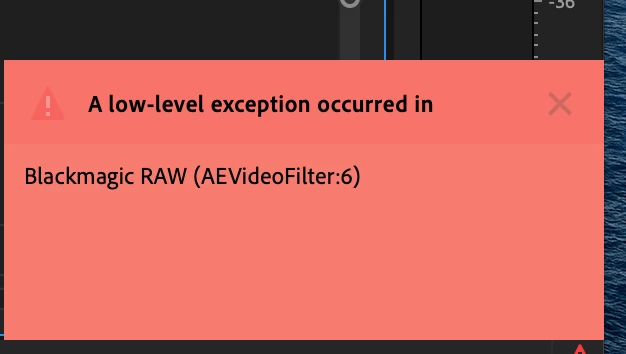
Premiere Pro - A low-level exception occurred in Blackmagic RAW (AEVideoFilter:6)
New Here ,
Feb 16, 2020 Feb 16, 2020

Screen Shot 2020-02-16 at 12.45.17 PM.png

Does anyone know what this means? I did a project 2 weeks ago working with Blackmagic RAW files and no problems. Any help appreciated. Thank you.


[Moving from generic Start/Help forum to the specific Program forum... Mod]
[To find a forum for your program please start at https://community.adobe.com/]

4.8K
Translate
Report
Community guidelines
Be kind and respectful, give credit to the original source of content, and search for duplicates before posting. Learn more
community guidelines
Community Expert ,
Feb 16, 2020 Feb 16, 2020

Moving to Premier Pro from Get Started.


Nancy O'Shea— Product User, Community Expert & Moderator
Translate
Report
Community guidelines
Be kind and respectful, give credit to the original source of content, and search for duplicates before posting. Learn more
community guidelines
LEGEND ,
Feb 16, 2020 Feb 16, 2020

The BlackMagic BRAW plugin is a problematic tool. Check to see if there is an updated version available, there's a new one every few weeks.


I finally gave up on it and bought the Autokroma plugin for BRAW as ... it just works. Period. And you can create presets.


Neil

Translate
Report
Community guidelines
Be kind and respectful, give credit to the original source of content, and search for duplicates before posting. Learn more
community guidelines
Community Beginner ,
Dec 13, 2020 Dec 13, 2020

Hows it going? I just ran into this same error issue using Black Magic Raw footage. It was editing fine for a few days, now its spurratic with the error message. Sometimes i can cut away and sometimes it holds me up. I am little hesitant to buy the Autokroma Plug in not knowing if it will work. So no problems still with that plug in Neil?

Thank you

Translate
Report
Community guidelines
Be kind and respectful, give credit to the original source of content, and search for duplicates before posting. Learn more
community guidelines
LEGEND ,
Dec 13, 2020 Dec 13, 2020
LATEST

The Auitokroma plugin is simply a working tool. With options to create quite a number of presets if you wish even!


Their user support is quick and good, they even are the best source for the many, many problems one has with the BlackMagic plugin, as far as getting that thing to work.


Neil

Translate
Report
Community guidelines
Be kind and respectful, give credit to the original source of content, and search for duplicates before posting. Learn more
community guidelines
New Here ,
Apr 18, 2020 Apr 18, 2020

I have the same issue.

The problem is that once the error occurs everything becoes unstable.

Shortly after Premiere starts throwing errors during saving (it will just hang, sometimes mentioning that a backup file cant be written due to permissions - which is a red herring, as other times it seems to work). Eventually it will just become completely unresponsive and hang ..

I have literally had to resign to having to re-start Premiere every 30 min- not workable.


Very frustrated ...


I am on an iMac with 64BG RAM ...

Translate
Report
Community guidelines
Be kind and respectful, give credit to the original source of content, and search for duplicates before posting. Learn more
community guidelines
LEGEND ,
Apr 18, 2020 Apr 18, 2020

Are you using the BlackMagic BMRAW plugin? If so, have you gone to their website to make sure you are on their latest version?


I was having so many continuing troubles with that so I finally gave up and purchased the Autokroma plugins for Pr/Me. Haven't had an issue since ... and I do like the way you can create presets within the Autokroma BMRAW plugin.


Neil


Translate
Report
Community guidelines
Be kind and respectful, give credit to the original source of content, and search for duplicates before posting. Learn more
community guidelines