

Weekend Man
Inspiring
May 2, 2020
Answered

Premiere Pro & After Effects Import / Dynamic Link Problem

  • May 2, 2020
  • 2 replies
  • 1460 views

Hello everyone!

About one week ago all my After Effects compositions linked in my Premiere Pro project suddenly went offline (despite not changing their location). When trying to relink them the window where I would normally select the composition stays empty and I cant proceed (see picture below).
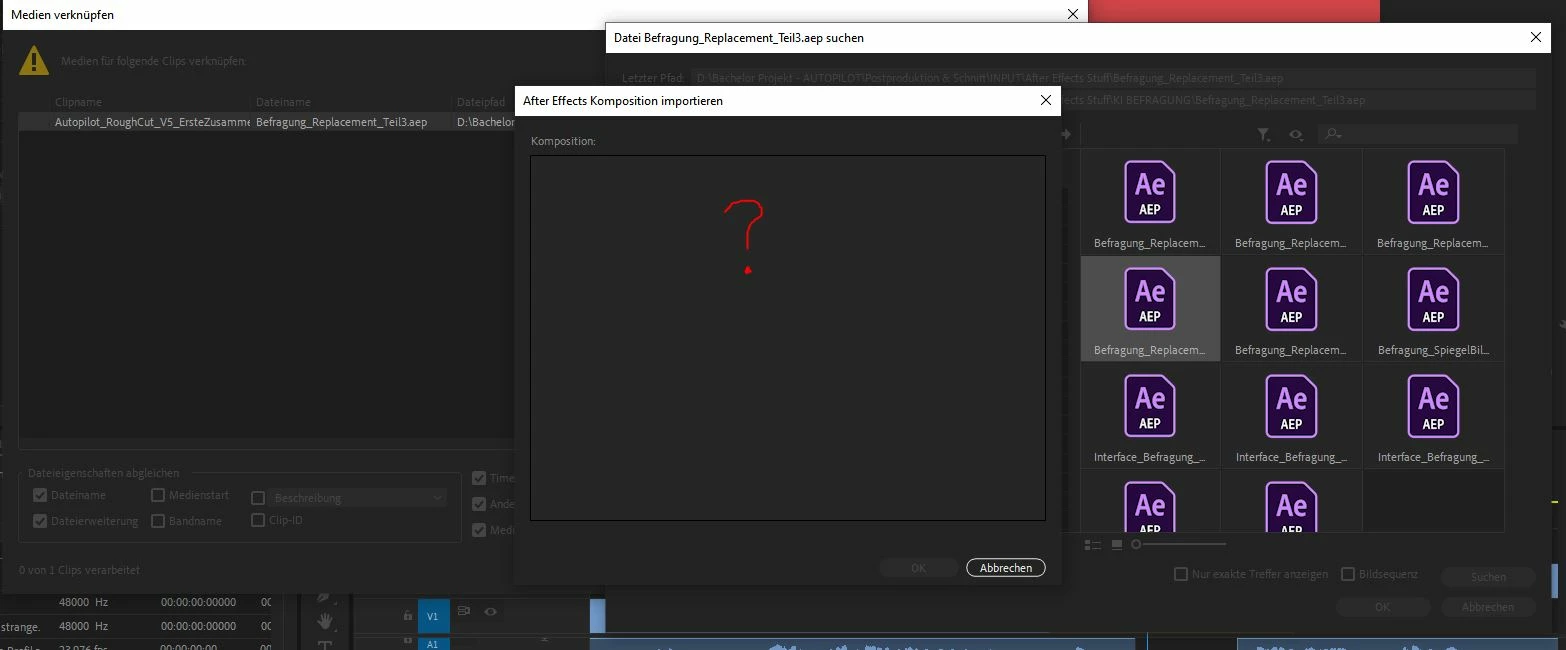


                                                  This is the same for every composition.


BUT: When I open my AE project and then try to relink it, it works. But as soon as I close After Effects or I try to do the same thing for another AE file the media goes offline again.

I have already tried reinstalling both After Effects and Premiere + Clearing Cache.


Thank you very much!


P.S.: Don`t know if this is caused by the same problem, but when I try to use the Warp Stabilizer in After Effects I get a Dynamic Link Error Message ("Dynamic Link-Project can not be retrieved (Dynamic Link-Projekt konnte nicht abgerufen werden.").

This topic has been closed for replies.
Correct answer Weekend Man

I have found a (temporary) solution!
This problem seems to be directly linked to the April Update (Premiere Pro 14.1 & After Effects 17.0.6). If you download the older versions (Premiere Pro 14.0.4 & After Effects 17.0.5) via the Creative Cloud Desktop Application Dynamic Link seems to work again! Atleast this fixed it for me. But you may have to relink all the stuff.

2 replies

Weekend Man
Weekend ManAuthorCorrect answer
Inspiring
May 2, 2020

I have found a (temporary) solution!
This problem seems to be directly linked to the April Update (Premiere Pro 14.1 & After Effects 17.0.6). If you download the older versions (Premiere Pro 14.0.4 & After Effects 17.0.5) via the Creative Cloud Desktop Application Dynamic Link seems to work again! Atleast this fixed it for me. But you may have to relink all the stuff.

Participating Frequently
May 8, 2020

Is someone not testing one of the core advantages of Adobe - Dynamic link - Before making it an update?  This completely kneecapped me.  Hopefully I don;t run into the problem of projects saved as newer versions not being backwards compatible.

Participant
May 2, 2020

I have the EXACT same problem and it's been horribly affecting my workflow for the last week.

On one of my workstations the dynamic link behaves in the exact way you describe it and on another Premiere Pro just freezes when I try to relink the AE comps that are offline (no "Compositions" window even opens and I fave to force quit the application).

Weekend Man
Inspiring
May 2, 2020

Good to know I am not the only one! Hope someone can help us with this problem.

Participant
May 2, 2020