
Participant
August 20, 2024
Question

Premiere Pro and Ableton syncing issue

  • August 20, 2024
  • 3 replies
  • 441 views

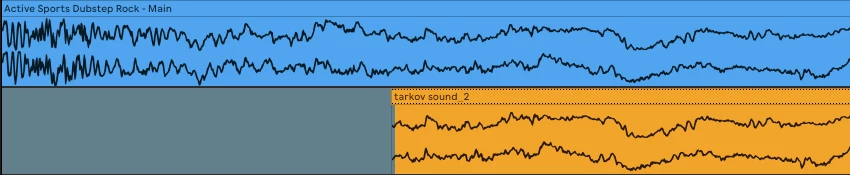
Hello, Could you please tell me why after the sound engineer sends me an audio, which I use to make a video and then render the final result, the video together with the audio loses the first seconds (literally the attack or in other words the transient). And when I send this video back, then in Ableton my video with music does not start from the very beginning, but after a few milliseconds. This is very similar to autofades or crossfades, which are usually enabled by default to avoid clicks in DAWs. Or is the reason in something else and I need to disable something in the settings? Any ideas? 

Please find attached Blue audio and yellow video screenshot as well as duration of cut..
This topic has been closed for replies.

3 replies

Peru Bob
Community Expert
Community Expert
August 22, 2024

Check the Audio Hardware Preferences. Default Audio Input should be set to No Input.

5lineAuthor
Participant
August 23, 2024

Thank you, that was the issue, yes, but when I set Default Audio Input to No input, for some reason there are a few seconds of silence at the beginning appears and only after that the track itself starts (along with the attack, finally), and also at the end, for some reason, the tail disappears...

Community Expert
August 22, 2024

Have you applied any audio noise reduction to the new audio track?

5lineAuthor
Participant
August 22, 2024

No, It is just a music track

5lineAuthor
Participant
August 22, 2024

Anyone please?
