Sander-Kalle
Participant
December 20, 2016
Answered

Premiere Pro CC 2017 0.1 - Most MOV codecs missing

  • December 20, 2016
  • 7 replies
  • 36418 views

Greetings!

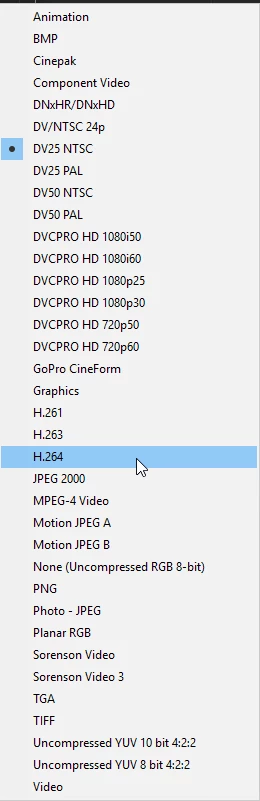
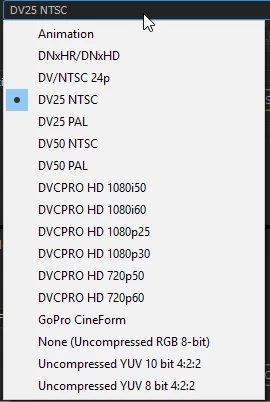
I have most MOV codecs missing in Encoder and Premiere Pro CC 2017. Does quicktime still need to be installed to have these codecs? I have only 6, but there should be 40 codecs!

Thank you!
This topic has been closed for replies.
Correct answer mike_bk

About 3 weeks ago I installed PPCC on a new installation of W10 and had the same issue.

5 minutes ago I uninstalled PPCC along with all the user settings and then re-installed it, but still have the same issue-

I installed QuickTime 7.7.9 for Windows, but ran a custom install and deselected the quicktime player.

Tested again:

Fixed!

7 replies

Participant
May 22, 2020

Just go to your iphone's settings. Then, go to Camera... In the Formats section, choose 'Most Compatible.' It will automatically record videos in H.264 format.

Participant
November 29, 2018

I have the same issue and did the fix, installing QT 7.7.9 without the player and my problem was not resolved. I need the ability to render a H.264 .MOV per client requirements. They will not accept an H.264 .MP4. Any help is appreciated.

Legend
November 29, 2018

Your client may have to change their requirements.  (I would try to persuade, myself.)

Or you may have to use use different software.

Participant
November 30, 2018

That's what I suspected. Unfortunately it is out of my hands.

Any suggestions for best software to convert h.264 .mp4 to a h.264.mov for Windows 10?

Dr. Ayman Raafat Ph.D
Inspiring
November 27, 2018

QuickTime 7.7.9 contains security updates and is recommended for all QuickTime 7 users on Windows.

Download QuickTime 7.7.9 for Windows

best

Ayman

roycefilmwriter
Participating Frequently
August 31, 2017

I am editing a feature movie in Adobe Premiere CC 2017 and the footage is Pro Res HQ quicktime. The footage worked in CC 2017 working with Windows 7, then I upgraded to Windows 10 when things started to run slow and with glitches. Now, the quicktime footage is causing errors. But the movie needs to be edited and mastered in the end as Pro Res so I cannot convert to something else.

R Neil Haugen
Legend
August 31, 2017

Well, you can't master it as ProRes from a PC anyway. Apple being a bunch of jealous kindergartners of course, nobody else can play with their toys.

Have you tried downloading the non-player part of QuickTime to the computer? You can download other parts of Qt without the player, and that occasionally helps PC's in Win10 using the Qt codecs.

You still can't export in ProRes on a PC. DNxHD/R for example has been tested to actually be a bit higher quality than ProRes on account of it being a newer designed format. And it plays back as well or better during editing than ProRes. So transcoding to DNxHD/R can work quite well for your editing, and also as it is completely cross-platform will be usable for a final output anyway.

Neil

Everyone's mileage always varies ...
roycefilmwriter
Participating Frequently
August 31, 2017

I also have an issue with 4k footage that is quicktime. It worked with Adobe CC 2017 when I was using windows 7 but when I upgraded to Windows 10, it gave me issues.

mike_bkCorrect answer
Inspiring
July 19, 2017

About 3 weeks ago I installed PPCC on a new installation of W10 and had the same issue.

5 minutes ago I uninstalled PPCC along with all the user settings and then re-installed it, but still have the same issue-

I installed QuickTime 7.7.9 for Windows, but ran a custom install and deselected the quicktime player.

Tested again:

Fixed!

Participant
March 10, 2017

I also have the same issue. Running PPro CC 2017 on Mac OSX Sirera.

Almost all the .mov codecs I use are missing, including some really standard ones like ProRes 442 (HQ/LT).

Has anyone resolved this issue???

R Neil Haugen
Legend
March 10, 2017

That's a Mac codec ... and the Qt thing is only a "thing" on Windows, as Qt is still supported in the Macosphere.

So it's kind of puzzling. Maybe your install didn't properly install?

Neil

Everyone's mileage always varies ...
Participant
March 10, 2017

Agree, it was puzzling to me too.

It would not surprise if this was a problem with the install, as we have device licenses, and have to use Adobe Creative Cloud Packager, which is consistently problematic.

Does anyone have a quick fix as to how to get the codecs back without need to go through the whole installation process again?

Legend
December 20, 2016

That sounds normal for Windows.

Don't install QuickTime.

Urgent Call to Action: Uninstall QuickTime for Windows Today -

Homeland Security warns Windows PC users to uninstall Quicktime | Fox News

Rather, avoid using it whenever you can.  It's long been a problematic format whose use in this industry needs to die already.  MP4 and MXF are both superior formats.

Sander-Kalle
Participant
December 20, 2016

Acutally not, other PC has quicktime installed and has all those other codecs. I dont even have quicktime h264. Does not seem right! But yes, I do not want Quicktime installed, perhaps there is another way?

John T Smith
Community Expert
Community Expert
December 20, 2016

I do not have QT so I do not know how this is done, but I did read a message that the QT player is the problem, so if you select an option during QT install to install ONLY the codecs, and not the player, you won't have security problems