
Premiere Pro CC 2017.1: dvacore.dll crashing on Win7 x64
Hi,
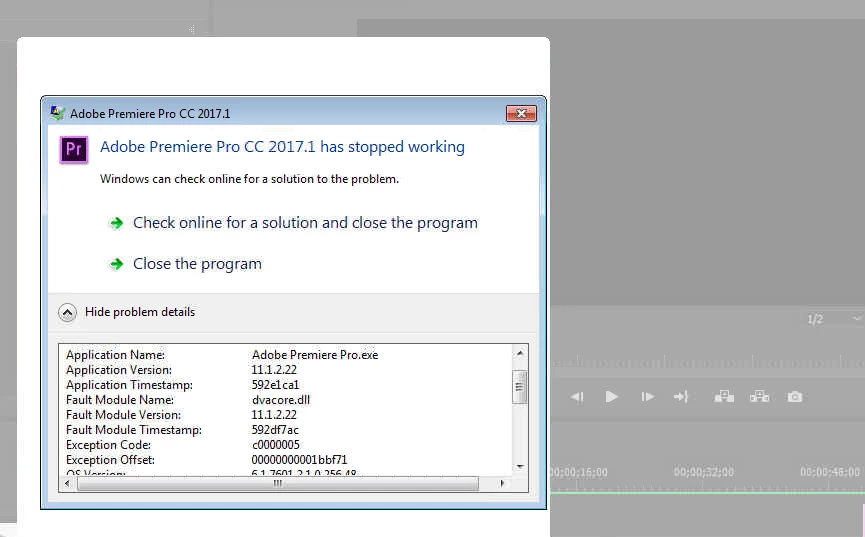
I have Adobe Premiere Pro CC 2017.1 installed and it has been working flawlessly for sometime without glitch, however this week it has been crashing minutes after loading into the program (dosen't even need to load a project), just idleing in Premiere will cause Windows to produce "Adobe Premiere Pro CC 2017.1 has stopped working" with the whole screen going pale-white (see screenshot).
System:
Computer: HP ProDesk 800 G2 SFF
OS: Windows 7 Professiona x64 (Windows up-to-date)
Graphics: Onboard Intel HD Graphics
I'm aware of the "use a graphics card" suggestions, though the projects I'm doing are lite-weight, basic editing, worked smoothly on this machine and has never glitched - At this point, I would like to try and resolve this "dll" crashing issue, before making hardware changes.
Troubleshooting steps already done:
1.) Event Viewer
- Faulting module: dvacore.dll on all Error messages - No other file or programs are mentioned.
2.) Checked recently installed updates.
- No Windows Updates, but Acrobat Reader DC updated the same day this problem started.
3.) Uninstalled Acrobat Reader, cleared registry - didn't work.
4.) Uninstalled Premiere, cleared registry, installest latest verion from Creative Cloud - didn't work.
5.) Uninstalled ALL Adobe products, cleared registry - didn't work.
6.) Updated Drivers: Video, Chipset, BIOS and Audio - didn't work.
7.) Roll back of drivers, didn't work.
8.) Cleared Media Cache, didn't work.
9.) Compatability mode, didn't work
10.) No third party plugins or adds on to worry about, just default Premiere that has never glitched.
11.) Tried 32bit version, same result
12.) Sound is unmuted, and working with other audio programs; I only run Premiere, no other applications.
13.) Done further research both here on Adobe and Google, tried various suggestions which all hasn't worked.
Are there are other software based suggestions I could try?
Thanks,
 AdChoices