
Participant
December 5, 2016
Question

PREMIERE PRO CC 2017 Crashing on Mac

  • December 5, 2016
  • 23 replies
  • 32231 views

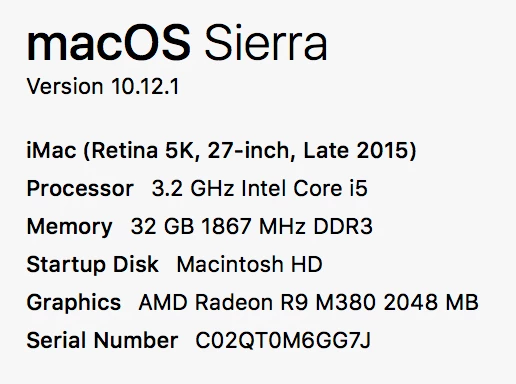
Premiere Pro has been routinely causing my iMac to crash since the 2017 update, at least 4-5 times per day.  This happens most commonly when I'm masking.  No other software is doing causing this problem.  I've built out massive compositions in After Effects with no real issue that haven't caused a crash.  I'm not entirely sure why such a simple function is doing this.

Here's my computer's specs:
!

This topic has been closed for replies.

23 replies

Participant
December 6, 2016

Hey Ryan

I had the same issue..similar spec..after multiple crashes past couple of days.. the last crash happened as PP  start up..I contacted Adobe support, who remote accessed my iMac to troubleshoot.

Apparently there is A wacom tablet bug that seems to be the causing the crash.I removed my wacom and its good so far,I will keep you updated if crashes persists.

Hope this helps

Kevin-Monahan
Community Manager
Community Manager
December 6, 2016

Hi NickW,

Thanks for posting your potential solution.

Regards,

Kevin

Kevin Monahan - Sr. Community and Engagement Strategist – Adobe Pro Video and Audio
Kevin-Monahan
Community Manager
Community Manager
December 5, 2016

Hi highfivemedia,

Sorry to hear of your conundrum. Is this with a new project, or an updated one? I'll do some masking to see if I can reproduce the issue.

I think it would be helpful to take a look at any crash log you might have saved or generate in the future.

Just a few thoughts As a long time NLE editor and Mac User, (and not saying this on behalf of Adobe—have my editor hat on here)

  • I always completely wipe my system between major versions of OS X. Though it is a little painful to do, I have very few problems with my own OS X systems and suggest others having deeply rooted problems do so, as well.
  • I usually lag behind most versions of OS X by a full version, sometimes two, as well. However, this may be extreme in many peoples' eyes.
  • The other thing I do avoid is updating projects between major versions of my NLE and OS X. In troubleshooting others' issues, problems crop up on updated projects rather than brand new ones created in that version.

Some things to consider, anyway, and not necessarily a solution to your ills.

Hope we can get to the bottom of this.

Kevin

Kevin Monahan - Sr. Community and Engagement Strategist – Adobe Pro Video and Audio
Participant
May 25, 2017

Process:               Adobe Premiere Pro CC 2017 [41199]
Path:                  /Applications/Adobe Premiere Pro CC 2017/Adobe Premiere Pro CC 2017.app/Contents/MacOS/Adobe Premiere Pro CC 2017
Identifier:            com.adobe.PremierePro.CC11
Version:               11.0.2 (11.0.2)
Code Type:             X86-64 (Native)
Parent Process:        ??? [1]
Responsible:           Adobe Premiere Pro CC 2017 [41199]
User ID:               502

Date/Time:             2017-05-24 15:01:11.743 -0500
OS Version:            Mac OS X 10.11.6 (15G31)
Report Version:        11
Anonymous UUID:        A6B5BAE7-D9D2-30E6-83F8-B49C8621B92C


Time Awake Since Boot: 180000 seconds

System Integrity Protection: enabled

Crashed Thread:        20  Dispatch queue: opencl_runtime

Exception Type:        EXC_BAD_ACCESS (SIGSEGV)
Exception Codes:       KERN_INVALID_ADDRESS at 0x0000000000000008
Exception Note:        EXC_CORPSE_NOTIFY

===============================

Source footage: MP3, JPG, PSD

Actions leading up to issue: Moving title on sequence. Inserting key frames on title and JPG.

Other running software: Photoshop, Firefox, Chrome, Open Office

No 3rd party effects or codecs

Problem has happened with both final output and previews.

It doesn't always crash, but once a project does crash, it randomly continues no matter. Only way to stop it is to recreate it brand new.

I'm not that familiar with the software, but I still must help find a solution. 2 weeks ago I installed the update to 11.0.2

Any help is appreciated!

Kevin-Monahan
Community Manager
Community Manager
May 25, 2017

Hi KaySea2,

You didn't include the crashed thread, Thread 20. Repost the crashed thread and I'll take a look.

Thanks,

Kevin

Kevin Monahan - Sr. Community and Engagement Strategist – Adobe Pro Video and Audio
Known Participant
December 5, 2016

Same to me. This is the worst software I´ve ever used. It doesn´t matter if Macbook Pro, MacPro (new), MacPro (old), 10.10, 10.11, 10.12 - Adobe is equal to every system: it crashes at least 3-10 times a day.

Kevin-Monahan
Community Manager
Community Manager
December 5, 2016

Hi tp-doku,

Sounds pretty bad. See my response to highfivemedia to see if anything there might help: Re: PREMIERE PRO CC 2017 Crashing on Mac

That would be great if you could post a crash log. Also, please check if you are getting the crashes while using masking tools. If not, include what you were doing when you crashed in any response.

You can also file a bug report any time here.

Thank you,

Kevin

Kevin Monahan - Sr. Community and Engagement Strategist – Adobe Pro Video and Audio