
Premiere Pro CC 2017 Project Corruption - Can't Roll Back Version
[UPDATE: This thread shows how to recover a WORKING version of PP... ]FAQ: How do I reinstall Premiere Pro CC 2015.2 (9.2)?]
[UPDATE 2: The project I was working on in 2017 yesterday WON'T open in 2015.2 - incompatible file format... and the GRIEF continues]
The Premiere Pro CC 2017 update is a disaster...
Can Adobe PLEASE tell people that 'Several major features are broken' - BEFORE you ask if we want to 'upgrade'?
This is costing me time/money and I have a deadline.
'Product does not work' is fine - we all understand that there can be issues...
...but if your loyal FEE PAYING USERS are not told of the challenges before clicking 'Update' in a clear/concise way - then it just causes pain.
Also, where is the button that says "OK, this version of Premiere Pro CC 2017 is f***ed - click here to roll back to the previous WORKING version".
I love Adobe products - use them all the time - but this is a MICROSOFT LEVEL FAIL.
Just looking at the problems people are posting... You have screwed us with this update Adobe.
PLEASE PLEASE PLEASE
For future updates, please make a 'These things are not working' list, so we can judge before pressing Go'
Also, please include a "OMG, roll me back to the working version" button
Thanks
Andrzej
UPDATE: Now PP won't even load - even after clearing the media cache and reloading
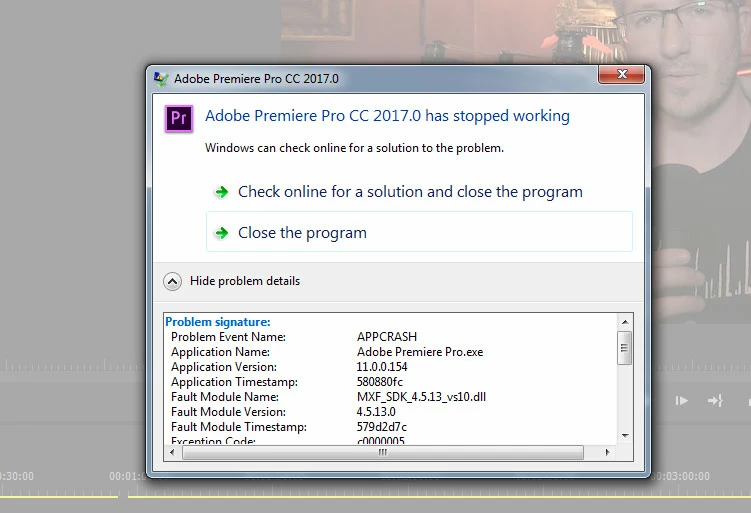
Full error message...
Problem signature:
Problem Event Name: APPCRASH
Application Name: Adobe Premiere Pro.exe
Application Version: 11.0.0.154
Application Timestamp: 580880fc
Fault Module Name: MXF_SDK_4.5.13_vs10.dll
Fault Module Version: 4.5.13.0
Fault Module Timestamp: 579d2d7c
Exception Code: c0000005
Exception Offset: 00000000000caff7
OS Version: 6.1.7601.2.1.0.768.3
Locale ID: 2057
Additional Information 1: 118a
Additional Information 2: 118af531b134a298d7f36c76378d8d99
Additional Information 3: 562d
Additional Information 4: 562d55d4d4045628818ff3562f8d8441
 AdChoices