Inspiring
June 24, 2020
Question

Premiere Pro CC 2020 Display Color Management causes severe banding

  • June 24, 2020
  • 4 replies
  • 1024 views

Hi everyone!

This is a bug that I noticed in the first 2020 release of Premiere Pro, that still persists in version 14.3.0.

I have replicated it on a separate machine (with a different GPU), and I can also replicate that it does NOT exist in 2019 (version 13.1.5, or earlier) - all in Windows 10.


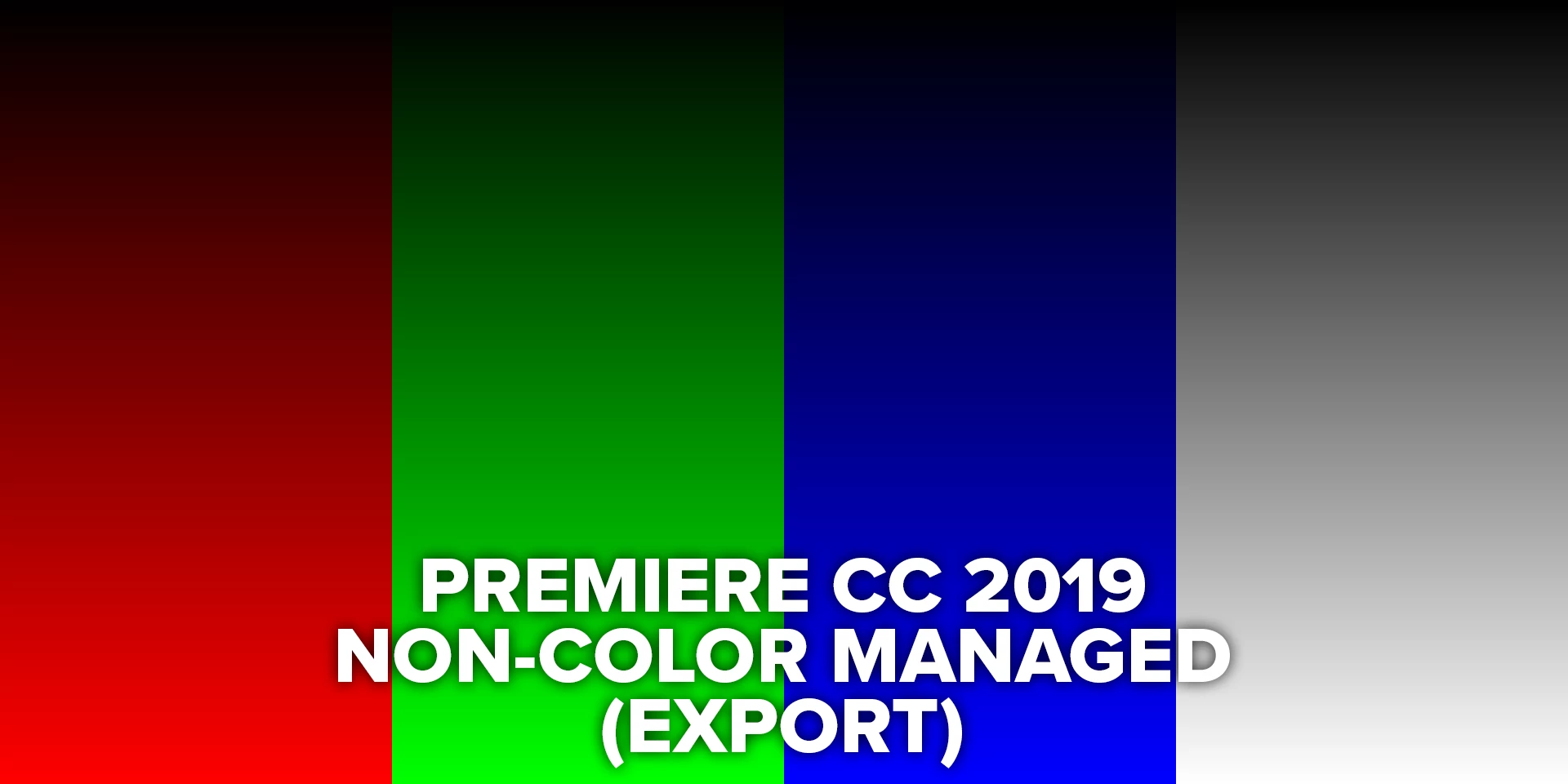
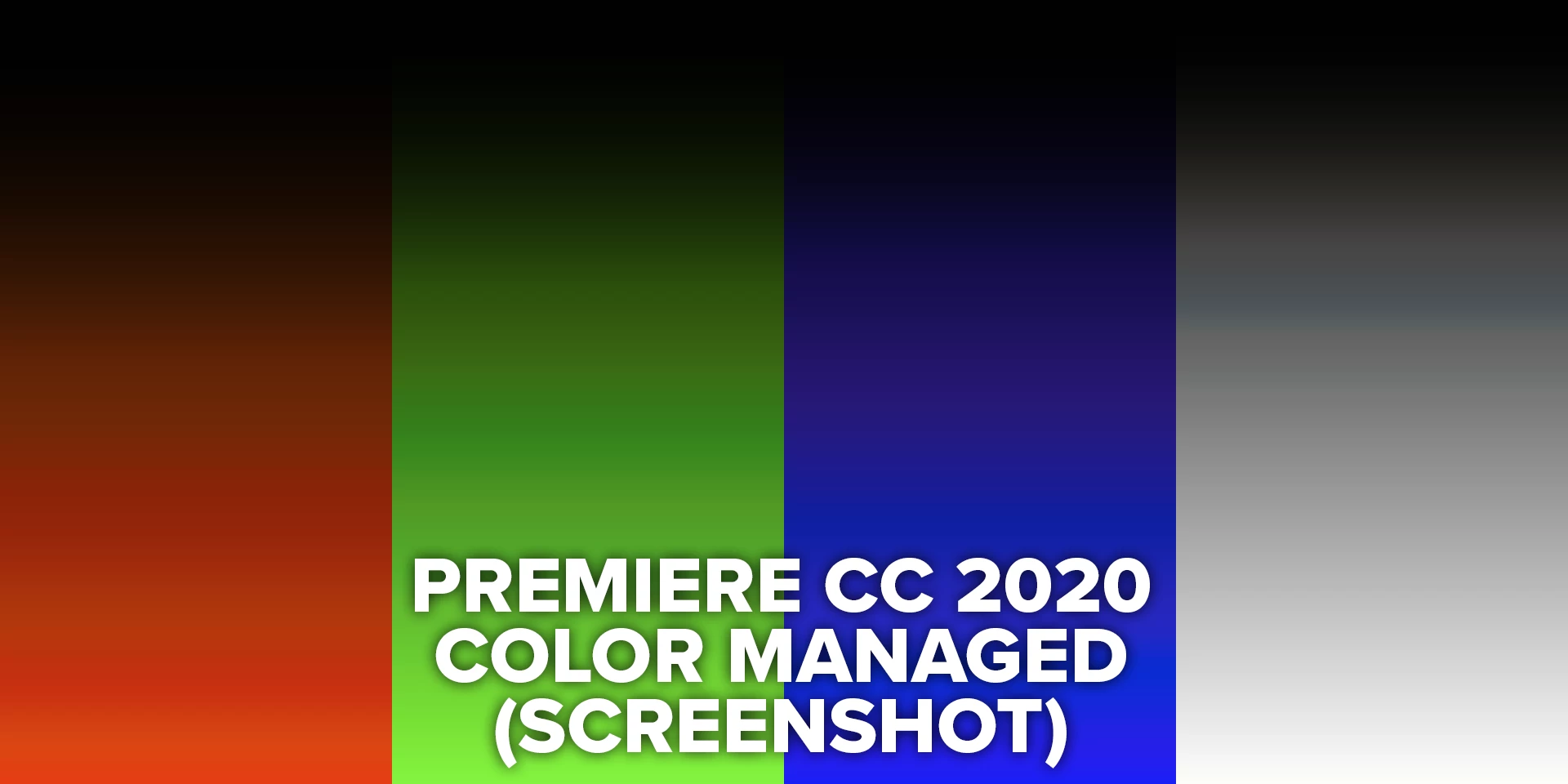
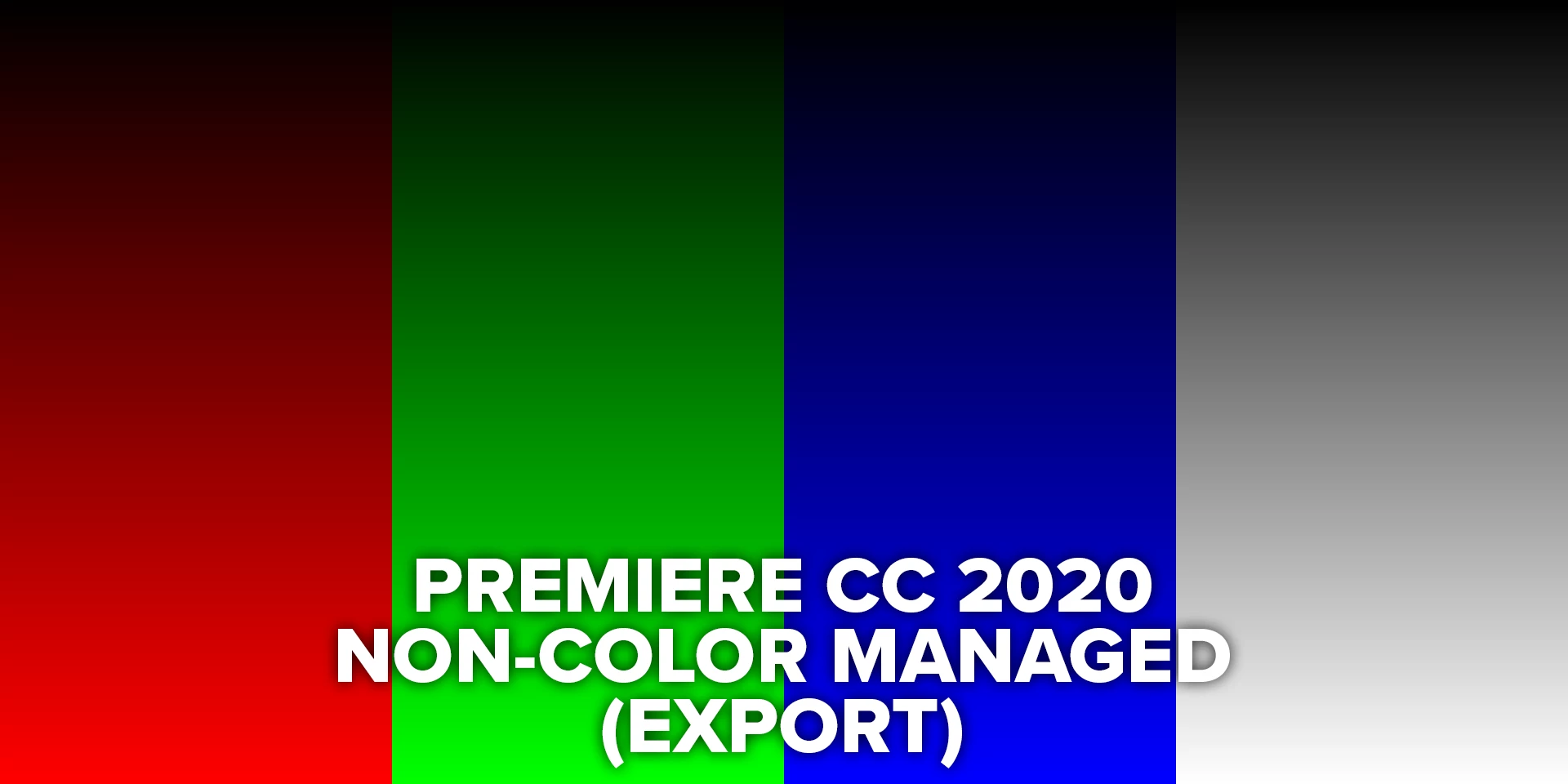
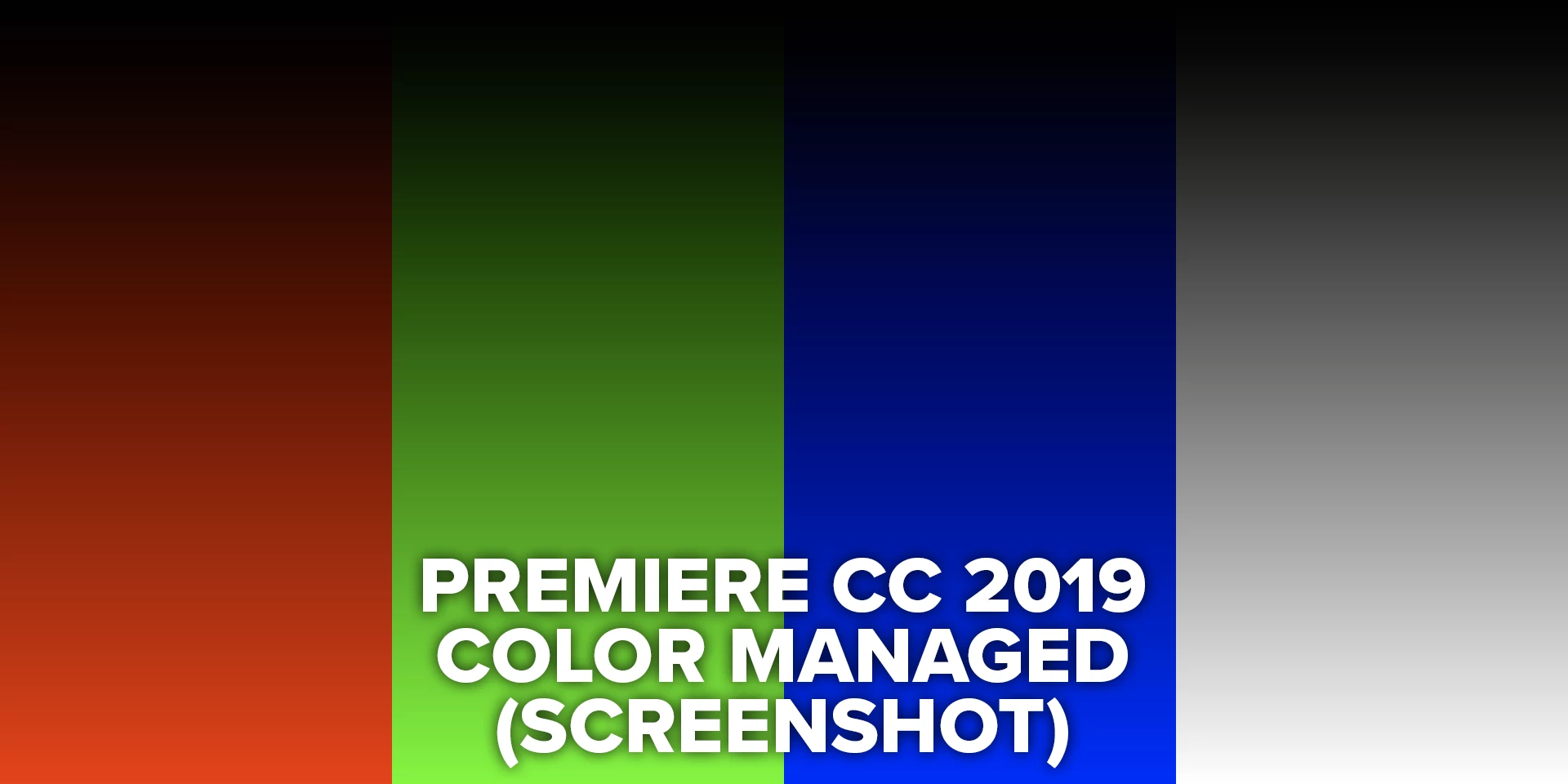
Simply put - the Display Color Management seems buggy. If enabled, it causes severe banding in the image. I have attached sample images as proof, showing the following

- unmanaged images from both 2019 and 2020, which both look identical

- managed image from 2019, which shows how it 'should' look (reduced saturation and a change in gamma)

- managed image from 2020, which replicates the issue (for example, the harsh blue tint in the greyscale midtone, and the general corruption of colour in the other 3 channels. Obviously the effect is more noticeable with a captured image, but the ramps represent it more informatively).

This means that the DCM option is more or less unusable in 2020, at this stage.

The profile was created in DisplayCal with a gamma of 2.4, and a D65 white point target chromacity. It functions perfectly inside Photoshop 2020 and Premiere 2019 (as above).

I've seen that others have noticed similar behaviour but with no proper solution - does anyone have any thoughts or ideas?

Thankyou so much for the assistance!


[Modertor note: PLEASE add images directly to your reply box so users do not have to download strange files to view them as with the "drag and drop files here to attach" box at the bottom of the reply area. I've fixed that for this post.]


This topic has been closed for replies.

4 replies

Participant
October 10, 2021

I guess you used DisplayCAL to make a profile in the form of XYZ+Matirx. If it is true, please use Curve+Matirx or other forms instead.

After my test, I found that Premiere Pro is not compatible with LUT, not only in the dark, but almost the whole picture will have some degradation.

I wrote a discussion article on this issue, written in Chinese, if you are interested, you can refer to it.

R Neil Haugen
Legend
June 27, 2020

I got a response from Jarle Leirpoll ... ( premierepro.net, author of several books on Premiere) and it may be of use.


"I've seen this happen when the monitor is "calibrated" using Spyder, X-rite etc.


They call it calibration, but it's really just profiling. And if the correction in the profile is rather large, it will cause banding. Add the extra internal gamma correction that happens with DCM, and it may be more visible."


Essentially, if the profiling step of the X-rite or Spyder process has to make some major changes in remapping pixels to match the needed chroma/gamma curves, then when Premiere applies whatever it does to the image going to the Program monitor results in skipped values.


From what you've listed for your process, I can't see that DCM would be of use to you anyway. Feel free to leave it off. It works best with uncalibrated monitors actually.


Neil


Everyone's mileage always varies ...
Inspiring
June 29, 2020

Hi Neil!
I really appreciate your thorough investigation!

Such a strange one! If it weren't for 2019's implementation being without issue, I would be much less confused...

Thankyou so much for all your help - I'll just keep it off for now!

Best of luck!

R Neil Haugen
Legend
June 25, 2020

Yea, I can see what you're experiencing, but thanks for the description. You seem to have setup very nicely. I'm trying to guess what's going on.


Neil

Everyone's mileage always varies ...
R Neil Haugen
Legend
June 25, 2020

What is your monitor, and any connections (such as Decklink) between the monitor and the computer? What color management is set in the OS for profiles and in any monitor controls that may be applied to that monitor's imaging?


My setup is also Win10, with an LG ultrawide for my main UI monitor and a BenQ PD2720U as my transmit-out monitor. I run my i1 Display Pro puck/software for Rec.709/2.4/100 nits, and then check the results with Lightspace software running Resolve as a patch-generator measured with my i1 puck. The results, after learning how to tweak both the monitor and the i1 settings, is pretty tight, DeltaE has a red spike at 0.5 to about 2.8, everything else is below 1.8, mostly below 1.0. Gamma is three tight curves.


With DCM on, I get a slightly exagerated contrast/saturation in both the Program monitor and the Transmit Out to the BenQ. In Bars/Tone and other tech clips, I lose the fine (and subtle) distinction between the two bottom black-checking bars and colors get a bit more pop. So I don't use it.


But I don't have any banding going on ... wonder what the deal is?


Neil

Everyone's mileage always varies ...
Inspiring
June 25, 2020

Thankyou so much for the generous response!

The monitors are both connected by DisplayPort (I believe 1.2) at 2560x1440 - they are both Dell UP2716Ds.

In the monitor themselves, they are set to 'custom color' which disables dynamic modes and enables individal colour controls for calibration.


I've calibrated using an i1 Display Pro to Rec709 (BT.1886, and I've tried both 100 nits and 120 nits brightess, as a test to see if there was a clipping issue or similar - both result the same).

I am fairly confident in the profile due to Premiere 2019's implementation of it successfully - but perhaps 2020 is more compatible with a different format of profile?

My main reason to use it is to control the satch of the monitor - without DCM, the monitor's gamut is much wider than sRGB, and so any colours are represented as much greater in saturation than they should be (the gamma and other corrections of the profile are useful too, of course).

I also struggled to find the right word to describe it - 'banding' is close, but if you look at the top half of the corrupted gradients above, you'll see the colours themselves are significantly different than in the 'correct' versions of the gradients.

Thankyou again for your reply!