
joes47599238
Participant
April 19, 2016
Answered

Premiere Pro CC crashes when I try to change the file name before export

  • April 19, 2016
  • 21 replies
  • 19738 views

Hello,

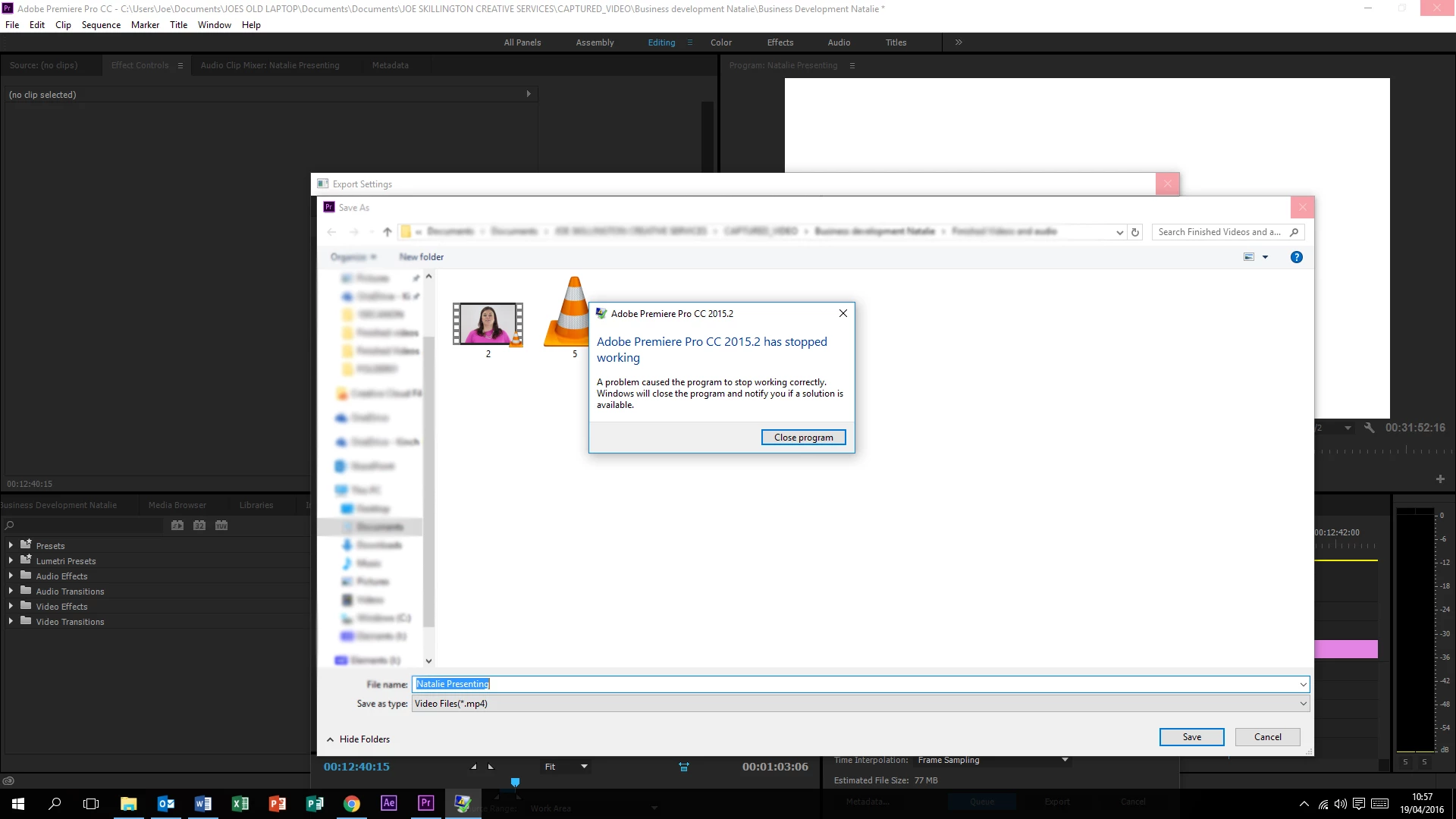
This issue recently started happening - Premiere Pro CC crashes when I try to change the file name before an export. Premiere runs smoothly at every part of the edit until I come to exporting a file either directly or through media encoder. I can get as far as changing all export settings but as soon as I click the filename to change it, I get an error message (attached).

Never had this before, not installed anything new on my system, running windows 10, decent specs etc.

All adobe software is up to date also.

Any ideas on this? This is my first posting so sorry if I have missed anything off that will help you guys!

Cheers in advance,

Joe

This topic has been closed for replies.
Correct answer neils87714402

Hey Neils,

I have the exact same problem.

Sorry to hear that, did you try all of the above mentioned steps?

Please click on the "I have the same question" tab at the top.

Thanks,

Kulpreet Singh


Hi,

Thanks for your quick response.

I just found a suggestion that worked. Changing the render settings to "Mercury Engine Playback Software Only" solves the problem. I'm not sure of the impact this will have, but I'm not making many big projects, so that's okay.

I also don't know the cause - maybe I don't have the correct graphics drivers or something, but for now, this fixes my issue

Neil

21 replies

Participant
January 6, 2020

I've had this issue for a long time now. After it crashes the first time I find that if you open the folder that your project is in/the folder you want to save your export to, then restart Premiere, it usually works the second time around.  

Not 100% of the time, but might be helpful to anyone as frustrated with this bug as I am.

Participant
November 11, 2020

So I just ran into this issue after working for about 2 months on hte latest premiere pro.  No rhyme or reason... until I realized that I had an external usb hard drive connected.  I'm on a Mac but I've had this general issue on my PC too for years.  The OS is just busy sorting out what drives are free and trying to populate the dialog box... anyway, I disconnected this external drive and so far its fixed the problem.

Participant
January 9, 2021

I have been having the same problem as everyone here.


I tried a solution similar to this, my issue seems to be all the NAS mapped network drives I have. So before clicking on the output name to change it and the location it saves to, I open up Explorer and click on all the networked drives so they populate the first level folders in Explorer, then when I click on the filename in PP, it doesn't crash and the dialog box opens as it should. 


So it seems like that could be the issue, struggling to populate all the possible drives that are connected.

Inspiring
December 17, 2019

Is there any update as a to a fix on this.  Losing your last changes before a render is really very annoying, and just a downright straight bug.

Participant
December 17, 2019

No,

Considering I have been having this issue 20% of the time for the last 12 months and just had it now and lost a bunch of work about 30 seconds ago as I tried to render out. This is honestly a disgraceful issue to still exist 4 years after just this thread was created.

Participant
December 4, 2019

Hello.

I've been experiencing this problem for about a year now.

It's very annoying, especially when you're up against deadlines.

I've tried clearing cache, preferences, different external hard drives, with and without external HDD attached and it still continues!

Any news on a fix?

FocusPulling.com
Known Participant
December 4, 2019

Adobe totally doesn't care.  Many have reported this directly to them, and over at UserVoice, and here, where you can see an Adobe employee marked the topic as answered and resolved.


I think Adobe is passively encouraging us to use competing software.  Their profit margins went through the roof after moving to a subscription model, and currently they don't feel any need to compete.  That is changing.

Rich_S_UK
Participating Frequently
December 4, 2019

I have exactly the same problem, and downgrading to software rendering isn't acceptable.  Come on Adobe.  This needs sorting.

Kevin-Monahan
Community Manager
Community Manager
December 4, 2019

Rich,

Try checking permissions for the folder where you are trying to save. Make sure they are set to Read/Write. Did that help? Need help with that? Let us know.


Thanks,
Kevin

Kevin Monahan - Sr. Community and Engagement Strategist – Adobe Pro Video and Audio
FocusPulling.com
Known Participant
December 4, 2019

That has absolutely nothing to do with it, Adobe Employee (but sure, I just checked).


Instead of sending questions back to us, perhaps finally do something?

Inspiring
August 2, 2019

And it's still happening....

Inspiring
May 27, 2019

I also have the same problem, caused me to quite often lose work.  Very annoying.  All it's doing is browsing the file system!!

FocusPulling.com
Known Participant
May 27, 2019

  wrote

I also have the same problem, caused me to quite often lose work.  Very annoying.  All it's doing is browsing the file system!!

It's incredible that Adobe has totally ignored this issue for many years.

Participating Frequently
March 8, 2019

Same issue.

daily doseo49630288
Participant
May 20, 2019

I have same problem

nicklear
Inspiring
March 3, 2019

Just to add another me too - this bug has plagued me over the last year. I am still on v12 as I am on a big project and I don't trust upgrading it. I hope v13 fixes this for others. I certainly don't want to have to have software only render on. I don't want to stop using OneDrive.

Participating Frequently
December 31, 2018

It happens to me too. I actually EXPECT it to happen so often that I save my project before clicking the link to rename the file.

Windows 10 / GTX1070 / SSD's

If I restart Premiere the problem goes away, but then returns after a while of using Premiere.

Participant
January 7, 2019

yeah i do the same

yet it still manages to surprise me sometimes...

Participant
December 14, 2018

i resolved this issue by changing my renderer to "software only" and then back to "GPU acceleration/CUDA" and then also restarting Premiere

_earthtojens
Participating Frequently
December 14, 2018

Thanks for the tip @ _yuwara. Unfortunately this did not work for me and now Premiere is also crashing when my project is set to 'Mercury Playback Engine Software Only'. My export directory is essentially stuck in the 'C:\Users\Public\Documents\Adobe\Premiere Pro\13.0\Tutorial\Going Home project' folder.

_earthtojens
Participating Frequently
January 22, 2019

Updating to the latest version of Premiere Pro CC has fixed my problem. I no longer crash when changing the output name in the export settings. Thank you to all who attempted to help me with this issue.

Premiere Pro CC Version 13.0.02 (Build 38)