
Premiere Pro CC - Sample Rate Not Supported by Current Audio Device
Hi all
I hope that someone can help me with a solution to this most annoying issue in Premiere Pro.
I was previously using a speaker set up with my Mac Pro (2013) and Premiere Pro. I have recently moved the studio and for the moment I need to edit with headphones. I loaded Premiere ready to do a days work and I have no sound. I was greeted by the following message:
On clicking YES to this I then got the following immediately:
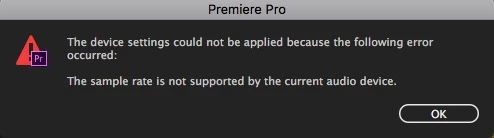
So I then click OK and it takes me to the Audio Hardware Preferences menu but shows that all my inputs are 'not working'??? What? Also, there is no 48,000Hz sample rate so I have no idea what to do at all. I then went to the Mac Audio MIDI setup and I noticed that the output format was set to 96kHz even though I manual tried setting it to 48kHz.
This is so frustrating. I have all other computer audio coming through the headphones and sound in Audition is also coming through headphones...WHY NOT PREMIERE?!?!
Can anyone help with this please?
I'm using the latest version of Premiere Pro CC and the most up-to-date version of Mac OS possible currently (Sierra 10.12.6).
Thanks
 AdChoices